In Praise of the iPad Air 2

IMG_1136

Image courtesy Apple

With the release of the 12.9 inch iPad Pro late last year, and more recently the 9.7 inch version, much of what I’ve been reading recently has centred around the virtues of that larger 12.9 inch screen, or equally since earlier his month, the benefit of the “pro features” — namely the Smart Keyboard and Apple Pencil support for both sizes of the device.

I’m happy to admit in my links post two weeks ago, I myself extolled the virtues of “newest and shiniest”, however when it came to an actual purchase, common sense and a little objectivity thankfully ruled the day.

My previous iPad? A mini 2 – or as it was known at the time I bought it in November 2013, the iPad mini with Retina display (a 32 GB WiFi model). The mini served me well for over two years, until I made the decision late last year a little extra screen real estate and additional features of iOS 9 (read Split View) were probably something I could utilise quite well on my iPad. Having made the decision to upgrade, I was very tempted to immediately pick up an iPad Air 2 (64 GB) from the Apple Refurbished stock at a pretty decent AU$619, however given the timing, decided to wait until March this year to see what a new release might bring in the way of features and processing.

With that decision made, I had a few months to think about what I really needed in a mobile device, and with a pretty firm commitment to the Apple ecosystem these days, it was always going to be a 9.7 inch iPad. The only question being whether that would be a newly released version, or a pretty compelling iPad Air 2 on a reduced price tier. I was, of course, excited in anticipation of the “new”.

Exactly how do I use my iPad? In summary, I’d say I am a moderately frequent, yet low demand user. By that I mean it certainly gets a good deal of use, however most of that use relates to reading, writing and research; followed by email & social media; with some video content consumed on the way home during my afternoon commute (there’s no better way to wind down after work than with an episode of House of Cards or Vikings). Most of this use typically occurs on the couch at home, at my favourite cafe, or on a bus. By low demand, I simply mean I do no video recording or editing, gaming and only perform infrequent photo editing, with no actual photography. All activities which might be a little more demanding on the processing capacity.

Perhaps I’m mistaken, however I’d like to think this pattern of usage is not unique to me, and I think you can probably see where I am heading with this post.

What they’re saying

The larger model: iPad Pro 12.9 inch

Firstly, a comment on why I so easily ruled out the larger 12.9 inch iPad Pro. For what I use this thing for, it’s simply too big. A tonne of added features mean nothing if it won’t fit where you want to use it. I’m almost at the point where I laugh upon repeatedly hearing “I could never go back to the smaller size after using this 12.9 inch screen”. Well, if it fits where and how you use it — why would you? When was the last time anyone chose to buy a smaller TV unless they absolutely had to?

Believe me, I get it that Split View gives you two “full size” apps side by side; the 4 GB of RAM and A9X chip are fantastic; the Apple Pencil is great; and that keyboard — once “I got used to it”, works really well.

For me however, ruling the 12.9 inch size out was pretty simple, and in fact, it was never really in the hunt in the first place. Great device yes — just too big for how I want to use it, and at a base price of AU$1249.00, never really a consideration.

The smaller two: 9.7 inch Pro and Air 2

The recent release of the 9.7 inch iPad Pro, has brought even more comparisons between screen sizes on the Pro line, and to a lesser extent, between the iPad Air 2 and the corresponding Pro version. A quick scroll down the iPad comparison table on the Apple website will highlight the main differences between the two 9.7 inch iPad models, and my aim is not to provide an exhaustive listing here.

What I would recommend however, is when scrolling down said list, for every difference in specs or dashed line in the Air 2 column, ask yourself whether that will really make a difference to how you use the iPad. And I mean real differences — not just nice-to-haves.

A case in point for example is this, from CNET, admittedly not my usual tech reading source, though many have expressed similar thoughts. Here we have five reasons to pick the iPad Pro over the Air 2, stating “it’s what’s under the hood”. The article then cites:

  • More storage (32, 64 and 128 GB vs 16 and 64 GB for the Air 2)
  • Apple pencil support
  • That “Smart Connector” (with the Smart Keyboard it “means no more bulky batteries in keyboards”)
  • 4K video shooting, better selfies
  • Better audio

We then read, almost as an afterthought, about the A9X chip and M9 coprocessor with Hey Siri capability, and the True Tone display.

Writing on Macsparky (more like my usual tech reading), David Sparks, in a comparison with the Air 2, cites the better processor; the “pro features” (Pencil and Smart Connector); the camera; and better colour and sound. Also acknowledged here are the levellers — being the 64GB Air 2 storage and 2 GB RAM on both models, and introducing the article with the comment that neither is a bad choice.

Looking at the bigger picture, I don’t necessarily disagree with any of the above. Any review of a new device or model will always highlight those new features — otherwise what is the point of it at all. Again, objectively consider what sits before you, how you will use it, and the value proposition it presents.

Which is exactly what I did — before picking up a pretty good deal on a 64GB iPad Air 2 at AU$687.00 last weekend.

Ending up with the Air 2

With reference back to my use case above, let me outline a little further on how I ended up with the Air 2.

Firstly, the Pro model’s A9X/M9 chip/coprocessor. For me, this could have gone either way. Of course, for longevity of performance in future years, faster equals better. The 2GB of RAM (the same as the Air 2) probably swayed me towards the Air 2 a little here. I’d also note, for the way I use the device – I’ve never had any performance issues with the A7 chip on my iPad mini 2. Yes, the Air 2 is significantly snappier across all aspects of usage by comparison, however somehow I don’t think I’ll be hardly done by in choosing the A8X of the Air 2 over the newer A9X.

IMG_1137

Ulysses and MindNode in Split View

Next: go and draw a line through everything which is identical between the two devices on that iPad comparison page — it’s an awful lot of lines. Only a few things remain, essentially those listed by CNET above. It is for you to decide whether they are worth it. I’m simply here outlining how for me, they are not.

I am certainly no tech writer (pretty clear), however what I am is a consumer with a budget, who carefully considered the options and ultimately purchased the best device for my needs at the best available price — I’d imagine the same as anyone. Given these considerations, what follows is simply my thought process before I ultimately made the purchase. Whether or not they able in your case is another matter of course, however I could not be happier after using the Air 2 over the past week.

The Numbers

Any real comparison surely must look at the numbers (read price) to some extent, and if the difference we’re talking was $50 or $60, or even say $100 then I wouldn’t be suggesting there is much of a decision to be made. That said, I also understand new technology comes at a cost. For reference, in Australian dollars, we have:

Model iPad Pro 9.7 (WiFi) iPad Air 2 (WiFi)
Storage 32 GB 64 GB
List Price $899.00 $729.00
Apple Pencil $165.00 N/A
Smart Keyboard $229.00 N/A
Total cost $1293.00 $729.00

Consider that final figure for the iPad Pro for just a second — particularly in the context of many reviews holding up the Smart Keyboard and Apple Pencil as some of the main reasons you should invest in the Pro model. It then isn’t “just a couple of hundred bucks” more is it? I say go for it if those are two accessories you could really get a lot out of, though to suggest the price is not much more, and have those as some of the main arguments for the Pro model I find a little misleading, and in many ways a little disrespectful — particularly to consumers prepared to spend the money if required, yet for which it would be a considerable stretch to do so.

I hear what you are saying — no one is forcing anyone to buy anything, and the cost of these accessories can be spread out, yet the tone is often one of you should, or in many ways it would be a mistake not to buy them. In this case, I simply don’t agree.

Of course I have not included the 16 GB Air 2 as the comparison above, which can be picked up even more cheaply, and there are a few very good discounted deals on the 64 GB model available at the moment.

Those points

So in looking at the points made by CNET above, were there compelling reasons for me to go with the Pro rather than the Air 2? Perhaps I have erred after all?

Remember – my thoughts based on my use case.

As far as storage is concerned, the Pro has more storage, yet at the same time less. I have never needed more than 32GB on my iPad mini 2, having never come close to the limits. If anything, it would have been the 32 GB model for the Pro, yet all of a sudden, I now end up with 64 GB and refer you back to the price comparison above. Not a bad deal, of course I could argue just as easily there will be quite a few GB wasted on me, though for the price, I’ll take it.

Regular readers of this site will of course realise, I love my pens and notebooks. For my handwriting, I am firmly embedded in the analogue world, however when it comes to drawing, I am utterly hopeless. My point? Apple Pencil support brings nothing to the table for me as far as features go. Given my fairly jarring lack of creativity with a standard pencil, the only possibility was taking digital handwritten notes with the Apple Pencil. Set aside my pens for that? Not for me.

On to the Smart Keyboard, which I admit to looking a little longingly in the direction of, though again, at the end of the day I cannot justify a purchase here given the price (remember we are talking the combined price of the Pro itself and the Smart Keyboard just for the benefit of this specific keyboard). I do use an external Bluetooth keyboard with my current iPad mini (laughable to some I know), essentially for the extra screen real estate it gives me when writing, however also find it more comfortable to so.

As far as my pattern of use is concerned, when out and about in my lunch break, if I know I’ll be sitting to write, the keyboard is attached just before I leave the office. If I’m not, or prefer to write by pen and notebook that day — it won’t. All other times it is Smart Cover only, as I prefer the iPad as thin as it comes. Although it is minimal, the added thickness of the Smart Keyboard doesn’t appeal to me as an “always on” cover, and I suspect I would find myself swapping it on only when I planned to sit and type as I’ve outlined above. A pretty expensive proposition for a three or four times per week occurrence.

The most likely scenario? Were I to indeed buy the iPad Pro I would most likely have purchased the Bluetooth keyboard I am planning to buy for the Air 2 anyway (at a third of the price), with the Smart Connector left out in the cold. True, there may be additional accessories which will utilise this capability, yet I cannot imagine any over the next few years that I’ll be kicking myself for missing out on.

As for the 4K video and better selfies? I’ve not too much to say here, having never taken a photo on my iPad mini let alone a video. I have nothing against those who do, and a better camera would no doubt be a boon for said people, however I am just someone who has always used my phone. Further I cannot remember the last selfie I took on either device, which is probably a similar boon for any of my followers on social media.

I also mentioned in my Wednesday links post a couple of weeks ago that if the Pro was my preferred purchase, the camera bump would be a non-issue, and after further consideration in writing this post, I’m even more certain on that point. If my iPad lays completely flat when not in use, it is face down on the Smart Cover, and when used, the flattest it will ever get is at the lowest Smart Cover elevation. I cannot come up with a scenario in my daily use where I’d notice it.

I have no doubt the four-speaker audio is a significant improvement on the Air’s two, however in the last 6 months I’ve listened to the audio on my iPad without headphones probably once or twice, and that’s because I was too lazy to get of the couch and go and get them. Again, just not something I’d use.

Finally, I don’t use Siri on my iPad, so the “Hey Siri” option doesn’t afford much benefit, and although I absolutely love the Night Shift feature in iOS 9.3, the True Tone display (while a nice touch), also isn’t a big drawcard.

In conclusion

I seem to have rambled along quite a bit here, however my intention was simply to say: if you are anything like me in how you use an iPad and are considering an upgrade, there is an awful lot to like about the iPad Air 2 in the context of the current iPad line up — particularly given the price. With my main criteria being able to access Split View, at a minimum the Air 2 was needed, however now two options (at the 9.7 inch size at least) are available if you are considering something similar.

For me, the iPad Air 2 is the perfect mobile device to get a few things done, as well as serving up everything else I consume online. The iPad Pro 9.7 inch? It would of course be the perfect device for the exact same thing — it’s just that some things are a little more perfect than others, and at $729.00 (or less with a good deal) for the Air 2, there’s never been a better time to pay a little bit less for that.


Wiser Web Wednesday

Wiser Web Wednesday – a semi-regular link to posts of interest from around the web, by those far wiser than myself:


Ink & Flour
There is a lot to be said for a more focused approach in pens inked or in use at any given time, even if our collections may be increasing in overall size.

I have been itching to ink up another pen, something a little bigger or heavier, but we’ll see. I’m very pleased with using a smaller number of pens, I feel like I’m getting to know them better and getting to know the inks better as well.

It sounds like we’ll be seeing a few more pens in the collection here over the coming months, and I look forward to hearing about them:
Loadout Update: End of March Edition


Alt. Haven
Earlier in the year I picked up a Jinhao X750 fountain pen with some store credit at local online store Just Write, and am yet to ink it up.

I admit, the overall feel is equivalent to what I paid for it, however that of course doesn’t mean it won’t write well. If Junee’s review is anything to go by, I may be pleasantly surprised, and if I’m not, then there are always options:
Review: Jinhao X750


The Pen Haul
A guest post on The Pen Haul from Chris of The Penman Post, looking at the Pilot Custom 74. I like the colour of this model very much, as it reminds me of the grey, blue and transparent colour scheme of my Pilot Custom Heritage 92 – still one of my all time favourites:
Pilot Custom 74 – The Penman Post


The Gentleman Stationer
Having backed Baron Fig’s Squire pen fairly late in the game, I will be down the list a ways in receiving mine, though kudos to the Baron Fig team for getting things out on time as promised.

As described, the pen is medium-sized and perfectly balanced in the hand, and the refill extends using a twist mechanism that functions smoothly.

I’d normally avoid a review of a pen I have bought (or backed in this case) yet not received, for fear of reading a bunch of negatives. This time I couldn’t resist having a peek at Joe’s thoughts, which makes me just that little bit more excited about receiving that shipping notice myself:
First Impressions of the Baron Fig Squire: The Pen Is A Mighty Sword


The Pelikan’s Perch
Appearance and design a 10/10? Agreed.

Each pen produced has a somewhat unique finish but all are beautiful. The vibrant blue swirls evoke a sense of water flowing amongst the earthy deep browns to create a visually stunning piece.

Simply a stunner — great pen, great post, great pics:
Review: M800 Grand Place (2016)


Piktochart Blog
Although I miss the Dot Grid podcast, Will Fanguy’s new gig at Piktochart seems to be going pretty well.

There’s still the hurdle of taking a template like ours (and we have almost 500 of them) and making it work for you. The good news is that with some imagination and a bit of dedicated effort, you can turn something good into something great. The best part is your kids will know you made it. Maybe now they’ll stop giving you a hard time about stealing someone else’s Powerpoint.

Although I’m not a teacher, a few valid points for the business world in this post, where we’re all just stealing each other’s Powerpoints anyway:
3 Tips for Easy and Engaging Classroom Visuals


Pinboard Blog
I’ve never used IFTTT to any great extent, however one action I do use is to send archived articles from Pocket as links to Pinboard. That being said, when this recipe ceases to function, that will most likely be the last of my IFTTT usage.

For users left stranded, I recommend taking a look at Zapier or Botize, which offer a similar service, or at one of the dozens of new sites that will spring up next week to capture the market that IFTTT is foolishly abandoning.

For anyone looking for an alternative, it appears there are a number of them out there.

An interesting read on the other side of the story from the creator/operator of Pinboard:
My Heroic and Lazy Stand Against IFTTT (Pinboard Blog)


MacStories
This was one of those apps I downloaded some time ago and never really got around to using, however as you’ll read in this post, a recent update is probably as good a time as any to get in and give it a run.

While I’ve been using Copied to move bits of text and screenshots between devices with iCloud, DeskConnect’s simpler approach, 30-day automatic deletion, and integration with documents will work just as well for a lot of people – especially for those who can’t stand the unreliability of AirDrop between iOS and OS X or who just want a quick way to send a file from an iPhone to an iPad.

In my limited time using the app, transfer is indeed fast and reliable.

Worth a look:
DeskConnect Brings Fast File Transfers Between iOS and OS X


Asymco
Interesting reading — well if, of course, you are interested in this type of thing — on the next 40 years of Apple.

Combining the history of customer creation and customer preservation with the value obtained from each customer implies that the next 40 years will be about creating another large tranche of customers whose willingness to spend on whatever Apple creates will be relatively unchanged.

A couple of things struck me when reading this post. One was the overall shipments of Windows PC’s over the time period of the review. Yes, I acknowledge that trend is declining, however it was an awful lot of sales and market share over a long time.

Also, think about what devices we may be using in 40 years time, and how we evolve to that point from where we are now. Boggles my mind a little:
The Next 40


The App Factor
Probably not something I’d bother doing, however yet another of those little hacks made possible by Launch Center Pro.

Launch Center Pro, which lets you choose what apps you get access to through 3D Touch actions. I’ve chosen to take advantage of this by using it as a way to launch my most used media apps; Rdio (RIP), Sonos, Music.app, and Pandora

LCP seems to be the glue that holds many a workflow together:
3D Touch tips: Using Launch Center Pro as a media controller


Wiser Web Wednesday

Wiser Web Wednesday – a semi-regular link to posts of interest from around the web, by those far wiser than myself:


Three Staples
Upon first glance I thought this was simply a Kakuno customisation initiative — an extension of the “whimsical and colourful design” of the pen, which Jinnie describes in the post.

Although the cracked caps are a little concerning, I am sure there are more than a few completely undamaged Pilot Kakunos now sporting embellished caps since this post was published.

Three out of three staples for both vision and execution. I like it:
Pilot Kakuno Fountain Pen Caps


The Pen Haul
Cody of The Pen Haul writes about becoming a pen addict. Like many, it began a long time ago, yet accelerated and expanded with the assistance of the internet and discovery of the online pen community.

Although the stories always interest me, I always find it interesting to read about the pens which dot the path of these journeys:
How I Became a Pen Addict


The Gentleman Stationer
The Pelikan Stola III definitely caught my attention when I first saw some images online, and Joe’s review certainly doesn’t discourage my interest. This pen actually reminds me of the Tombow Object fountain pen in my collection, which I wrote about a year or so ago.

Pelikan markets this pen as “a modern writing device for a successful start into the business world.”  If that’s their goal, Pelikan has largely succeeded, though the relatively short barrel, inability to post, and the lack of any variety in nib size will probably limit the size of the audience who can use this pen for a true daily writer.

Personally, were I to use it in my “business world”, I finer nib choice would go a long way:
Pelikan Stola III: A New Entry Level Contender?


The Pen Addict
I admit to having never been a fan of “word cloud” type patterning — particularly so with my pens. This one? Well, I must admit topic might just trump my usual preference. The texture and antique bronze trim just about seal the deal.

The build quality, form and function of the Retro 51 is, of course, a given. Indeed – I like it.
Retro 51 Coffee Tornado Review


From the Pen Cup
Although the nib grind is the hero of this story — what a great looking pen as well.

I’m trying to make 2016 the year of fewer acquisitions and more/deeper use, so it finally seemed like the perfect time to send this pen off to Dan Smith, The Nibsmith, for some nib magic.

To me, that is a sound strategy, and better yet — some mighty fine execution as far as I can tell:
High Praise: An Architect Grind by Dan Smith


David Hewson
I must admit I’ve found the Ulysses iPhone app pretty handy for adding a few hundred words to draft posts here and there, as well as putting these links together while sitting on the bus during my daily commute.

Although I could be capturing this text anywhere and adding it later, removing one step from the process makes it infinitely more efficient and convenient.

One essential in my view is that you need to be able to read, edit and make entries on a phone. A lot of the time I have thoughts about the book I’m nowhere near a computer. I need to be able to get them down quickly and have the results synced back to all of the places I want to access them

Author David Hewson writing about another use for this type of convenience — keeping a book diary:
Writing a book diary in Ulysses – David Hewson


MacStories
Early yesterday morning saw a fairly subdued Apple event, which included the release of the smaller 5s-by-design, 6(ish)-by-nature iPhone SE.

Macstories is a great one stop shop for all the news and announcements, as well as looking a little deeper into the new products.

Clearly the descendant of the iPhone 5s, the new iPhone SE comes in a very similar form factor, but now packs nearly the same power and feature set as Apple’s flagship iPhone 6s

Having jumped from an iPhone 4s to the 6 upon its release 18 months ago, I am not about to return to the smaller phone, however I do believe the from factor still has considerable merit, and it sounds as though there is a market for such a device:
Apple Announces New 4-Inch iPhone SE

The real reason for my early morning yesterday? To hear about the upcoming addition of the smaller 9.7 inch Pro to the iPad line. Over the past 12 months, I’ve been particularly surprised by the proportion of writing I do when away from home, most of which occurs on my iPad mini 2 — a fantastic device in its own right.

I have however been looking forward to returning to the slightly larger form factor, and the added advantage of split screen capability. A combination which narrows my choice to either the iPad Air 2, 9.7 inch Pro, or of course the larger iPad Pro.

Federico Viticci writes in a review of the new device:

Apple is positioning the 9.7-inch iPad Pro as a smaller version of the bigger iPad Pro that comes with some unique benefits because of its higher portability. The improved display, for instance, with True Tone capabilities directly relates to the fact that more people carry around a 9.7-inch iPad than they do with a 12.9-inch device.

That said, as someone who uses a bigger iPad Pro as his only computer every day, the changes to the display brought by the 9.7-inch model don’t sound as compelling as fast charging, USB 3 transfer speeds, and the additional screen real estate of the 12.9-inch iPad Pro.

In some ways I’d agree with the above sentiment, however portability is key here for me, and the precise reason I moved from an iPad 2 to the mini in the first place. It won’t be much of an adjustment returning to the 9.7 inch size, and the added benefits I see for my writing workflow I’m very much looking forward to.

Read more on the Macstories review here:
The 9.7-inch iPad Pro: Our Complete Overview

Pardon…? Oh, the Air 2 or the 9.7 Pro? Newest and shiniest does have its place dear reader — indeed it does.

Before I move on, one more thought: there has been a little hand wringing online about the camera bump on the rear of the device. While I hardly use the camera on my current iPad (with the exception of scanning a few documents), I also cannot remember the last time it lay flat on its rear surface while I used it. For me and how I use an iPad? The bump won’t even get a second thought.


The Telegraph UK
With a headline like the one below, why would we panic, I mean — wait..what!

Experts say the shortage could last 10-15 years, and push up prices considerably

Don’t panic, but we might be running out of Scotch whisky

Though another article would suggest we need not worry — the French have it covered:

Nicolas Julhès, head of the Distillerie de Paris, said: “Within 15 years the world’s best whiskies will be French. We will be able to stop copying the Scots to bring a real French style. We have the greatest specialists on the ageing who have always worked in wine and cognac.”

Umm… there remains a 15 year gap in there:
Whisky could soon be France’s national drink


Perfect Daily Grind
If there is one main aim of adding water to grounds and brewing coffee, it is extraction. An interesting look into the principle of measuring said extraction through TDS (Total Dissolved Solids) via a refractometer

This tends to be between 18-22% extraction, yet each coffee is individual and has a different character. Merely aiming for this golden range, without evaluating its impact on the coffee’s taste, will leave you doomed to failure

Of course, it follows that if there is one main aim of drinking the coffee you have just extracted, it is taste:
Coffee Science: What Is TDS and Why Should You Care?


FRSHGRND
Speaking of extraction, one way of achieving the result you are seeking is though even grind particle size — something the Rafino Kickstarter project aims to assist with.

Frsh Grnd take a look:
Rafino Coffee Sieve


Wiser Web Wednesday

Wiser Web Wednesday – a semi-regular link to posts of interest from around the web, by those far wiser than myself:


Pens! Paper! Pencils!
What appeals to me most about systems such as the Atoma or Arc is the ability to reorganise the page order at will — something I typically find quite useful for larger projects.

What makes it not quite perfect: while the system is good, the paper can come unstuck now and then if you’re careless turning the pages. There’s also something lovely about writing in a good quality hardcover notebook that you don’t get with this.

Ian has done a pretty good job in sourcing a great value alternative, which incidentally appeals to me even more:
Atoma and Arc Notebook Systems


Alt. Haven
Junee reviews a pretty good-looking and well performing entry-level pen, in the Platignum Studio.

An affordable and colourful offering from a brand I haven’t really seen a great deal written about before:
Review: Platignum Studio


Crónicas Estilográficas
After seven years of blogging on mainly vintage pens, some thoughts from Bruno Taut on some of the changes that have occurred over that time — particularly as the actual pens become more difficult to acquire.

The conclusion of all this is that writing about pens and, particularly, about vintage pens is a bit like shooting ourselves on the foot. But somehow I enjoy it—the writing, not the bullet.

Thanks to blogs like this one, the information is certainly a little easier to find, but the pens themselves? Perhaps not:
Side Effects


Ink and Ben
Ben Elijah with some thoughts on encryption, and an interesting take on perhaps improving your own.

It’s important to make a difficult, mature decision about the compromise you’re prepared to make between the convenience you want and the security that you need. Right now, I want more security and I’m prepared to tolerate less convenience.

So, I’ve decided to experiment with taking my task system partially offline. So I’ve retired my OmniFocus installation and work from paper.

Whether you are talking simple organisation, or something as important as encryption, we all make trade offs in what we use and how we use it. In case you were wondering, the possibility of loss or theft of a physical notebook is also acknowledged:
Upgrading to Paper


Laughing Squid
These great looking postcards have a complete picture only when stained with the ring from a cup of coffee — just don’t waste too much finishing off your masterpiece.

Better yet, send me one and I’ll finish it off myself:
Adorable Postcards That Are Only Completed When You Stain Them With a Coffee Ring


MacStories
Yes — another blurb from me on Ulysses.

I’ve been using Ulysses on my Mac (and subsequently my iPad) since 2014’s NaNoWriMo, and have not needed to look elsewhere. It has all the features I need, and beyond that, it simply suits me, the way I write, and what I then do with said writing.

One of the significant ways Ulysses stands out and earns its price tag is with a variety of feature, power, and polish in the vein of what I’ve already mentioned, spread throughout the app. In my experience with nearly every app you could name, you’ll be hard-pressed to find much of this elsewhere.

With Ulysses for iPhone now released, read a comprehensive review on Macstories.

Ulysses for iPhone — you complete me:
Review: Ulysses 2.5 for iPad and, now, iPhone


Macsparky
One of the reasons I love Ulysses so much is its suitability for all my writing, large or small. Don’t take my word for it though – David Sparks is infinitely more qualified to comment than I:

It lets you collect bits of text together and organize them, reorganize them, hide them, delete them, write them over again, and generally carry you through all the angst that comes with large writing projects. I currently have 2 books half-written in Ulysses and several long legal briefs and letters.

Collecting bits of text? Absolutely, these weekly links are now collected as seperate sheets via the Ulysses iOS extension; tweaked a little; then merged into this post.

Brilliant:
Ulysses Version 2.5 — MacSparky


Open Culture
My high school years through the 80’s were in no small part accompanied by a New Order soundtrack.

Not played quite like this though:
New Order’s “Blue Monday” Played with Obsolete 1930s Instruments


Colossal
While we’re on music — not really sure how to explain this one.

…the Wintergatan Marble Machine, a hand-cranked music box loaded with instruments including a circuit of 2,000 cascading steel marbles. As the devices cycles it activates a vibraphone, bass, kick drum, cymbal and other instruments that play a score programmed into a 32 bar loop comprised of LEGO technic parts. The marbles are moved internally through the machine using funnels, pulleys, and tubes.

That will do it. Certainly worth a look:
This Ludicrous New Instrument Makes Music with 2,000 Marbles


The New Industrialist
A post which although not its specific intention, goes a long way towards explaining why we are so passionate about our side interests.

We may even have an organisation chart that shows that someone is now an ‘Improvement Champion’, ‘Project Champion’, ‘Lean Facilitator’ or some other title. They have been touched by the Magic Wand!

I know them well. Someone, please save me… please?:
Why Lean Manufacturing, Six Sigma And Other Improvement Projects Fail


The Fix — MistoBox Blog
You could do worse than cherry picking a few of these items for a home coffee brewing setup:
Inside Peek: MistoBox Director of Coffee’s Favorite Coffee Gear


The Barista Hustle
A new page on The Barista Hustle looking to create the resource for links to articles on all things coffee, many of which would otherwise be scattered about the Barista Hustle Facebook page.

Matt Perger in the Barista Hustle newsletter describing the page:

Brew recipes, research papers, blogs, videos; you name it, I want The Guide to have it. Soon it’ll be a one stop shop for anyone looking for anything to do with coffee.

A great resource in the making:
The Barista’s Guide to the Galaxy


Coffee: A Natural Processing Experiment Part 2 – Methods and a little madness

Welcome to the second instalment in a series of posts describing my use of dry processing methods to take a small batch of coffee cherries from the tree and into the cup. If you missed the initial post, you can find it here, along with a series of posts from a couple of years ago on washed processing methods which I have recently combined and republished.

Since publishing Part One some weeks ago, I’ve been crunching a few numbers (I do mean just a few: no complex algorithms or statistical modelling here), and hopefully can present something coherent about how this whole thing proceeded.

My expectations

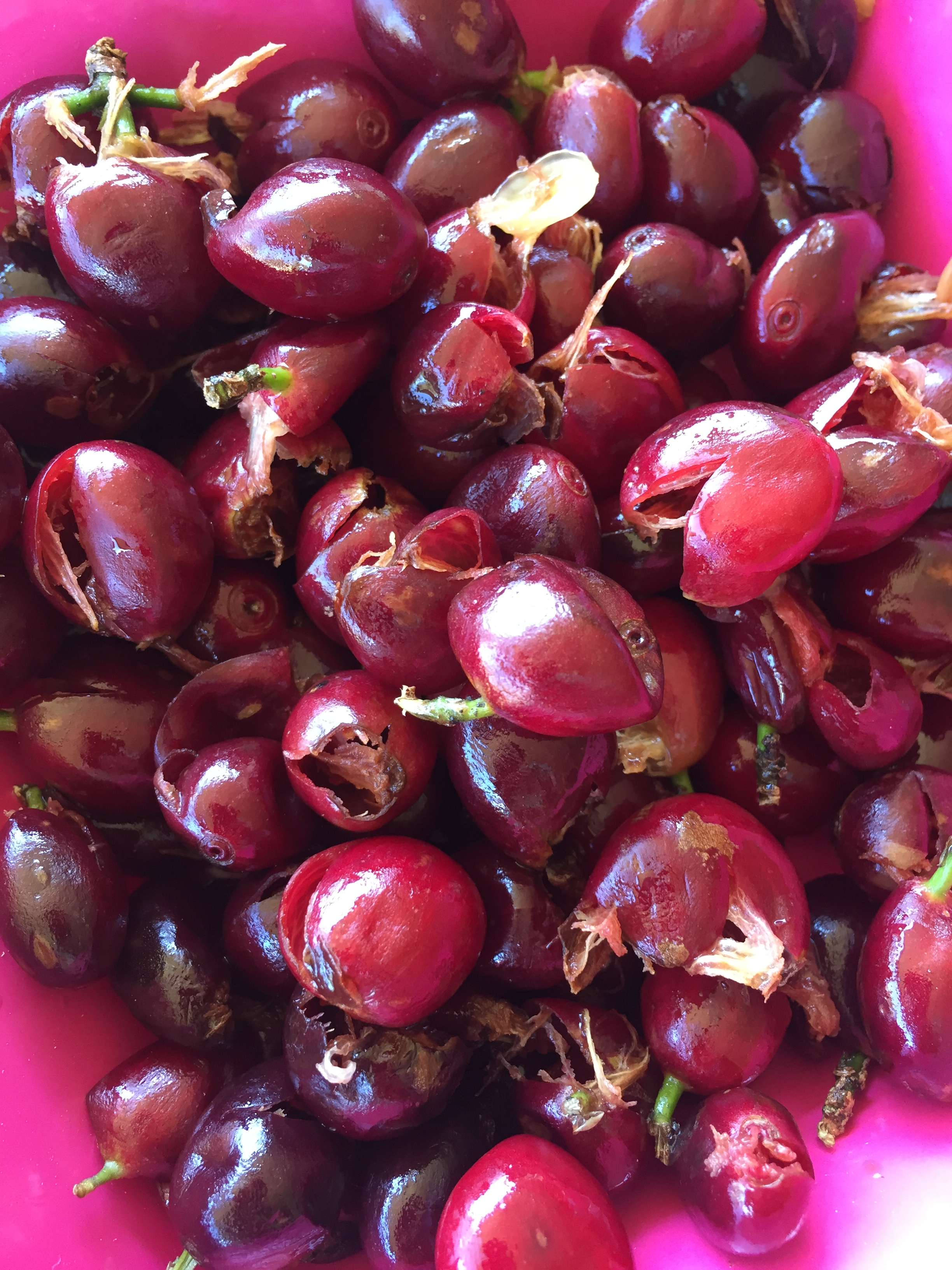
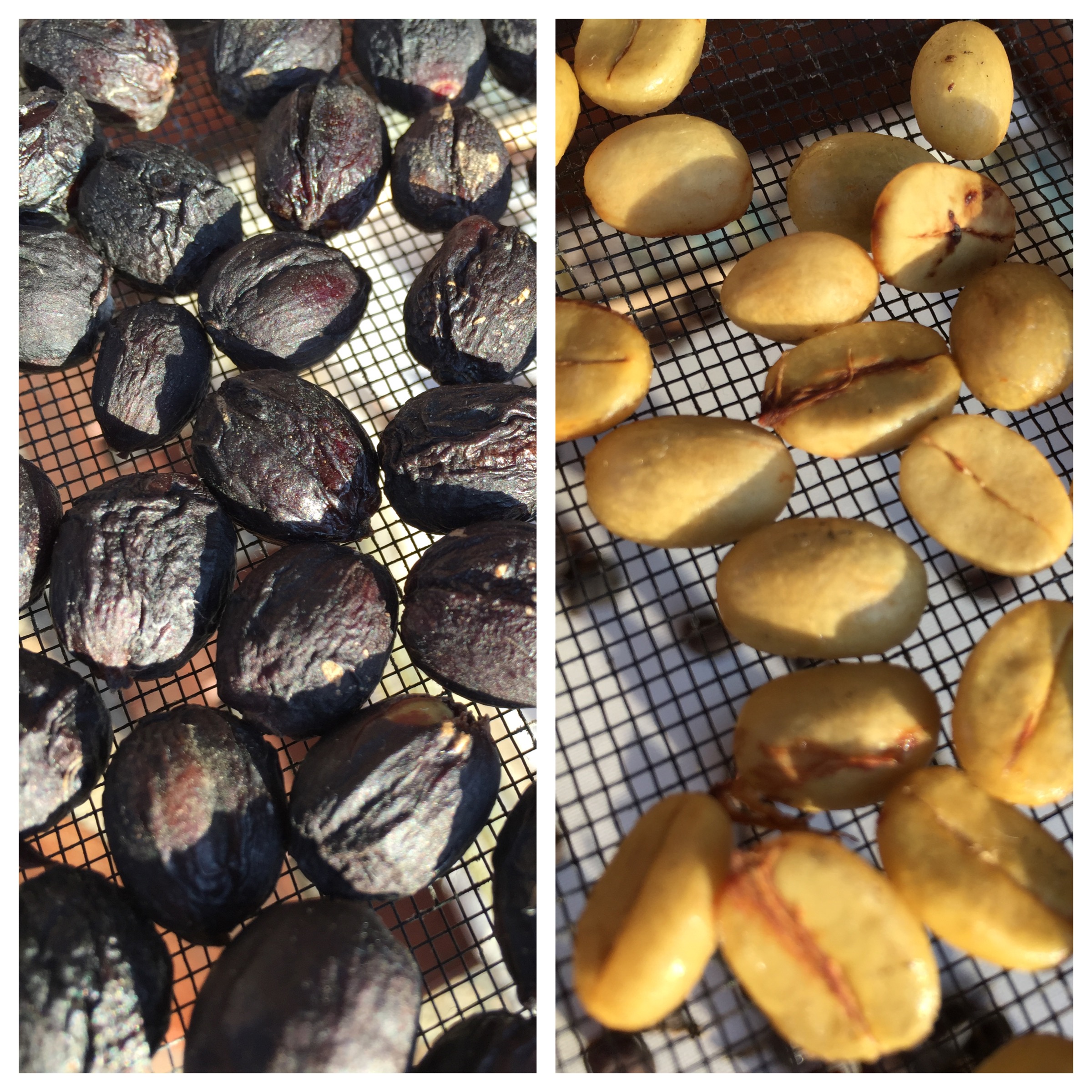
To recap, I am experimenting with two dry processing methods: Natural processing, where after picking, the whole coffee cherry is simply laid out and sun-dried. Once the whole cherry has dried, depulping and hulling then follow. The second is Honey processing, where the flesh or pulp is removed from the cherry first, leaving the sticky mucilage layer on, with the beans then laid out and sun-dried.

At the outset, I planned to have the beans drying for three to four weeks or so, remove the pulp and mucilage from the naturals, and allow them to dry for a further week before roasting. The honey processed batch? Well, that was anyone’s guess, as I really had no idea how long it would take for the sticky mucilage to dry on the outside of the bean — particularly in a climate known for its humidity. Time would tell me, or so I hoped.

For that matter, I wasn’t even entirely sure as to how I would tell when the drying process had reached a stage where roasting would then be possible. I have mentioned the often quoted 12.5% moisture content in previous posts, however I do not have the necessary equipment to readily determine the exact moisture level.

Time and estimation would have to do.

Tools

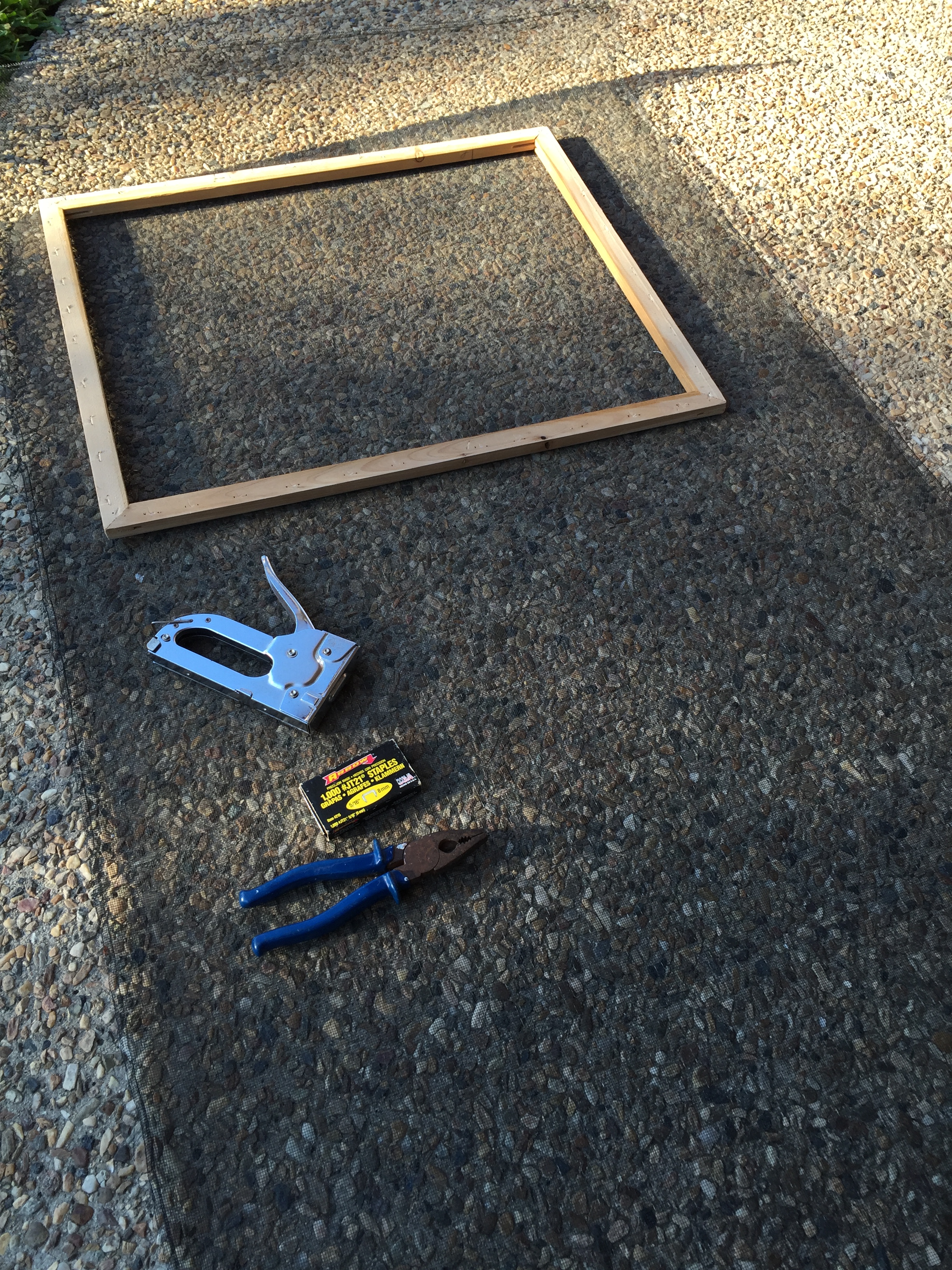
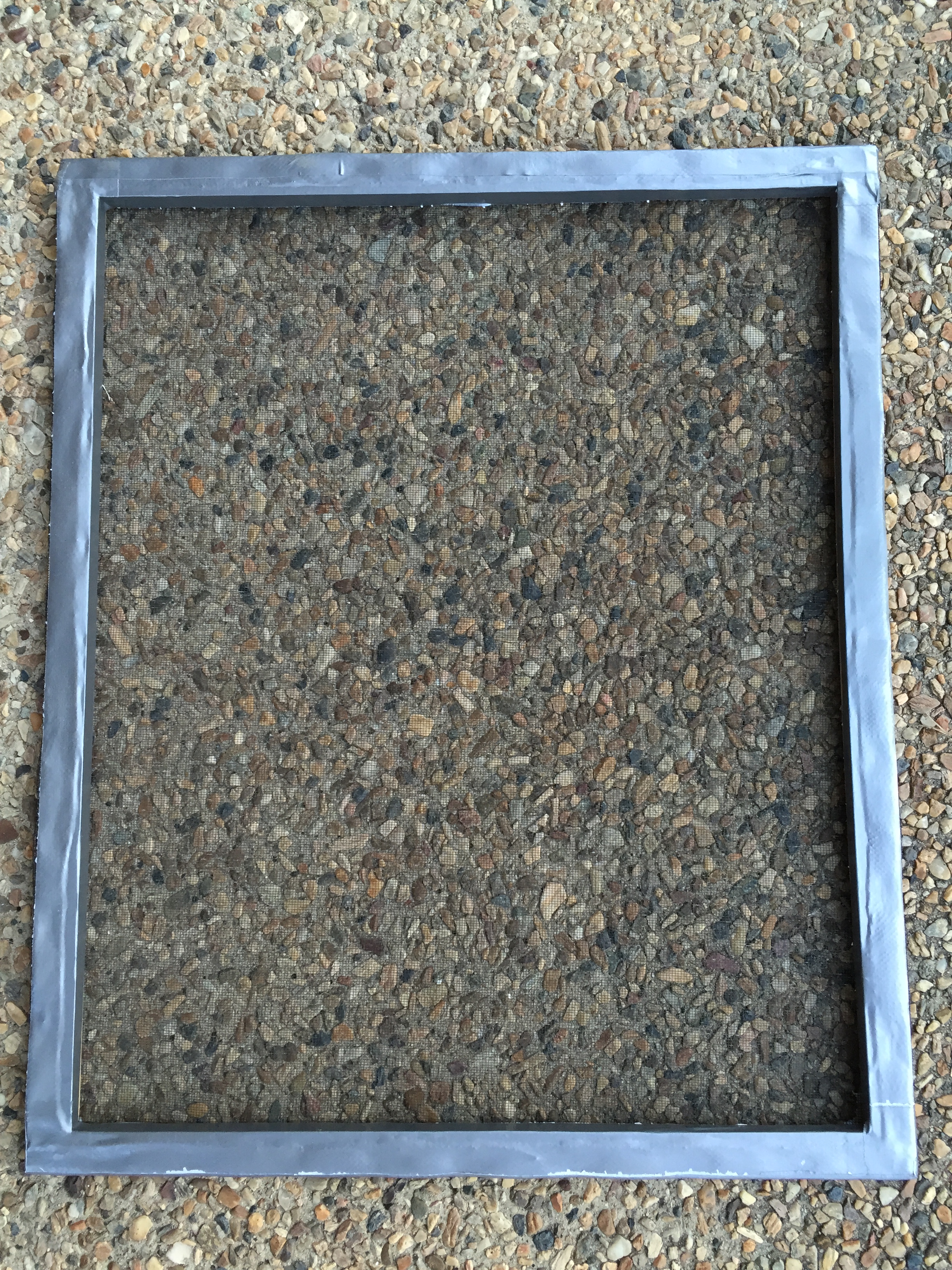
I say tools — however there was really only one: my custom-made raised drying bed. Sounds pretty fancy when described like that, however it consisted of a flyscreen-covered picture frame sitting across the arms of an outdoor chair. Fairly rudimentary, however not a great deal of complexity is needed to ensure adequate ventilation and airflow.

IMG_4915 IMG_4923

Other than that, it was simply my iPhone for recording photos and data, Day One app as I’ve mentioned in a previous post, and a couple of bowls for both beans and debris when depulping the honey processed lot and eventually the same for the naturals after drying.

Methods

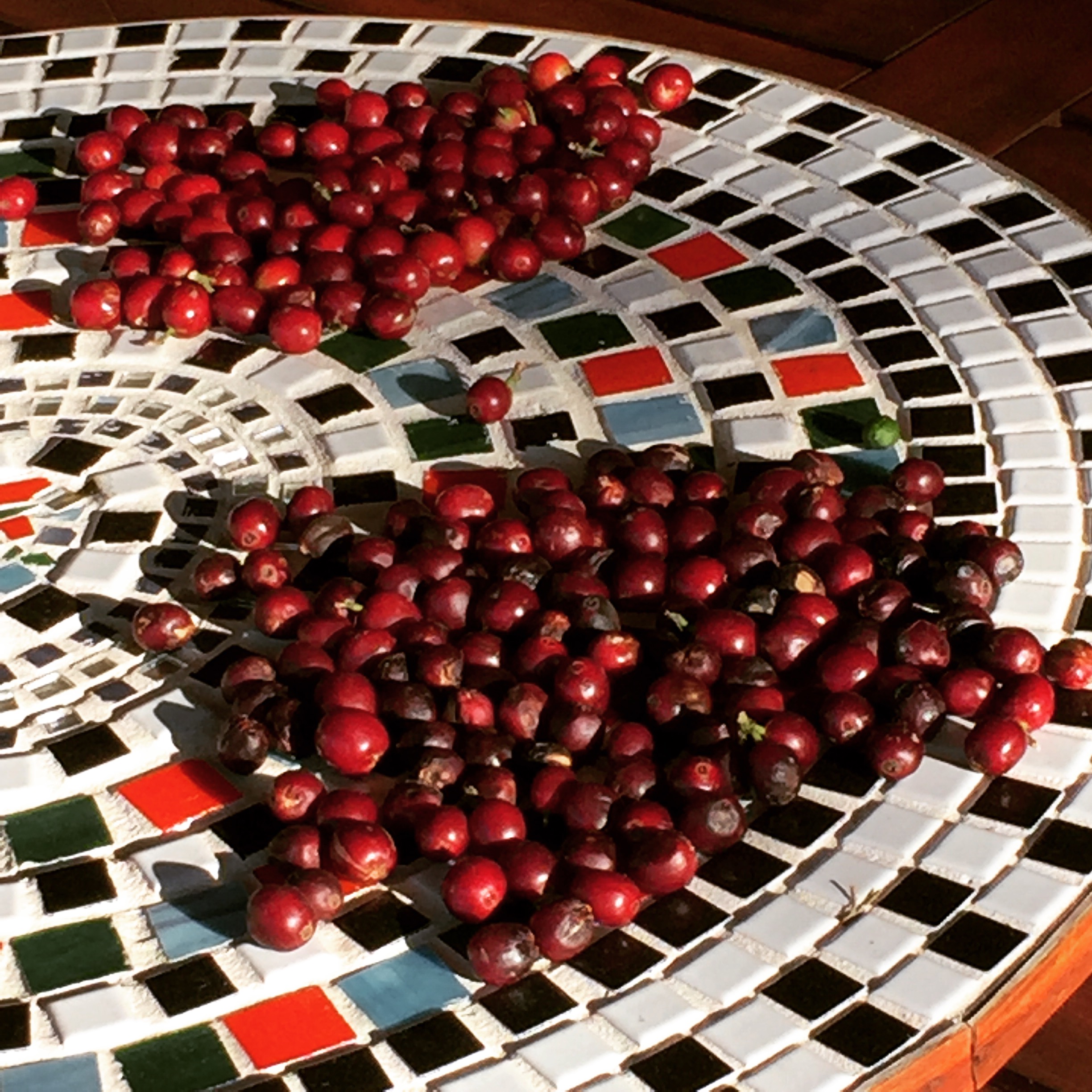
Before we get too much further not things, I probably should mention upon beginning this whole process, I had 420 grams of coffee cherries by weight at my disposal.

IMG_4919

These were split into the two groups evenly, with 210 g into each of the natural and honey processed groups respectively. Of course this reduced quite significantly in the honey group once the pulp was removed, however I did not check the actual weight again.

Initial processing

As you can imagine, the naturals required zero processing to prepare for drying, with the exception being to check for any bad fruit.

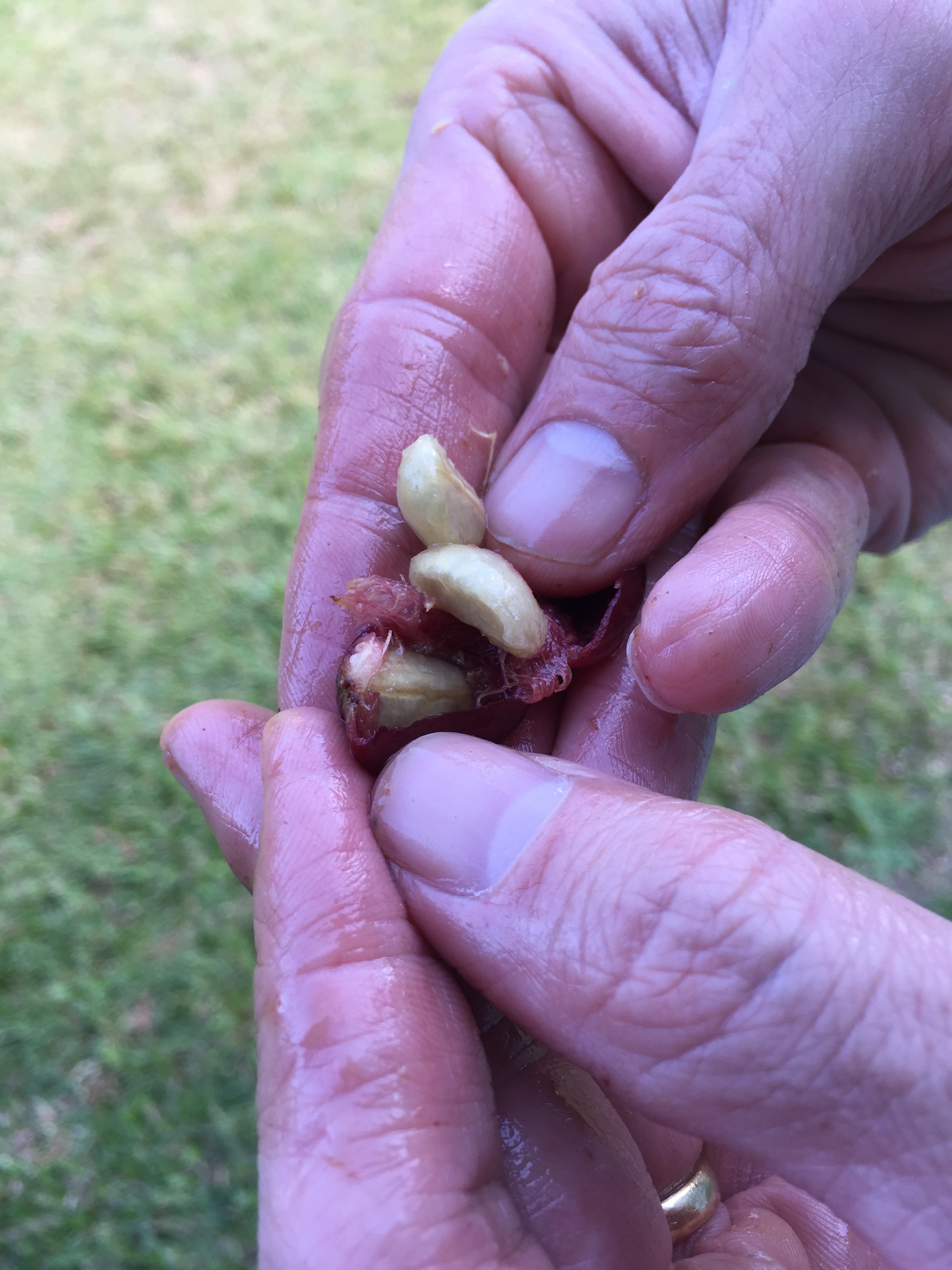
For the honey group, this amounted to depulping or removing the skin and outer flesh by hand, leaving the sticky mucilage covering the parchment layer on the outside of the seed or “bean”. Not an overly onerous task, however at any great scale would require significant time and effort — or machinery.

IMG_4929 IMG_4930

Once complete, out on the drying rack they went, with a Day Zero photo taken, and we were under way.

Drying

Over the course of the drying period I followed the same routine to ensure the beans were regularly turned, and also covered from any dew which formed in the evenings:

  • at around 6 am each morning the chair and drying rack were placed out in my back yard in a position of full sun;IMG_4934
  • a photo of each batch was taken and uploaded to Day One with additional humidity data from the Bureau of Meteorology (courtesy of the Pocket Weather Australia iOS app);
  • any additional comments were added to the entry;
  • upon returning home from work, both batches were manually turned, with the drying rack placed back under cover of the patio roof, ready to repeat the process each day until completion.

It was during this process a little bit of madness set in. As I have mentioned on numerous occasions, the mucilage remaining on the honey processed batch was quite sticky. If you’ve ever had to move and turn numerous small sticky objects you’ll invariably understand the ensuing challenge.

By hand, well… the beans simply stuck to my hand. By a plastic IMG_5086paint scraper… the beans simply clumped and stuck to that. Eventually, I resorted to simply turning them by one by one. Wait…what? Yes, that’s right, flipping over each little bean and placing it softly down again on its little bed for the night, only to have it face the searing sun again the next day.

One. At. A. Time. Like I said — madness.

Despite this insanity, the routine worked well over the weeks this IMG_4995whole process took, with the exception of a few days where I was either home late or in a rush, and didn’t stop to turn them or record data and photos. In any event, each night they were in and the following day back out. During some stormy weather for a few days during the middle of the drying period they were also left under cover during the day. Better safe than sorry.

Final processing

Once the drying process was complete, we end up with essentially the reverse to how we started. The naturals required depulping, and for the honey group, only removal of the final parchment layer to expose the bean inside.

Just to be sure I planned to then leave the beans a further week before roasting.

The data

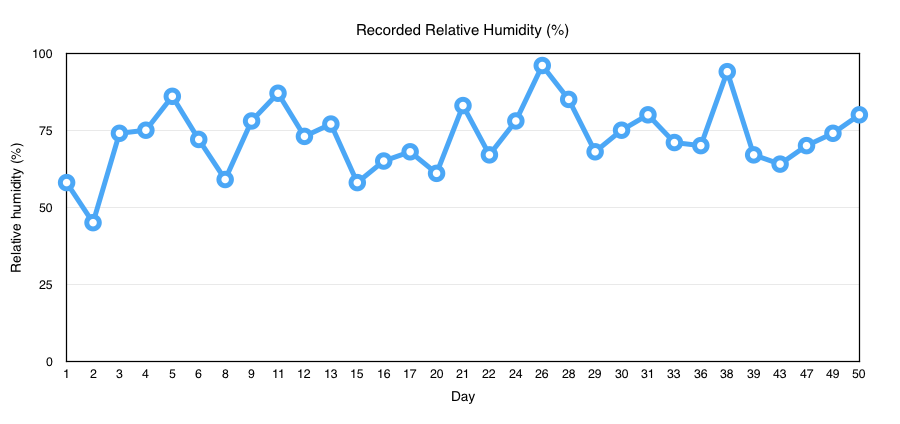
The result of the data recording in Day One was a 64 page PDF export containing basic data such as day, date and time; weather information (temperature and description); a photo record of the bean appearance, and any additional comments I made for the day’s entry, which importantly included a record of the relative humidity at the time — a known enemy of natural processing.

Although there were 64 entries, these were made on 32 individual days, with two entries per day the result of taking separate photo of each of the natural and honey groups each day. Although it might have been nice to upload two photos on the one entry, that was not a feature available to me at the time, however it is now, with a fantastic recent update to Day One.

Drying progress one week in.

Drying progress one week in.

Further to this point, although the entries were made on 32 individual days, with a few days missed here and there for various reasons, the entire process spanned 50 days in all — perhaps a little long, however we will get into that later. Typically around the time I begin entering data into a spreadsheet is when I also realise a few additional data points or variables collected may have assisted the overall analysis a little — this time was no different. Upon adding the temperature data, it soon became apparent the numbers probably didn’t quite reflect the actual temperature during the day, when those little beans took one for the team, and spent many hours in reasonably hot sun.

When entering the numbers I found myself thinking it had been a very mild October compared with how I remember it feeling day-to-day. It wasn’t long before I realised this was largely due to the fact that the times I had available to snap the photo and add the Day One entry, were either before or after work. Of course both these times occurred when the temperature had either yet to rise, or was already falling — really, must an occupation get in the way of everything — particularly hard-core science?

Thankfully, gathering additional data retrospectively is what we have the Internet for. The Bureau of Meteorology kindly helped out with mean, maximum and minimum temperatures, and a few other pieces of information such as rainfall and average sunshine over the course of the drying period. Would all of this additional data make any difference to how I conducted the drying? Absolutely not, however I think it does provide you with some idea of the conditions at the time, and perhaps whether or not it might be something you’d try yourself relative to how things turned out.

So, those numbers:

  • Drying period 50 days through October/November (Southern Hemisphere Spring);
  • October mean temperature range 16.3 – 27.1 degrees celsius (actual temperatures 12.9 – 33.8 degrees celsius);
  • November mean temperature range 19.8 – 29.2 degrees celsius (actual temperatures 16.1 – 33.4 degrees celsius);
  • mean hours per day of sunshine: October 9.1 hours; November 9.2 hours;
  • Total rainfall: October 55.8 mm; November 74.2 mm

What good is recorded data without a few charts, so I have included daily temperature and humidity recordings below, along with my own bean turning degree of difficulty score — which I understand is quite complex, however if you look hard enough I think it tells a story.

Screen Shot 2016-03-13 at 6.29.10 AM

Screen Shot 2016-03-13 at 6.29.29 AM

Screen Shot 2016-03-13 at 6.29.56 AM

Next: results and a few lessons

This post has started to become a little lengthy, so I have split off a closer look at the results and outcome for next time.

I’ve said it before and I’ll say it again here: the absolute best thing about writing this blog (beyond the knowledge that a few people actually read it), is what I learn along the way. Not simply from the research and dodgy backyard experiments that ensue, but how the act of writing makes me think a little more on the results, and what I might do differently or look into further next time. You know, that realisation you sometimes get: “well now that I say it out loud I’m not sure if it really is such a great idea”.

I hope you’ll join me for a few more realisations in the next post.