Wiser Web Wednesday

Wiser Web Wednesdaya regular link to posts of interest from around the web by those far wiser than myself:

The Dafacto Blog
I have often thought about the longevity of my online presence after my actual presence passes in this world, both from the perspective of my online accounts, and any writing I have created and put out into the ether. Further to this, there is also the issue of any secure digital data stored in the various cloud based services I am currently using.

To date, this thinking has not gone beyond providing my wife with my 1Password login (and vice versa), however I do need to consider this a little more thoughtfully and carefully.

Matt Henderson recently looked at a couple of possible strategies:
Planning for the transfer of personal data in the case of one’s unexpected passing

SBS News
Probably not surprising to read such a positive statement on coffee, given it’s origin:

What I tell patients is, if you like coffee, go ahead and drink as much as you want and can,” says Dr. Peter Martin, director of the Institute for Coffee Studies at Vanderbilt University.

That aside, this article goes on to report (again) what ongoing research has been demonstrating for some time now, in the significant and multiple long term health benefits of coffee. It also points out how, in addition to the benefits, much of the negative side effects long associated with beverage such as hypertension are also beginning to be disproven.

Some of the studies here quote continued benefits in upwards of six (up to ten) cups per day. Whilst I would not advocate lighter drinkers necessarily increase, perhaps those of us who find ourselves brewing every 2-3 waking hours can raise a knowing smile along with our preferred drinking vessel:
The case for drinking as much coffee as you like

A Fool With a Pen
Top fives, favourites, recommendations. We all love seeing where lists such as these take us, from agreement to dispute, to discovering something new. Just in time for Christmas comes one such list for your consideration and viewing pleasure:
The Charts

David Hewson
Author David Hewson provides a snippet of comment and a link to Dream of Venice, a photo compendium by Charles Christopher, which features an extract from Hewson’s book Carnival for the Dead. I think we’d all like to be saying the following line:

I’ll be back in Venice next month for a week finishing off a new book.

However in the absence of all capacity to say such a line, perhaps the book will have to do:
Dream of Venice

Pentorium
Personally, I don’t believe I could ever learn too much about fountain pens, however this guide at Pentorium goes a long way in furthering that endeavour. One of the most well set out and illustrated posts of its type I have come across.

I particularly like the “problem solving” type approach to the overall structure, rather than a simple list of general maintenance topics – certainly one to save and refer back to:
Fountain Pen Guide Series, Session 3: How to Maintain Your Pens

Brainpickings
One I particularly enjoyed from Brainpickings recently about a book by Carl Sagen, The Demon Haunted World. Why? Simply because it relates to much of what I spend my day doing, which is reviewing medical evidence in relation to what would be considered peer-reviewed and accepted treatment methodology. Probably the two most common mistakes I see others make who interpret such research are not dissimilar, however are listed individually in the list of 20 common pitfalls relating to common sense:

Number 12: post hoc, ergo propter hoc — Latin for “It happened after, so it was caused by” (e.g., Jaime Cardinal Sin, Archbishop of Manila: “I know of … a 26-year-old who looks 60 because she takes [contraceptive] pills.” Or: Before women got the vote, there were no nuclear weapons)

and

Number 17: confusion of correlation and causation (e.g., A survey shows that more college graduates are homosexual than those with lesser education; therefore education makes people gay. Or: Andean earthquakes are correlated with closest approaches of the planet Uranus; therefore — despite the absence of any such correlation for the nearer, more massive planet Jupiter — the latter causes the former)

Really, the title of the post says it all:
The Baloney Detection Kit: Carl Sagan’s Rules for Bullshit-Busting and Critical Thinking

Mic
Although commonly seen in movies, the idea of a post apocalyptic type landscape actually existing in reality is not one we commonly think about. This drone flight with footage of Chernobyl from the air is one such reminder, despite the nuclear reactor tragedy occurring in 1986, now almost 30 years ago:
Someone Flew a Drone Through Chernobyl and the Result Is Haunting

Back on the Blog – A Few Links

Clearly there has been a little disruption to my usual posting schedule on this blog both during, and since, November’s NaNoWriMo (National Novel Writing Month), a topic which perhaps some of you may be a little tired of hearing about. If so I apologise, though there may be a post or two on that very topic still to come – perhaps.

Whilst I enjoyed participating immensely, managing to become a “Winner” after passing the required 50,000 word count before month’s end, I did not find it easy, nor could have predicted the toll on my overall energy, time and willingness to write on other things throughout the month. It is only now, well into December, I have found the urge to get going again.

What better way to ease back into things than with a few links to posts I have found interesting or exciting over the past couple of weeks (soon to return to the usual Wiser Web Wednesday format).

Ink&Flour
The re-launch of a blog (formerly Hastily Written) with an idea that particularly resonates with me. Some may consider writing a blog without a sole focus to be a cardinal mistake in the world of online traffic, and perhaps that may be the case. Personally, I’d rather a blog with soul, than a sole focus, just for the sake of it.

After much consideration a little while ago about where my own blog was or should be headed, I am comfortable with the decision I made not to split off the various topics into their own niche blogs, but rather keep things together. My own interests, under my own banner.

So, whilst bread making and pens may not necessarily be diametrically opposed, they are indeed an unusual combination to be found on the one blog – but of course, that is exactly what makes this one unique. Looking forward to what is to come:
Changing Times, Changing Names

WriteAnalog
A launch, this time of an entirely new blog undoubtedly with some great things to come. The tone has been set, not only with a quote in the first post:

“To begin, begin.” – William Wordsworth

But also, a killer WriteAnalog Manifesto, every word of which, those who are excited about the creation of another such blog will immediately understand:
The WriteAnalog Manifesto

I wish both of the above, every success, and smile at the community widening even further.

JimSeven
Yet again an interesting piece from James Hoffmann on not only the idea of “how” speciality coffee is portrayed or “sold” to consumers, but also the idea of how personal preference is a significant consideration:

A person’s preference is a place to start. To be acknowledged, accepted and considered. Even if their preference is the last thing on earth you’d want to drink yourself.

I find the more you read on this subject, the more those within the industry often disagree, let alone convincing the consumer. An example of which can be seen in a response written to the above post by Tim Williams on his Tumblr page.

Upon reading the response however, I think the articles are discussing slightly different points, that being, there is a difference between selling the concept of speciality coffee to consumers, and those within the industry promoting themselves as purveyors of same, while at the same time, serving a substantially inferior product:
What message do I want to send?

Baron Fig
The guys at Baron Fig have indeed been very busy lately, coming out with limited editions of their two main products, the Three-Legged Juggler, a special release of the standard Confidant Journal, and the Lightbulb, a limited edition of The Apprentice pocket notebook.

As with many limited editions, special or seasonal releases, the colours may not suit everyone, however I think these are spot on. I cannot wait to see what they have in store for future editions of this nature.

Finally, I must commend Baron Fig on their customer service – the Lightbulb edition was launched shortly after I placed an order, and although it had already shipped and I was unable to amend or add to it, the guys were very generous with a subsequent order, making the whole experience an extremely positive one.

By the way, you better get in quick in future, as the dot-grid Lightbulbs have already sold out (plain and ruled still available):
Baron Fig Online Store

MacSparky
A masterstroke from David Sparks of Macsparky and Mac Power Users podcast fame. Another Macsparky Field Guide, this time in the form of an OmniFocus screencast:

… this 2.5 hour video that takes you, soup to nuts, through the Omni Group’s supremely bad-ass task manager. The screencast can turn an OmniFocus novice into a task-managing ninja.

I have read the OmniFocus user guide, countless blog posts, and tips and tricks pieces, however have yet to find something which really clicks in taking my use of OmniFocus to a more efficient and powerful level. I reckon this should do it.

Many of the David’s tips on the MPU podcast in relation to Omnifocus are real gems, and I am looking forward to getting stuck into this one after completing the somewhat hefty 1.6 GB download last night.

Looking forward to earning the task-management ninja title very soon:
The OmniFocus Video Field Guide

That’s better.

Good to be back writing on the blog, and, as opposed to what I have just spent November writing – nary a plot hole in sight!

NaNoWriMo – My Digital Tools

So far, my NaNoWriMo (National Novel Writing Month) journey continues as we come to the middle of November. My note taking, outlining, and general scribbling continues with the analogue tools I wrote about last week. How has the actual writing (as well as a bit more planning) occurred? With a few digital tools, which I thought I would share below.

Planning and Outlining

MindNode
Although I should no doubt use the technique more, I do find mind mapping incredibly useful. In the past I have used iThoughts, however for 6 months or so, it has been MindNode on iOS, and MindNode Pro on the Mac.

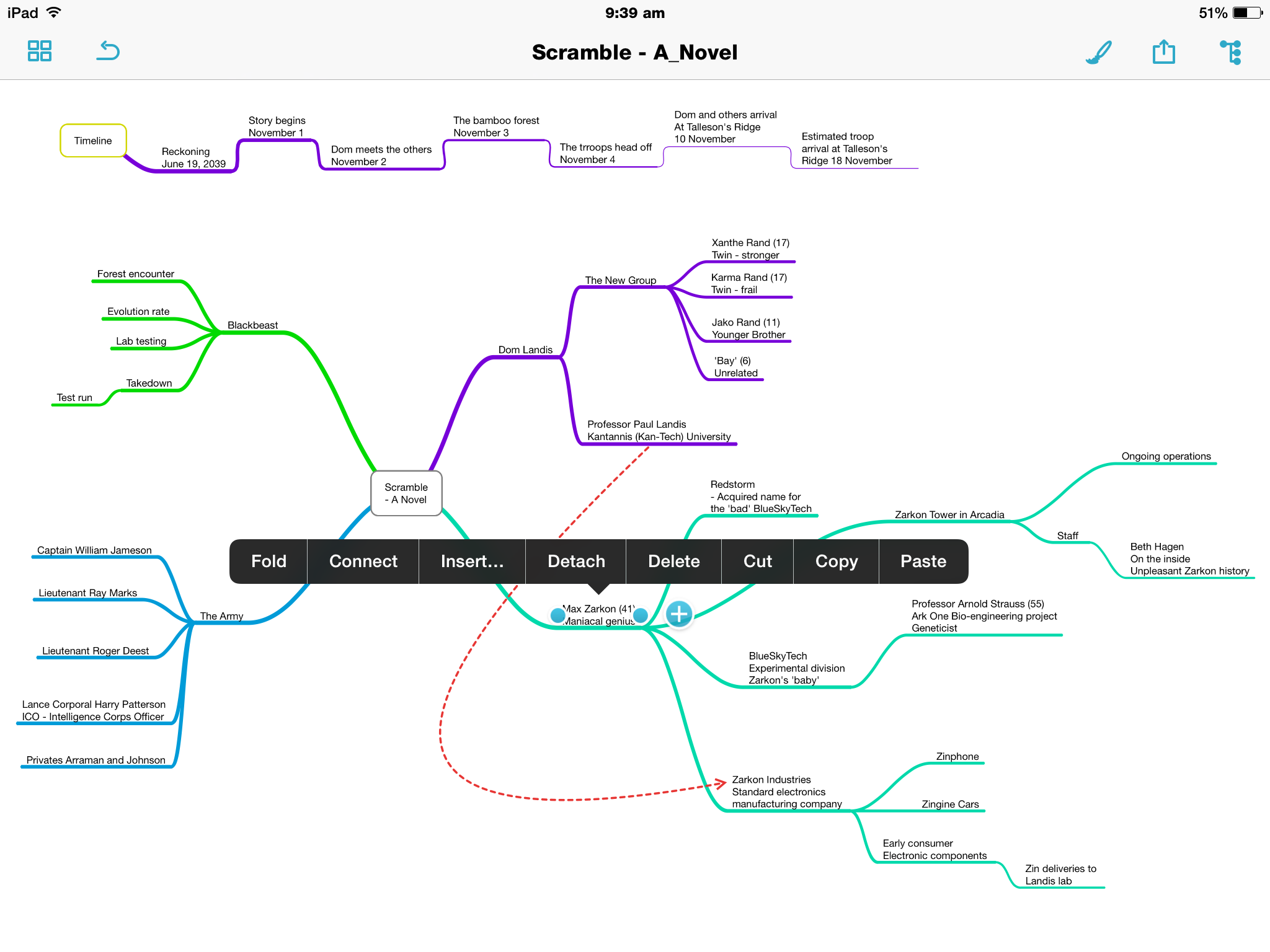
Specifically in relation to NaNoWriMo, MindNode has kept organised the general outline of the four overarching plot lines to the story, which I find particularly useful for referring back to in relation to names and relationships.
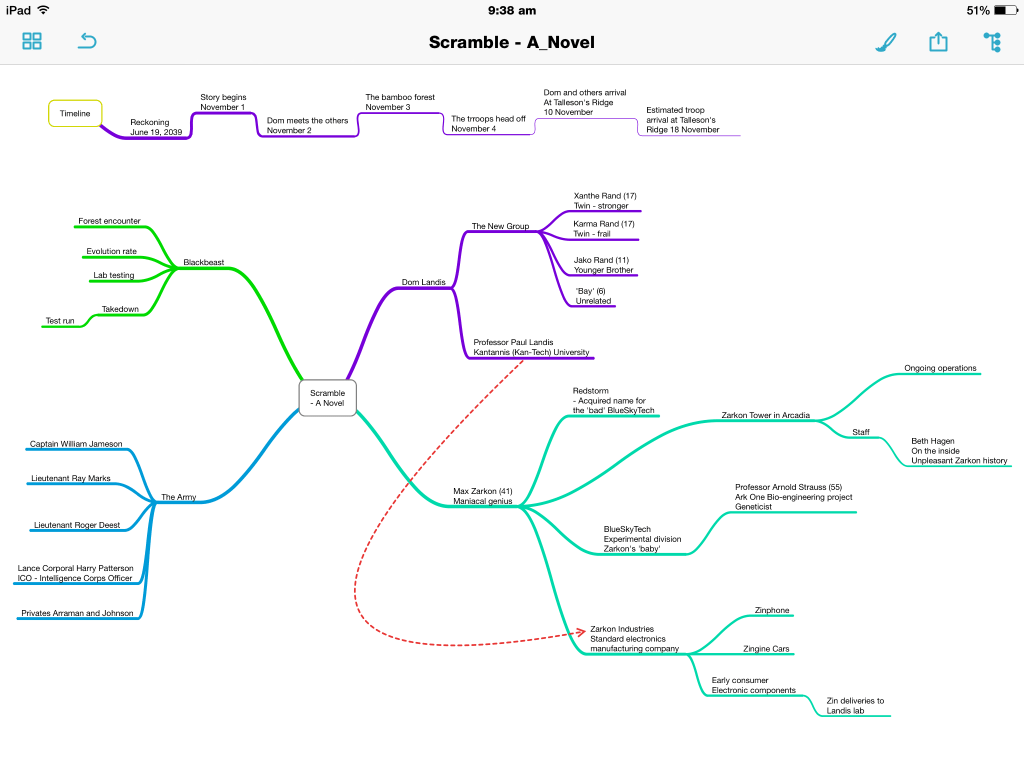
Photo 14-11-2014 9 38 49 am


The initial map itself was constructed just prior to beginning writing, however it is now largely an evolving document which develops alongside the story. I’ve found it extremely helpful when adding components, to then sit and review the story as a whole, as it is outlined on the map.

You will also see a timeline running across the top of the map which I have created on a separate node, which will most likely be split into a second node directly below the current one as the story proceeds and the timeline lengthens.

Why MindNode? It’s simplicity is the main drawcard.

Tapping a node allows the creation of child node by pressing the ‘+’ icon which appears, with a double tap to edit text. The nodes can be ‘folded’ down or expanded; detached to create another node, or attached to an existing node by tapping, holding and dragging. The same can be achieved through the contextual menus.

Photo 14-11-2014 9 39 52 amPhoto 14-11-2014 9 39 18 am

Of course there are the usual style and formatting options for the background, text and nodes themselves, with a ‘smart layout’ toggle which, if on, will align nodes and branches uniformly throughout the map.

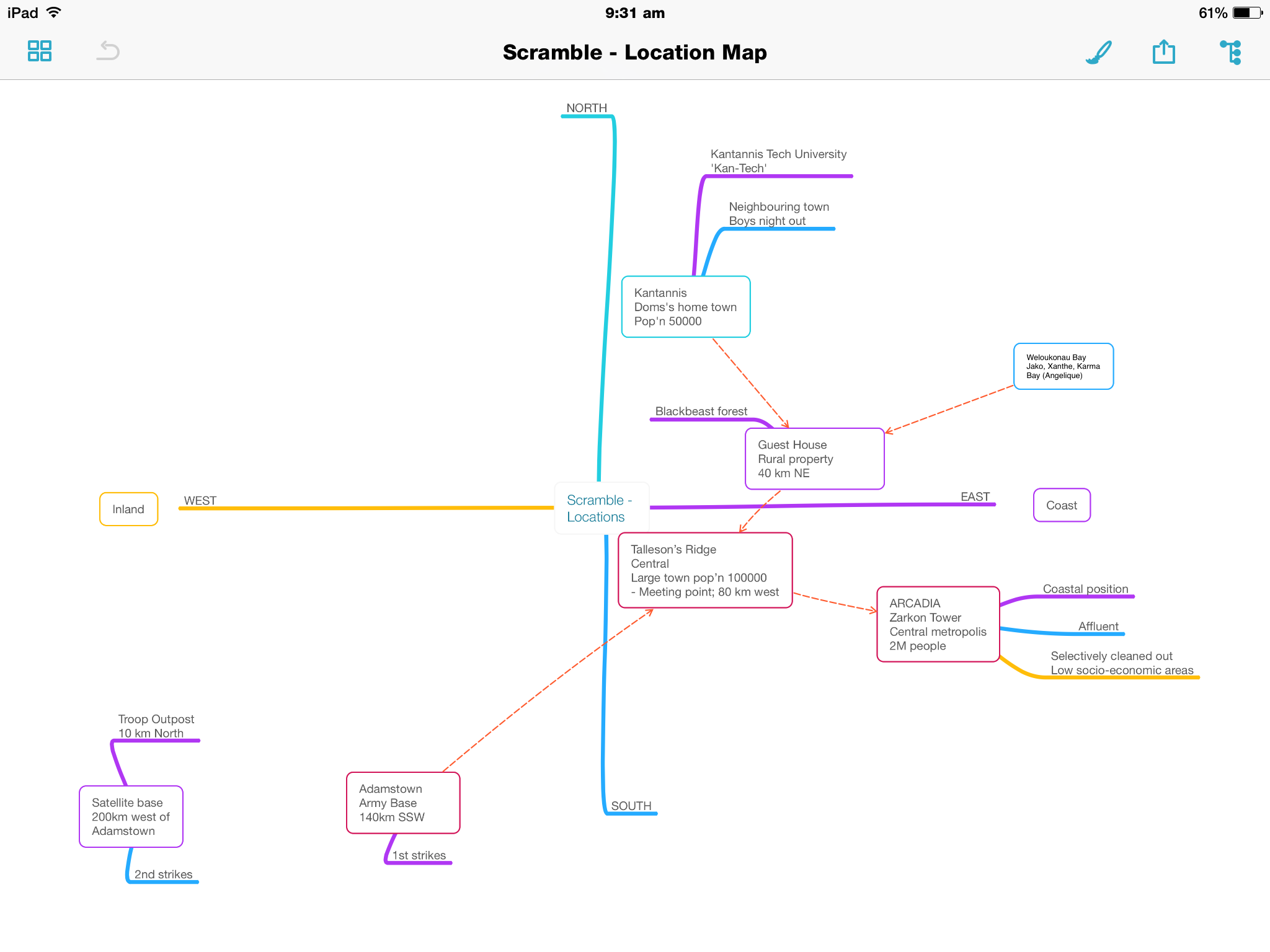
Although not it’s intended purpose, I’ve also created a ‘location map’ …map, if you will, which has been perfect for getting my head around where the characters have been, currently are, or are going to, geographically in the story.
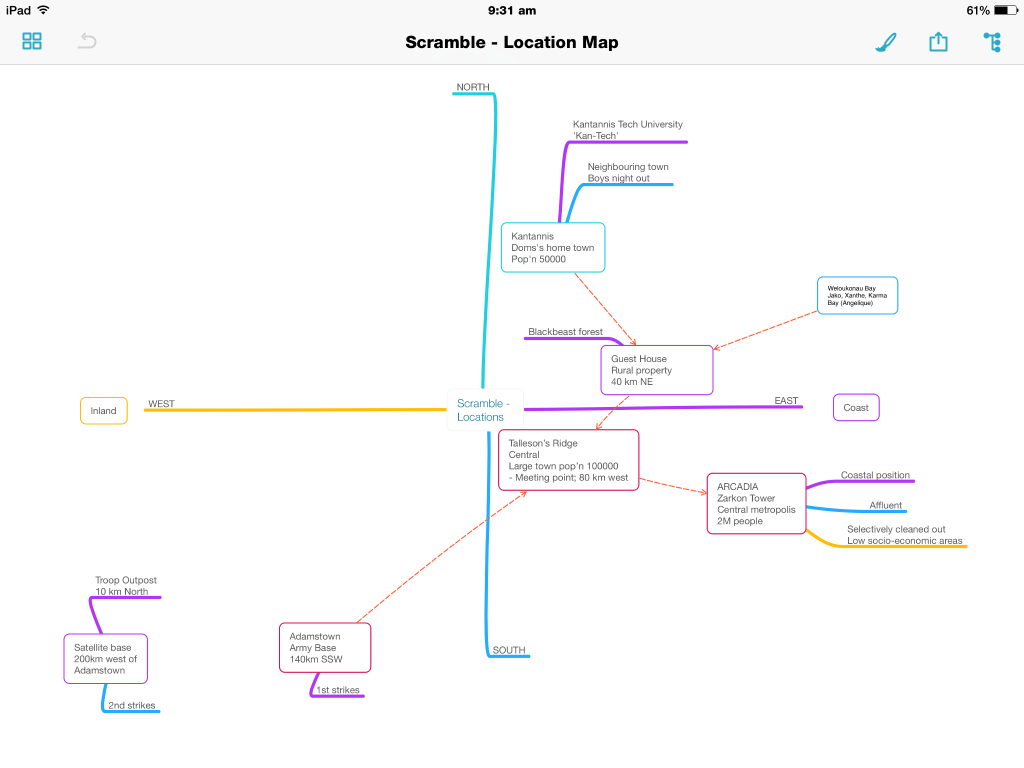
Photo 16-11-2014 9 31 55 am

It does not have the advanced attachment options of say iThoughts, however I simply don’t require those. In organising my ideas, it is the content of what I get down, plain and simple. Oh, and I do love the outline view.
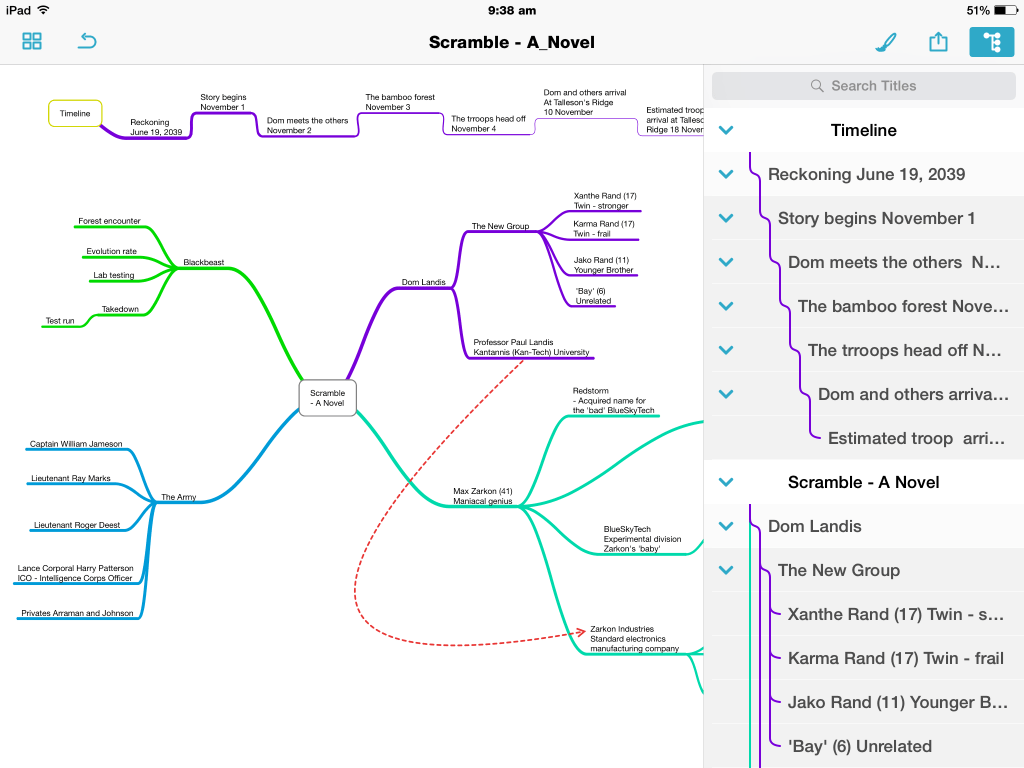
Photo 14-11-2014 9 38 59 am

Syncing is through iCloud Drive or Dropbox, with exporting options including Freemind and OPML file formats, along with text, PDF and image formatting.

Drafts 4
Although iOS only, I have been using Drafts for some time, recently upgrading to version 4.

For NaNoWriMo, it has been my go to app to use for quick notes, without needing to pull out my Field Notes and a pen. Syncing to my iPad mini provides some scope for expanding further on these notes on a larger screen if I need to, however I rarely do this.

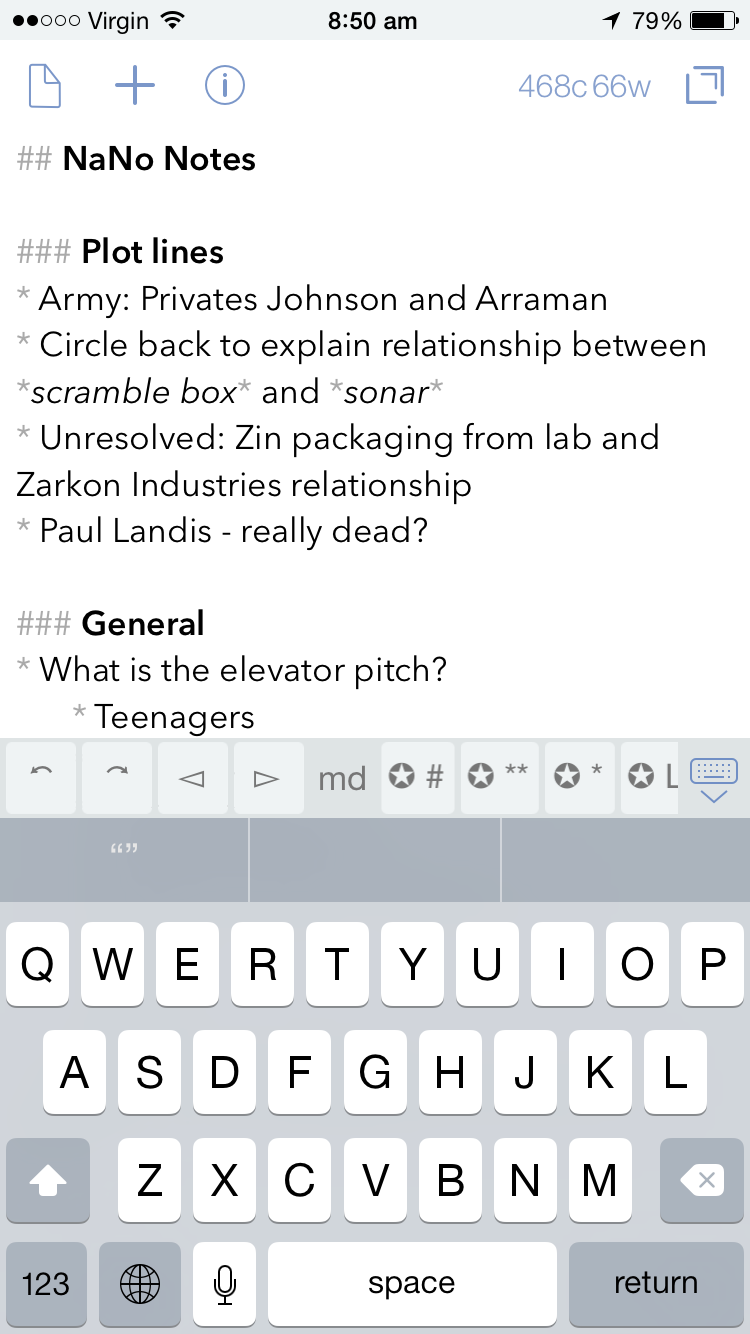
Currently in my ‘NaNo Notes’, I have a few thoughts around the plot, a couple of character names I had thought of, and some ideas for an elevator pitch, which only recently came up after a friend asked what the book was about, and I found myself somewhat disjointed in my resulting explanation. A catchy (I think?) tag line rounds out the note.

Photo 14-11-2014 8 50 39 amPhoto 14-11-2014 8 50 32 am

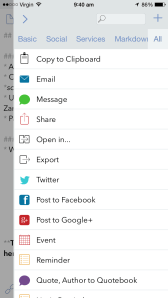
For those familiar with the Drafts app, there are virtually endless actions that can be applied to any note, with many more to be found on developer Agile Tortoise Drafts Action Directory.

Photo 14-11-2014 8 50 46 amPhoto 16-11-2014 9 40 11 am

As you can see from the screenshots, for anyone wishing to produce longer pieces, there is also Markdown support (with specific keys in the additional keyboard row for this purpose). At the current time, my NaNoWriMo needs only require a robust, reliable note taking app, and Drafts fits the bill nicely.

Writing

Ulysses III
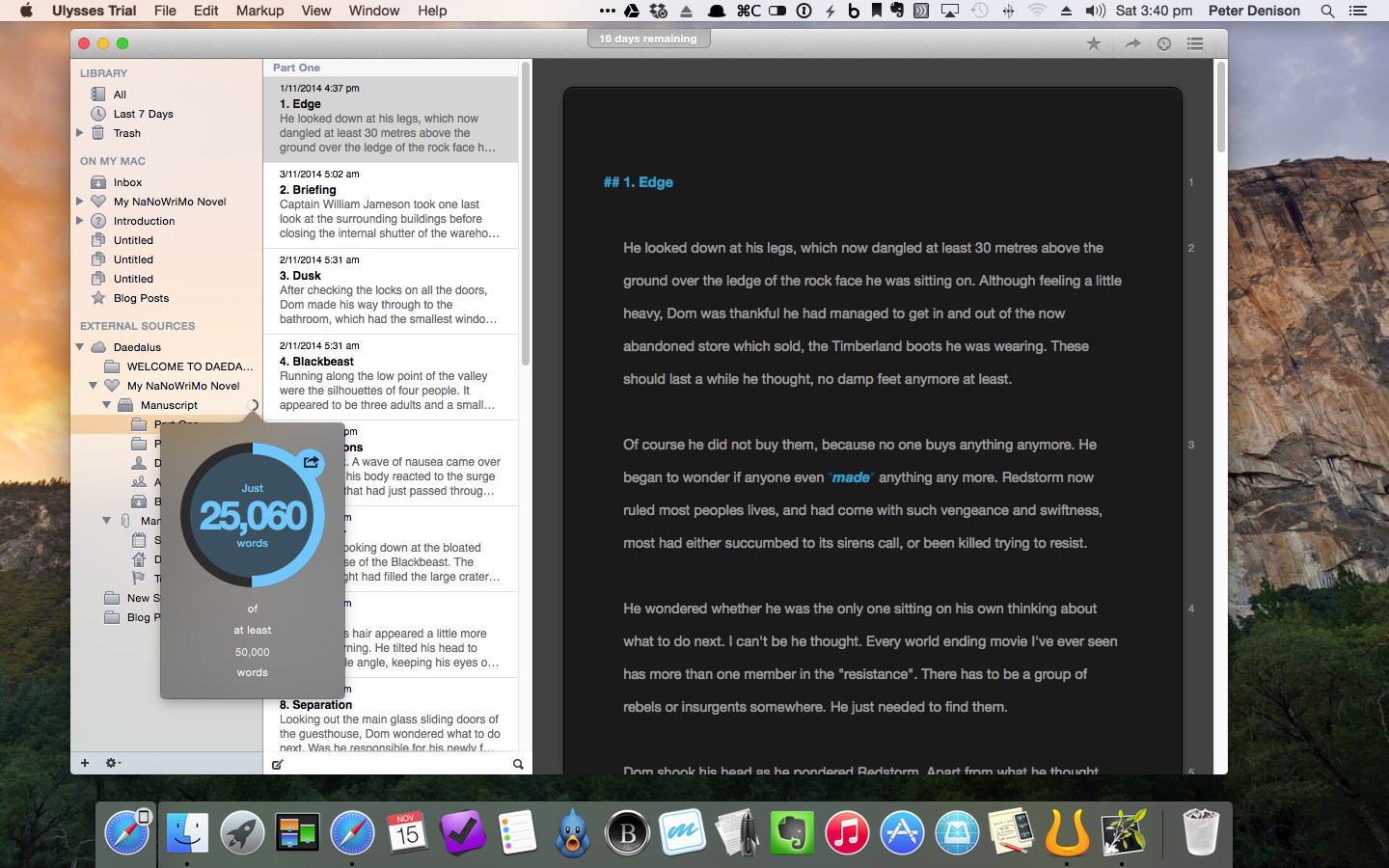
All the planning and outlining in the world won’t get you very far in this challenge unless you get the words down – and a good few at that. For this, I have used Ulyssess III for Mac, which is described thus by developer, The Soulmen:

Ulysses lets you focus when you need to concentrate. It keeps all your texts neatly stuffed in its intuitive library. With a few clicks, Ulysses can create beautiful documents from your manuscripts: PDFs, web pages, even iBooks-ready ePubs. With its simple, clutter-free interface, it will turn work hours into fun time. And mere thoughts into powerful stories. If you love to write, and write a lot, Ulysses is made for you.

Indeed I have found Ulysses III to be a great tool for getting the 25k+ words down I have managed to write so far.

So, with Scrivener already on my Mac, why Ulysses? To be fair, I have not really written anything of length as yet in Scrivener (a widely known and well-loved app for many an author – not that I consider myself one), so I cannot really compare the two.

Through a sponsorship of NaNoWriMo, Ulysses offered a 30 day free trial of the app, with some email encouragement throughout the month, and a free extract from author David Hewson’s book Writng a Novel with Ulysses III.

Screenshot 2014-11-15 15.40.32

Given the enormity of the NaNoWriMo challenge, I was looking for something with enough structure to keep things organised, yet the simplicity to allow me to just write – a lot. As far as I am aware, Scrivener may be a little more feature packed and powerful, however Ulysses has been spot on for what I have required, namely:

  • Chapter and scene separation through separate ‘sheets’
  • Highly intuitive organisation of folders, files and keyword tags
  • Focused, full screen writing
  • Usual grammar and spell checking
  • Statistics, including word count and reading time etc
  • Effective grouping of scenes with key words so individual plot lines can be worked on in isolation, despite being mixed throughout the book
  • Markdown support
  • Exporting to other MD supported apps and also as ePub / iBooks
  • Syncing through iCloud or Dropbox via the ‘Add External Source’ option

Screenshot 2014-11-15 15.40.48

I have also written both this post, and last week’s on Ulysses, to try out some of the features more specific to a blogging, which has also been a great success. Incidentally, the insertion of a web link via copying a URL to the clipboard, highlighting a word in the post, and simply pasting to finish the link is a little magical.

Screenshot 2014-11-15 15.39.30

Ulysses is indeed a fantastic app for writing, and my initial plan to purchase it as a reward for finishing NaNoWriMo looks on track so far. I encourage you to check it out.

A final word from David Hewson:

Writing’s hard. Software should make it less so. Ulysses really does.

Daedalus Touch
Daedalus is the iOS companion app to Ulysses, also by The Soulmen, who describe it as The World’s Sexiest Writing App, and Simple, Powerful and Flat Out Georgeous.

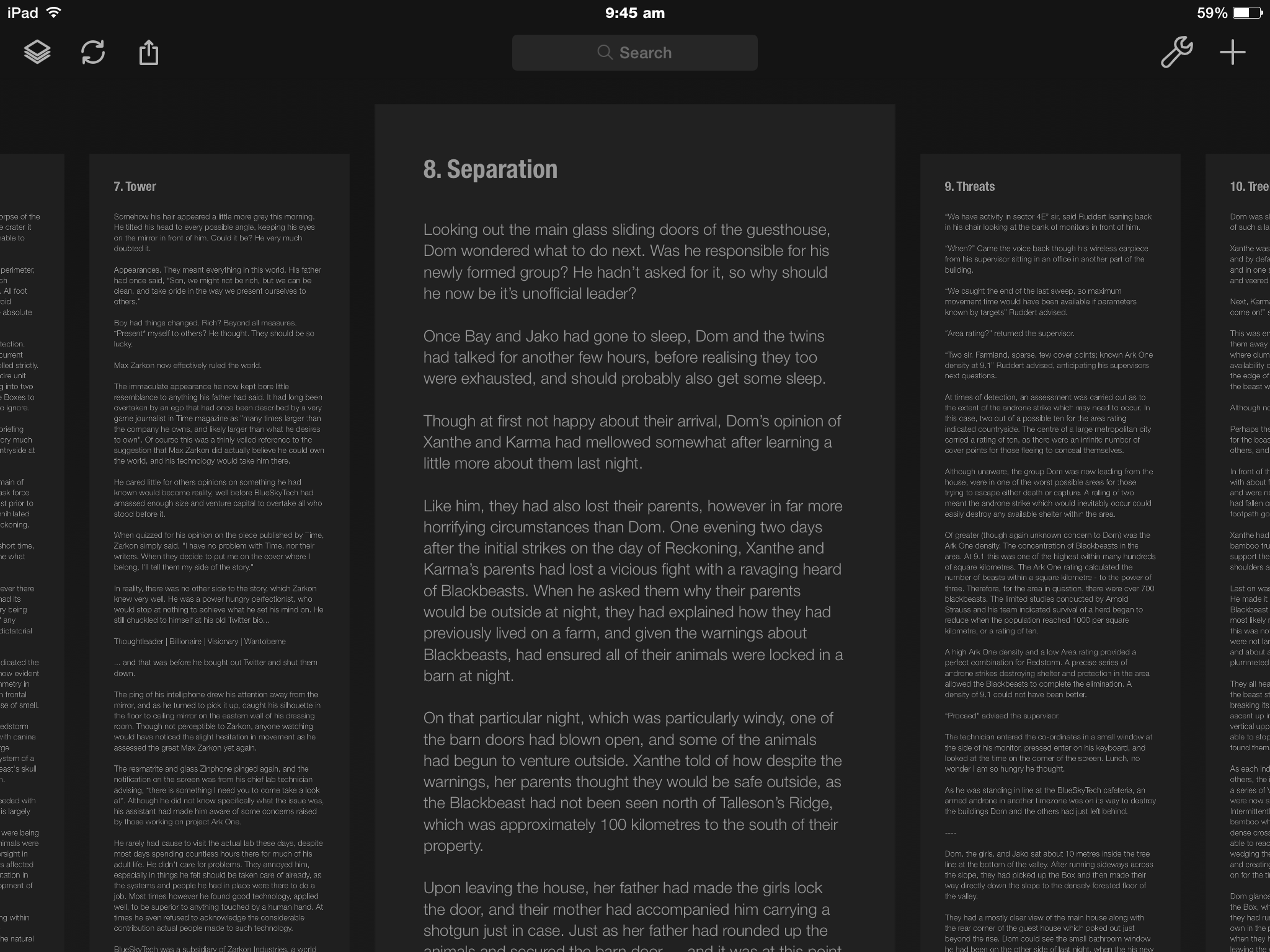
True? Well, it is strikingly minimal writing app, with an interface considerably different to many you will find on the market. The app is designed as a series of “paper stacks” rather than document lists, and, upon entering a stack, navigation is then by swiping from L to R, or the reverse between each page.

Photo 16-11-2014 9 45 02 am

Pages are not limited to a standard size, and will infinitely increase in length the more you write. To retreat back out of the stacks, a simple two finger pinch is all it takes. Daedalus has an additional, customisable extra keyboard row, containing a central area which, upon tapping, will scroll to the end of the sheet. A nice touch.
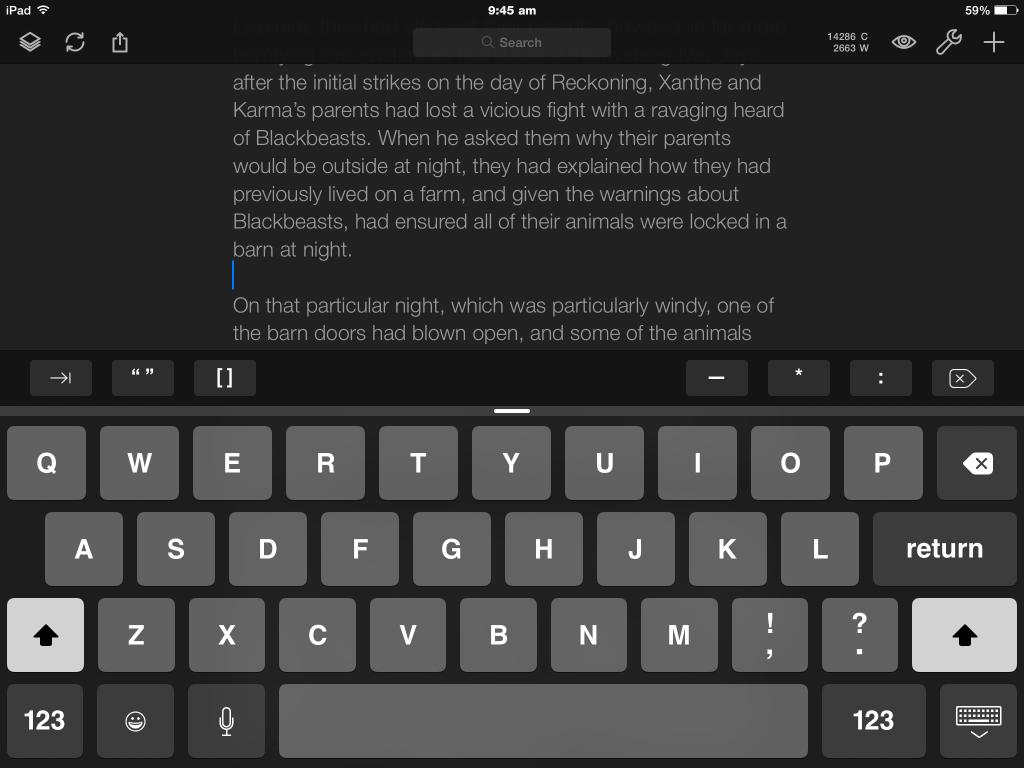
Photo 16-11-2014 9 45 47 am

Due to my insecurity with iCloud at the moment, setting up Dropbox syncing with Ulysses was a straight forward task, and has worked flawlessly since day one.

Having had Daedalus on my iPad and iPhone for some time, I guess I really just needed a reason to give it a good run, and I’ve been impressed so far. It has been the go to app for racking up 500–1000 words over my lunchtime coffee, or writing at the kitchen bench nearer my family, rather than being stuck at my desk.

Reviewing and Editing

As you’d expect, a good deal of editing occurs as I go along, however given the somewhat larger word count target than I am used to, there are times when I simply need to continue writing, and the editing and revision suffers a little.

iBooks
I am a firm believer in the reviewing or re-reading work in a different format to that in which it was originally written, as I find this allows me to pick up errors or parts needing revision a little easier. For blog posts I find Marked 2 a great way to review what I have written.

For NaNoWriMo purposes, I have found that exporting the book from Ulysses (an extremely easy task) to iBooks, allows me to not only view what I have written in ‘book’ format, but more easily pick up such errors, and I have the ability to highlight and take notes in the margin, which are then tabulated in the contents section of the book, and it is a simple tap to jump back to the relevant section.

Photo 14-11-2014 1 52 16 pmPhoto 14-11-2014 1 52 25 pm

Though I cannot edit the text directly as I read it, I have found it quite easy to edit on my Mac with my iPad in front of me showing the required revisions in iBooks.

The Hardware

There is not a great deal to say here, apart from mentioning the above Mac apps are used on a late 2012 Mac mini; the iOS apps on my iPad mini with retina display (now referred to as the iPad mini 2) or the iPhone 6, which have all performed flawlessly, and continue to do everything I ask of them. When writing on my iPad mini, I also more often than not use the Logitech Ultrathin Keyboard mini.

Conclusion

So there you have it. My NaNoWriMo ‘digital tools’ both for Mac and iOS. You would have a strong argument in saying I was a little crazy when undertaking this challenge to try new apps as well, however I think it says a lot about the simplicity and functionality of MindNode, Ulysses III, and Daedalus, that things have run so smoothly.

In fact, I am now quite confident these tools will see me through the next 25,000 words to the end.

Lets just hope the creative side of my brain will do the same.

NaNoWriMo – My Analogue Tools

The tools.

The tools.

With so many words to be written this month as part of my first foray into NaNoWriMo, I feared this blog would be a little forgotten over the coming weeks – and no, I had not planned ahead well enough to have written and scheduled posts in advance.

In a rare moment of wisdom, I came to realise my best chance of putting something up on the blog would be to combine the two. That is, participate in NaNoWriMo, and occasionally blog about participating in NaNoWriMo.

I plan to write a few more NaNoWriMo flavoured posts throughout the month, which is of course assuming the weight of expectation that comes with a 50,000 word target doesn’t crush me first.

So, with a tip of the hat to yesterday’s Fountain Pen Day, today I thought I would share some of the analogue tools I have been using to help plan out, and hopefully get written, the 50,000 words that constitute the NaNoWriMo challenge.

Notebooks

Various notebooks, pads, scraps of paper and even the odd dreaded yellow Post-It Note have all played their part here.

Although I have the overall plot and story outlined, my fear of running out of specific ideas to keep filling scenes, has resulted in a litany of places with either paragraphs, a line, or even a single word jotted down to avoid forgetting that great idea. Though I must admit, the more common scenario seems to be noting down why events written two chapters ago no longer make sense given the turn the story has taken.

This whole novel-writing thing is certainly not easy!

The paper I’ve been using:

Clairefontaine Essentials Notebook and Pelikan Edelstein Tanzanite ink written with Pelican M205 EF Fountain Pen

Clairefontaine Essentials Notebook and Pelikan Edelstein Tanzanite ink written with Pelican M205 EF Fountain Pen

Clairefontaine Essentials Notebook with Pelikan Edelstein Tanzanite Ink

Delfonics Rollbahn Notebook; Montblanc Daniel Defoe Palm Geen ink (Pelikan M205 EF Fountain Pen)

Pens

(L to R) Pelikan M205; Palomino Blackwing 602; Retro 51 Stealth; Lamy Safari; Montblanc Meisterstuck Classique

(L to R) Pelikan M205; Palomino Blackwing 602; Retro 51 Stealth; Lamy Safari; Montblanc Meisterstuck Classique

Again, this is either dictated by what is closest at hand for immediate idea capture, or what will be most enjoyable to write with for more extensive outlining. The following pens (and pencil) have to date suited either of these scenarios:

Inks

I have found using inks of varying colours quite helpful when going back through my notes to either check off ideas or plot lines I have implemented into the story, or in highlighting areas that may require more thought or detail. The Montblanc Meisterstuck inked with Burgundy Red has been particularly useful given it’s contrast to the Safari’s blue ink, clearly showing notes made as additions to the originals.

Markup in Field Notes Arts Edition; Lamy Blue ink (Lamy Safari M Fountain Pen); Montblanc Burgundy Red (Montblanc Meisterstuck Classique M Fountain Pen)

Markup in Field Notes Arts Edition; Lamy Blue ink (Lamy Safari M Fountain Pen); Montblanc Burgundy Red (Montblanc Meisterstuck Classique M Fountain Pen)

Rhoda Ice No 16 Lined Notepad; Lamy Blue ink (Lamy Safari M Fountain Pen)

Rhoda Ice No 16 Lined Notepad; Lamy Blue ink (Lamy Safari M Fountain Pen)

Summary

The most used of the items outlined above is probably a combination of the Field Notes Arts Edition notebook, the Lamy Safari for note taking, and the Montblanc Meisterstuck for marking up the Safari’s notes.

The Field Notes became the notebook of choice early on as I my initial intention was to keep all of my ‘NaNo’ notes in the one book, and the majority have ended up in here. I found the larger ‘Arts’ edition the ideal size for more extensive notes, yet small and light enough to carry with me.

Delfonics Rollbahn Grid Notebook

Delfonics Rollbahn Grid Notebook

The Delfonics Rollbahn notebook contains great paper stock for fountain pen use, however the yellow colour is not the best shade to highlight any particularly vibrant inks you may be using. Certainly not a problem for the darker blues and blacks if that is your preference.

The Safari was not necessarily my first choice pen, however is only a fairly recent purchase, and the paper based planning of this project seemed a great chance to test it out. No real complaints here, except it has been a little ’skippy’ occasionally, however I put this down to not having given it a thorough clean before inking it up after purchase.

I am really enjoying the Daniel Defoe Palm Green ink, which is now residing in the Pelikan M205 (EF). Again only a recent purchase, however what a great colour! I am sure it will see quite a bit of use throughout the remainder of November and beyond.

My main (and only minor) grievance has been the extent to which the Safari Blue Ink has faded. Although most likely due to both the ink and Field Notes paper (the same amount of fade was not evident on the Rhodia stock), I would have preferred it to maintain the vibrance it had when first laid down.

NaNoWriMo itself?

With my word count currently just over the 10k mark, I am finding this an extremely interesting challenge. I was falling on the side of “maybe I’ll just do it next year”, right up until a few days before November 1, however would perhaps have continued to say the same thing every year had I not bitten the bullet and entered.

So very glad I did.

Gotta go. There’s an important word count that needs increasing!!


Wiser Web Wednesday – Fountain Pen Day

Wiser Web Wednesday – a regular link to posts of interest from around the web, generally by those far wiser than myself:

This Friday, November 7 is Fountain Pen Day, which is celebrated on the first Friday of November each year. This WWW is thus flavoured with all things fountain pen.

Fountain Pen Day
I’ll let the official home of Fountain Pen Day set the scene:

Taking place on the first Friday in November each year, Fountain Pen Day is celebrated by enthusiasts worldwide as a time to embrace, promote, and share the use of fountain pens.

Fountain Pen Day Home

The Well Appointed Desk
Looking for some Fountain Pen Day merch or giveaways? Ana at the Desk will point you in the direction of some:
Fountain Pen Day: November 7

Pennaquod
I have previously mentioned this great site created and maintained by Ian Hedley of Pens! Paper! Pencils!, though the context of this post requires its inclusion again.

I had originally planned to highlight some of my favourite pen blogs in this post, only to find a) there are too many; b) it was too hard to choose my favourites; and c) the home page of this site pretty much lists them all anyway:
Pennaquod: The pen blog searcher

Richard Binder Fountain Pens
If you are seeking a little more information on terminology associated with the fountain pen, this is a pretty good place to start:

This Glossopedia is a compact glossary/mini-encyclopedia of words, phrases, and names, with more than 1350 definitions and descriptions, more than 800 illustrations…

Glossopedia of Pen Terms

Pete Denison
Yes, a couple of links from this very blog.

Although I do not consider my site a Pen Blog as such, as far as online communities go there is none better than the kind and helpful folk in the pen world. Many of these people can be found through the front page of the Pennaquod link above.

As a good portion of my spare time does turn to things pen and paper, I like to think I contribute to this community in some small way.

The links below are some of my own fountain pen musings:
My Fountain Pen Day
A Tale of Two Kaweco Sports – Classic and Ice
Pilot Kakuno Fountain Pen – Impressions
My Pelikan M205 Fountain Pen

If you have ever thought you might like to try a fountain pen, there is no better time. My beginner recommendations? A Pilot MetropolitanLamy Safari, or Pilot Kakuno for the younger (or younger at heart) writer.