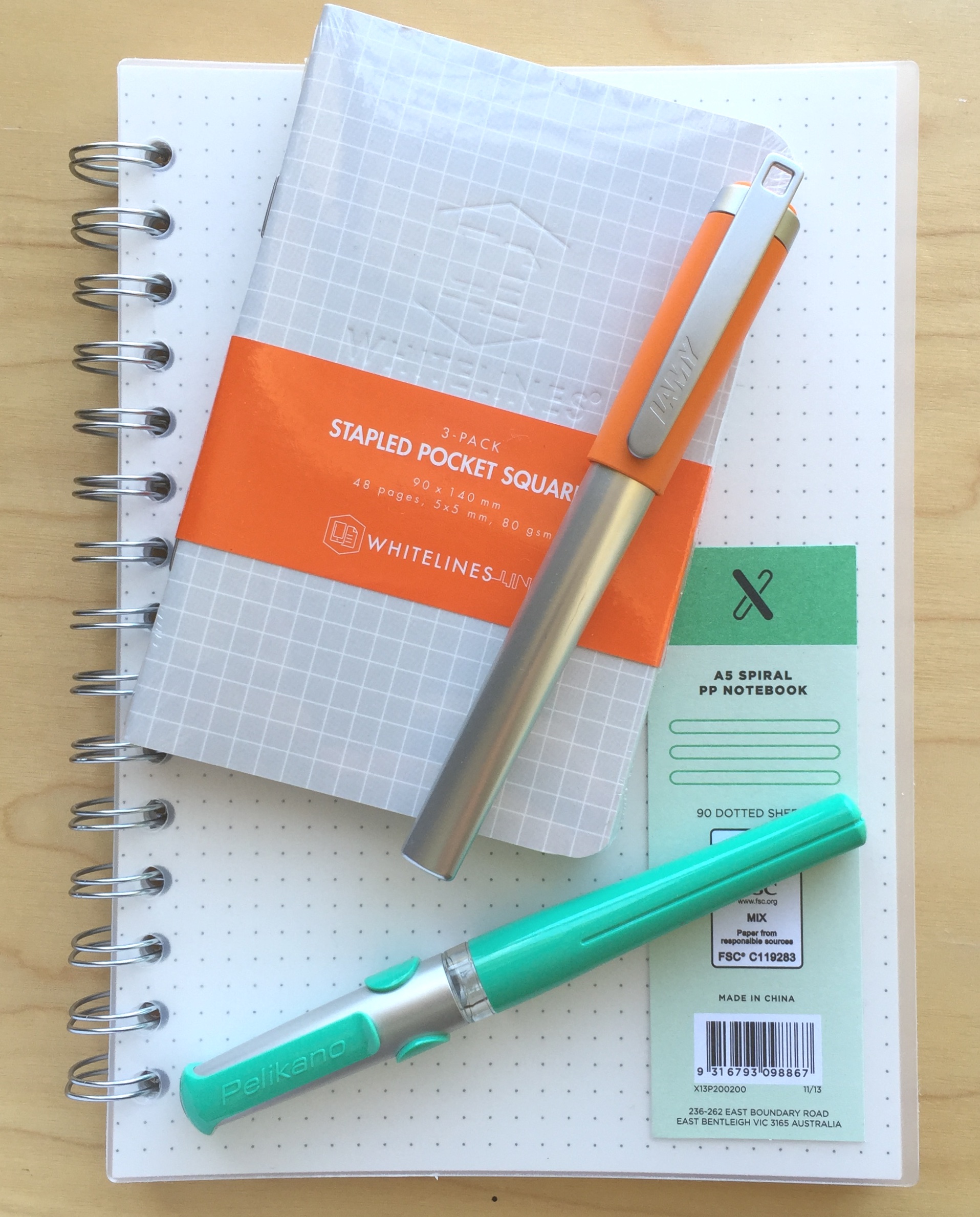
Possible Starters: Lamy Nexx and Pelikan Pelikano Fountain Pens

2016-04-09 pelikano_v_nexx_2

Call them what you will: low-end; entry-level; beginner; learners. Perhaps all true, however these two fountain pens are both pretty solid performers in their own right — for any purpose. They may look a little cheap and cheerful, and although not being for every collection certainly have their place, regardless of your level of fountain pen experience.

The Lamy Nexx and Pelikan Pelikano fountain pens can be found in the “Young Writer” and “Kids/World of School” sections on their respective manufacturer’s websites. Although you won’t see any in schools in this country (I am not sure of the current status regarding other schools around the world), the pens are clearly designed for an early or younger generation entry into the world of writing with fountain pens. That said, I’m certainly no whipper snapper, and I’ve enjoyed using these pens increasingly in recent times when gathering my thoughts for this post.

Those of us who use fountain pens on a regular basis are often the ones who introduce another generation into the habit. Would I use either of these pens with that aim? I’m not sure, and there are perhaps other options I may recommend for that purpose, however I can see these two being great options to offer as possibilities — particularly if a few different options were being considered based on the tastes of the prospective user.

Forced to choose either the Pelikano or the Nexx? A somewhat challenging question, and the answer surprised me a little, though as you’d expect, the ideal pen when comparing two or more generally produces a Frankenstein result — that is, a combination of the best aspects of each. Of course in the absence of that being possible, read on and my final choice will become clear, but really — either of these pens wouldn’t disappoint in their target market.

Look and feel

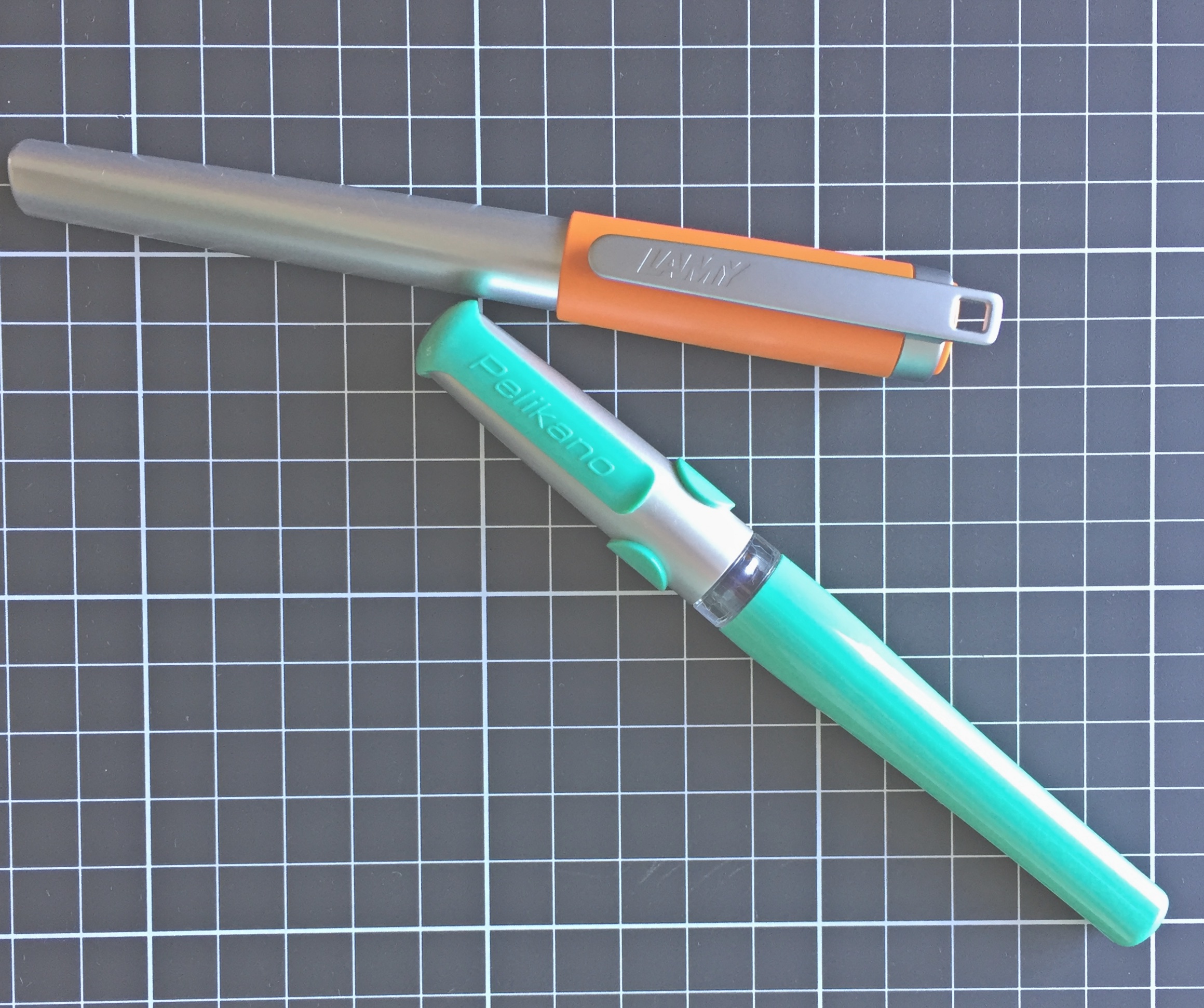
A point to note here: the current models of both pens have undergone a cosmetic makeover compared with what you see in the photos, which are the pens from my own collection. As far as I can tell, all other aspects of the specifications are essentially the same.

It’s probably in the “feel” more than the “look” that I was most surprised as I used both pens on a more regular basis. I have mentioned in the past I am not a huge fan of the traditional Lamy triangular grip section found on the Safari and AL-Star ranges.
2016-04-09 pelikano_v_nexx_7

Upon uncapping the Lamy Nexx, the first thing I see is another triangular section, this time covered in a rubberised, cushioned coating — somewhat reminiscent of the grip guides of similar material often slipped onto to pens and pencils for younger users. Despite this, I found the section on the Nexx to be far more comfortable to write with than the Safari in my collection. I don’t really have a valid reason for this given the sections are both quite similar in size and shape — the only difference being the rubber coating on the Nexx.

According to Lamy:

The LAMY nexx fountain pen has a soft non-slip grip which makes for extended fatigue-free writing. Its polished stainless steel nib makes writing super easy

All I can really put it down to is the fact that the rubberised overlay softens the edges a little, creating a slightly “rounder” and well… softer feel than the plastic of the Safari.

I would say however the junction of the section and nib looks a little untidy, with the increased diameter of the “stops” on the grip meeting the black plastic collar around the nib and feed. It is the same plastic collar which you also see on the Safari and AL-Star ranges, however on the former it is matched to the barrel colour, and the on the latter matches the darker section a little better. Certainly not a big issue here, and only noticeable as I sit here and review the overall look and form of the pen.

2016-04-09 pelikano_v_nexx_1

The top end of the Nexx barrel begins in a distinctly triangular form factor, rounding out as the barrel increases in diameter and moves towards the section, before returning to the triangular form and tapering slightly at the grip. Uncapped, it carries nice clean lines and I quite like the overall look and shape, however as I mentioned, it is perhaps spoiled a little where it meets the feed.

Capped, the Nexx demonstrates a smooth but steady increase in diameter from end to cap, reaching a maximum at the clip ring. This probably fits the overall funky aesthetic of the colourful cap which also contrasts nicely with the silver aluminium finish of the body. The top of the springy clip sits proud of the actual cap, and while it suits the overall form of the pen, the cap and clip “live a little large” for my taste.

The Nexx appears to be going for a fun, funky and cool aesthetic, rather than portraying itself as the “beginner’s” pen. To that end, I’d say Lamy have probably achieved their goal.

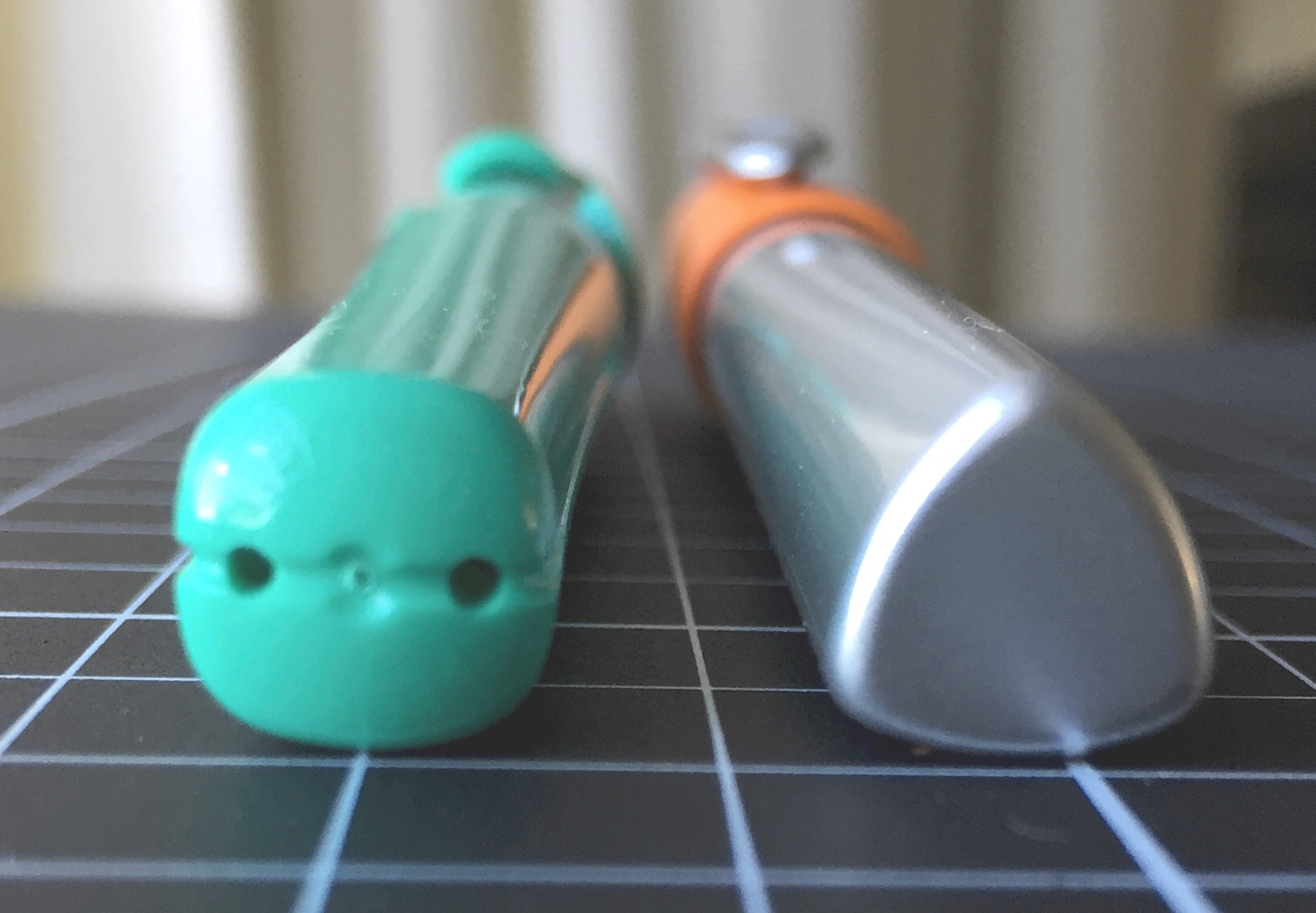
The virtually clipless Pelikano, aside from the cap, carries a certain similarity in shape to the Nexx, and again avoids too much of the “beginner” aesthetic, however I believe it does carry just a little more of that style. This time, the end of the barrel begins in square form, before a similar increase in diameter as it rounds out, before tapering into… wwhaaaaat?? A triangular grip section! I must admit it is more trianguar-ish, than triangular, though the similarity to the Nexx is not lost on me.
2016-04-09 pelikano_v_nexx_3

Again the section has a rubberised coating, however in this instance adds little thickness to the grip. Of the three flattened sides to the grip, the index finger third also has rubberised ridges which run perpendicular to the barrel, I assume to assist with grip and guidance of the nib when writing. A couple of things on this: firstly, they are probably not necessary, as the rubberised coating on the section is more than enough for gripping, and though I didn’t find it noticeable — it may annoy some. Secondly, this could also be used as a baseline grip point of reference in someone learning to write (“index finger here”).

This rubberised overlay sits on a clear section, and therefore prevents any decent view of ink colour or level inside the pen. In contrast to the Nexx, with the Pelikano the nib is held by black plastic “shoulders” at each of its sides. In pointing out above the look of the Nexx at the junction of the nib and section, I’m not really sure this one is an improvement. Personal taste plays a factor with any of the pen designs we prefer, and perhaps I’ve made a bigger deal out of it than it really is. I cannot say when I’ve picked up either pen I have even given it a second thought.

Overall, I marginally prefer the Pelikano’s grip section, though it is the centre of the barrel which raises a few questions for me. Both pens increase in diameter through the middle of the barrel, with the Pelikano doing so just a little more in comparison (1.4 mm more at its maximum, as you can see from the specifications below). This throws the comfort of my grip ever so slightly off, and I’ve found I cannot write for extended periods quite as comfortably as I can with the Nexx.

Aesthetically, the styling of the Pelikano is quite different to that of the Nexx, and to be honest I really have no preference here. The cap of the Pelikano reminds me of a helmet on the Lego Knights I used to have as a child — if you had them you know what I mean. While I enjoyed playing with those knights, I prefer the design as a helmet rather than a pen cap.

I’ve described it as “virtually clipless” above as the moulded plastic forms part of an exoskeleton or … yes, there it is: “helmet” over the cap. This forms a sort of pseudo-clip, however the functional section is very short, and I’d hesitate to use it regularly, being reasonably fearful it might snap as the plastic fatigues through repeated bending.

Although both pens are not what you’d call expensive — both feel sturdy enough to stand up to the usual level of wear and tear. The aluminium barrel of the Nexx may provide a little extra reassurance in this area, however with even a little care in the daily use and carry of, I doubt you’d have trouble with either.

As I’ve mentioned, the clip extending past the end of the cap on the Nexx may provide a snag point, however again I would not anticipate any major problems.

Specifications

Notwithstanding the cosmetic changes I mentioned earlier, following are the specifications in the current available line up from both manufacturers.

Manufacturer Pelikan Lamy
Model Pelikano Nexx
Body Plastic Aluminium
Cap Plastic Snap On Plastic Snap On
Clip Plastic Metal
Fill Cartridge/Converter Cartridge/Converter
Weight 23 g 31 g
Diameter max 14.5 mm 13.1 mm
Diameter grip 12.5 mm 12.2 mm
Length capped 13.6 cm 13.4 cm
Length uncapped 12.5 cm 12.7 cm
Nib type Steel Steel
Price A$ $26-$30 + int postage $54.95

Check the manufacturer’s websites for colours available.

As far as the price is concerned, Australian supplier LarryPost stocks the Lamy Nexx, at the price quoted above. I have not been able to find a local supplier online for the Pelikano, however this of course does not rule out any local brick and mortar stores perhaps stocking them. Fishpond lists the Pelikan at AUD $39.97, however it does state the pen ships from a UK supplier. The price I have quoted above is a conversion from both Jet Pens in the US and Cult Pens in the UK, however you would need to add international postage costs to these of course.

Also worth mentioning is the option of a left-handed nib on the Pelikano, as well as the slightly cheaper Pelikano Junior model.

As far as filling is concerned, I have been using the Nexx with a Lamy Z24 converter (with no issues), and the Pelikan with standard international cartridges, noting the recommended converter here is the C499 from Pelikan.

Writing Performance

I’ve had these pens for about 6 months or so now, intermittently using them in my rotation of pens, and have written more extensively with each over the past few weeks taking notes for this post.

As far as the nibs are concerned, I’ve been happy with both. The stainless steel medium nibs are smooth writers, with the Pelikano having a slightly softer feel in terms of a little give, however there also appears to be a marginally smaller sweet spot than what exists on the Nexx — at least with this particular pen anyway. Overall, both nibs have that firm, steel nib feel — one that I quite like and is not meant as a criticism in any way.

2016-04-09 pelikano_v_nexx_5

The Nexx comes as expected out of the box — the same Lamy nib you’d find in a Safari: firm, reliable and consistent. I say consistent because in mentioning the Pelican’s sweet-spot, the Lamy nib performs well at all points of minor grip and alignment adjustment — however when compared line for line, doesn’t quite match the smoothness and comfort of the Pelikano.

Both lay down a consistent, wet line, and with a little pressure applied, (despite the softer overall feel of the Pelikan) the Lamy nib will give a slightly broader one, though neither of these pens are what you’d be using for any sort of line variation lettering.

2016-04-09 pelikano_v_nexx_6

Overall, as far as the nibs go, points to the Pelikano, as it is a much smoother and more comfortable nib to be using for writing, and the sweet-spot is really not hard to find and then sit comfortably in like your favourite lounge chair.

Both pens I have used without posting the cap, however if you were to do so, the Pelikano retains its overall balance more so than the Nexx, which becomes very top-heavy and cumbersome.

Both pens handle a variety of paper types equally well, which is probably important given what they might be used for, and I’ve not found either wanting on the first stroke when uncapped, nor with extended periods uncapped, for example in writing intermittent notes while researching online and the like.

Only young writer?

Indeed, the young writer aspect of these pens is not to be dismissed, however I don’t believe either necessarily perform this role any better than the Pilot Kakuno, which is far cheaper to buy. The Kakuno also sports the triangular grip section, however the overall balance and feel make it — in my opinion at least — a better buy for this segment of the market.

2016-04-09 pelikano_v_nexx_4

Do either of these pens appeal to the non-young or non-early writers? That of course is a matter of personal opinion. As I’ve hinted at above, I think the Nexx is more likely to fulfil a more universal role across beginner and more experienced users alike, whereas the Pelikano based on looks alone I feel is perhaps relegated to the beginners end of the market.

Given its bright and funky sort of look, the Nexx to me is a pen you might use with a clipboard or reporter style notebook: marking off attendees at a summer camp, scoring a tennis match or perhaps even recording your backyard coffee roasting data — assuming suitable paper was in use of course. At then end of the day, if a pen (which both are), are solid performers, it really is down to personal taste, and that is really where we end up here.

Conclusion

In summing up, both of these pens are pleasant to use and perform as intended. If I had to choose one? Probably the Nexx, simply because I find the overall shape of the body a little more comfortable to use than the Pelikano, which becomes a little too broad in the middle for my grip.

The Frankenstein result if I could? The Pelikano nib in the Nexx body with a smaller version of the Nexx cap and clip. Because that isn’t going to happen any time soon, I’d go with the Nexx simply because of the Lamy nib options you have at your disposal, though with a pen like this, I’d assume you’d have be looking for something specific, otherwise a Safari might be a better choice — particularly at a slightly lower price point.

In any event, either the Lamy Nexx or Pelikan Pelikano won’t fail you as a notetaker, however for the “young writer” I am most likely sticking with the Pilot Kakuno as my go to recommendation.


Wiser Web Wednesday

Wiser Web Wednesday – a semi-regular link to posts of interest from around the web, by those far wiser than myself:


Daily Coffee News
As suggested in this post, coffee batch brewing has evolved in many areas with the possible exception of reinventing the actual brewing process itself. Whether or not it needs reinventing is perhaps another matter, however the Ground Control brewer by Voga Coffee is aiming to do precisely that.

Every time you eliminate all the water from the grounds, you establish a new solid-liquid phase partition equilibrium. In advanced chemistry labs, this technique is used to enhance extraction efficiency. This addition of new, fresh solvent to dried grounds essentially ‘re-starts’ the extraction, putting you at the beginning of the extraction curve. You can get at all the flavor you left behind in the prior brew cycles, but also remove all the brewed coffee from the grounds before it ever gets to the point of the extraction curve where bitter tannins are significantly pulled out.

An interesting approach, and as always, the proof will in the cup:
Voga Coffee Readies Ground Control, a Reinvention of Commercial Batch Brewing

Also from Daily Coffee News

This new release grinder from Baratza only needs to work as well as their reputation and grinders which precede it to be a hit.

To this point, conical burr grinders have always functioned with a stationary outer ring burr and a rotating conical inner burr. The Etzinger Mechanism works oppositely. The inner burr is stationary, and the ring burr spins around it, driven by a proprietary direct gear-drive system Baratza has licensed from another Swiss company and tested for strength and durability

A beautiful looking machine indeed:
Baratza Reveals the Sette: One Rotating Ring to Rule Them All


Nick Cho on Medium
There are certainly more and more coffee brewers around these days, with another version appearing (it seems) every other day, be it on Kickstarter or by direct production.

Problem is, when the next new machine comes out, your machine has now been made obsolete because your new machine was good at being new, not good at making coffee.

A sobering thought for the new next big thing:
On designing new coffee equipment


Jim Seven
James Hoffmann with some high level analysis and comment on dark versus light roasting, and the overall philosophies that have developed relating to same in this current “wave”.

My point is that we are scathing to anyone who lets a roast run a little too deep, while utterly forgiving of those who make the opposite mistake. I would like that to change. I believe they are both equal mistakes, both impact the enjoyment of the end cup (though I would argue light roasting is perhaps worse as it seems to discourage consumption more. Also a painful truth: dairy and sugar do little to make a grassy, sour cup of coffee palatable…)

True enough. Even if you enjoy variety and consider all roasts are equal, there are many who consider some are more “equal” than others — a fact likely to be explained for the most part by footnote two in the post:
Lightness and Darkness in Roasting


The Gentleman Stationer
I’d say the following is pretty accurate in the eyes of many who are familiar with both brands of notebooks:

I always think of the Leuchtturm 1917 notebook as the fountain-pen friendly option for those who like the Moleskine aesthetic but hate Moleskine paper.

Leuchtturm is certainly a good place to start when looking for a notebook to handle a far greater variety of inks if you are currently a Moleskine user — assuming you need it to of course. Its only when the search continues you find even more options out there, such as Rhodia and Quo Vadis which Joe mentions in the post — or even this Monokaki Notebook for example.

Wherever you end up, and with so many great colours available, the Leuchtturm 1917 is well worth a run if you haven’t tried one already. A reliable source (me — in store on Monday) tells me you can pick one up for AU$31.99 from your local Dymocks, or the slim version for AU$24.99:
Leuchtturm 1917 A5 Notebook: The Fountain-Pen Friendly Basic Black Notebook

Now is also a good time to remind you Joe’s Newsletter, the Digital Divide is going from strength to strength. The current edition discusses that age-old conundrum of multitasking, in the context of Cal Newport’s theories on “deep work”. Or as I like to call it: focus.

Joe also shares his thoughts on how his analogue tools fit into the mix.


The Fountain Pen Quest
A pen I am certainly unlikely to ever be pulling out and using, though I agree with Ray: what a beauty.

Look at it! It’s said that beauty is in the eyes of the beholder. Well, the Regency Stripe is beautiful in my eyes. While I wouldn’t normally go for something so shiny, this was conservative bling.

Just enough of the shiny, which is held in check by the contrasting black. Perfectly balanced. Love it! A fantastic review by Ray as always:
Review: Sailor Pro Gear Regency Stripe


The Well Appointed Desk
I’m always interested in “sketchbooks” from the perspective of trying them as notebooks, given I’m certainly no “sketcher”. In this post Ana also explains the origins of the 140 gsm “cartridge paper” which I was unaware of before now.

Viewed from the reverse of the writing sample, the only show through was the Pilot Envelope pen and a bit of the panda drawing…

Sounds like an extensive and varied testing process to me:
Review: Seawhite of Brighton A5 Starter Sketchbook


Matt Gemmell
As I’d expect, there are more eloquent turns of phrase here than pretty much anything else you’ll read on productivity and in particular — task management systems.

And I most definitely think that if you’re using something with a load of bells and whistles that you never touch, it’s a red flag. There’s a cognitive load there, and I bet it’s a bit ego-depleting too. Like you’re playing at being an adult, and hoping no-one notices. I like simple things that I can use elementally and idiosyncratically.

Although I’ve switched over from OmniFocus to 2Do fairly recently, part of that process also involved asking myself whether or not I just needed a list rather than a task management system. I went with 2Do and it’s working well for me.

A compelling argument here though for changing your philosophy and approach — if this resonates with your thinking:
Power Unused

In addition, Matt has just re-released his 5000 word e-book: Writing in Markdown, which is well worth checking out if you already do, or are perhaps considering that format for your writing.


Lauren Gemmell
For peak technology awareness and analysis, you needn’t go past the Gemmell household. Here Lauren Gemmell comments on a recent episode of television’s The Good Wife, shown here in Australia on Channel 10.

We all like to think of technology being clean and separate from these human concerns, however the problem with technology is humans.

The piece also mentions diversity in technology, something very relevant to us all.

The episode makes a very clear dig at the lack of diversity in technology and how it influences the products that are built and the knock-on consequences in the real world. It is easy to forget but so important for everyone in technology to keep in mind.

The topic of diversity is also making a frequent appearance in my listening and readings around the coffee industry. That’s two out of the three broad topics I generally link to each week, and is no less important in the third.

This point is also not lost on me in looking through the origins and authors of many of today’s — and previous Wiser Web Wednesday posts:
Data Scientists: if you watch one thing this week make it this


Reckoner
If you have a spare $1000 to put down on a Tesla Model 3 electric car, before you do, perhaps check out this comparison by Anthony Agius with the good old Toyota Corolla.

For $60,000 that’s really the domain of a Mercedes A250, BMW 318i, Lexus IS200 or countless other entry level prestige cars I’d normally not give a rats arse about because I can’t justify the extra cost over a more conventional Toyota, Mazda, Kia or Hyundai. But a Tesla, man, I could treat myself and go against every cheapskate bone in my body.

Always an entertaining read, however also a pretty definitive and in-depth look at the potential running costs and possible savings made by owning one of these (eventually) — also, it might run longer between charges than your iPhone:
A Close Look at Tesla’s Model 3 Potential Cost in Australia


Macworld
Jason Snell writing for Macworld, in the context of Apple’s recent 40th birthday. Count me in as one of the late adopters, entering the ecosystem through an iPod and soon after, an iPhone 3Gs.

The Mac was so groundbreaking that it deserves a lot of credit, but the iPhone is a product that has transformed Apple. There are many, many people who never used an Apple product before they bought an iPhone

The above quote carries similar sentiment about the Mac to many who have been Apple users far longer than that:
My life as an Apple guy


Analog Senses
In contrast to the above, comments were made by Apple at the recent product event last month, stating the 600 million PC’s over 5 years old currently still in use was “sad”.

Writing on his blog at Analog Senses, Álvaro Serrano takes that sentiment to task, mostly likely using either his 2008 or 2010 Mac — as mentioned in the post.

Yes we all like new and shiny stuff, but replacing a perfectly working computer just for the sake of owning the latest is a luxury at best, and irresponsible at worst. In any case, there’s absolutely nothing sad about owning your machines long-term, until they reach the end of their useful life.

Certainly food for thought:
Morning Coffee


Fraser Speirs
In putting down my thoughts on making the decision to go with an iPad Air 2 recently, I made a point about the relative merits of the “Pro” accessories, and how they fit (or not) into the overall purchasing decision.

Teaching with, and responsible for the deployment of iPads on a 1:1 basis for a school in Scotland, Fraser Speirs makes a great point about such a decision at scale:

My problem is that, processor performance aside, many of the Pro features just aren’t that important to us. The Pencil support is the biggest one but, if that’s all that really leads us to the Pro, the effective price of getting access to, say 20 Pencils is 20x£79 for the Pencils themselves plus 120x£70 to buy into owning the iPad Pro that supports them. Is access to 20 Apple Pencils in the school really worth nearly £10,000?

Whether its 120 or one — it depends on that all important budget:
Deployment Diary: iPad Pro or iPad Air 2?


In Praise of the iPad Air 2

IMG_1136

Image courtesy Apple

With the release of the 12.9 inch iPad Pro late last year, and more recently the 9.7 inch version, much of what I’ve been reading recently has centred around the virtues of that larger 12.9 inch screen, or equally since earlier his month, the benefit of the “pro features” — namely the Smart Keyboard and Apple Pencil support for both sizes of the device.

I’m happy to admit in my links post two weeks ago, I myself extolled the virtues of “newest and shiniest”, however when it came to an actual purchase, common sense and a little objectivity thankfully ruled the day.

My previous iPad? A mini 2 – or as it was known at the time I bought it in November 2013, the iPad mini with Retina display (a 32 GB WiFi model). The mini served me well for over two years, until I made the decision late last year a little extra screen real estate and additional features of iOS 9 (read Split View) were probably something I could utilise quite well on my iPad. Having made the decision to upgrade, I was very tempted to immediately pick up an iPad Air 2 (64 GB) from the Apple Refurbished stock at a pretty decent AU$619, however given the timing, decided to wait until March this year to see what a new release might bring in the way of features and processing.

With that decision made, I had a few months to think about what I really needed in a mobile device, and with a pretty firm commitment to the Apple ecosystem these days, it was always going to be a 9.7 inch iPad. The only question being whether that would be a newly released version, or a pretty compelling iPad Air 2 on a reduced price tier. I was, of course, excited in anticipation of the “new”.

Exactly how do I use my iPad? In summary, I’d say I am a moderately frequent, yet low demand user. By that I mean it certainly gets a good deal of use, however most of that use relates to reading, writing and research; followed by email & social media; with some video content consumed on the way home during my afternoon commute (there’s no better way to wind down after work than with an episode of House of Cards or Vikings). Most of this use typically occurs on the couch at home, at my favourite cafe, or on a bus. By low demand, I simply mean I do no video recording or editing, gaming and only perform infrequent photo editing, with no actual photography. All activities which might be a little more demanding on the processing capacity.

Perhaps I’m mistaken, however I’d like to think this pattern of usage is not unique to me, and I think you can probably see where I am heading with this post.

What they’re saying

The larger model: iPad Pro 12.9 inch

Firstly, a comment on why I so easily ruled out the larger 12.9 inch iPad Pro. For what I use this thing for, it’s simply too big. A tonne of added features mean nothing if it won’t fit where you want to use it. I’m almost at the point where I laugh upon repeatedly hearing “I could never go back to the smaller size after using this 12.9 inch screen”. Well, if it fits where and how you use it — why would you? When was the last time anyone chose to buy a smaller TV unless they absolutely had to?

Believe me, I get it that Split View gives you two “full size” apps side by side; the 4 GB of RAM and A9X chip are fantastic; the Apple Pencil is great; and that keyboard — once “I got used to it”, works really well.

For me however, ruling the 12.9 inch size out was pretty simple, and in fact, it was never really in the hunt in the first place. Great device yes — just too big for how I want to use it, and at a base price of AU$1249.00, never really a consideration.

The smaller two: 9.7 inch Pro and Air 2

The recent release of the 9.7 inch iPad Pro, has brought even more comparisons between screen sizes on the Pro line, and to a lesser extent, between the iPad Air 2 and the corresponding Pro version. A quick scroll down the iPad comparison table on the Apple website will highlight the main differences between the two 9.7 inch iPad models, and my aim is not to provide an exhaustive listing here.

What I would recommend however, is when scrolling down said list, for every difference in specs or dashed line in the Air 2 column, ask yourself whether that will really make a difference to how you use the iPad. And I mean real differences — not just nice-to-haves.

A case in point for example is this, from CNET, admittedly not my usual tech reading source, though many have expressed similar thoughts. Here we have five reasons to pick the iPad Pro over the Air 2, stating “it’s what’s under the hood”. The article then cites:

  • More storage (32, 64 and 128 GB vs 16 and 64 GB for the Air 2)
  • Apple pencil support
  • That “Smart Connector” (with the Smart Keyboard it “means no more bulky batteries in keyboards”)
  • 4K video shooting, better selfies
  • Better audio

We then read, almost as an afterthought, about the A9X chip and M9 coprocessor with Hey Siri capability, and the True Tone display.

Writing on Macsparky (more like my usual tech reading), David Sparks, in a comparison with the Air 2, cites the better processor; the “pro features” (Pencil and Smart Connector); the camera; and better colour and sound. Also acknowledged here are the levellers — being the 64GB Air 2 storage and 2 GB RAM on both models, and introducing the article with the comment that neither is a bad choice.

Looking at the bigger picture, I don’t necessarily disagree with any of the above. Any review of a new device or model will always highlight those new features — otherwise what is the point of it at all. Again, objectively consider what sits before you, how you will use it, and the value proposition it presents.

Which is exactly what I did — before picking up a pretty good deal on a 64GB iPad Air 2 at AU$687.00 last weekend.

Ending up with the Air 2

With reference back to my use case above, let me outline a little further on how I ended up with the Air 2.

Firstly, the Pro model’s A9X/M9 chip/coprocessor. For me, this could have gone either way. Of course, for longevity of performance in future years, faster equals better. The 2GB of RAM (the same as the Air 2) probably swayed me towards the Air 2 a little here. I’d also note, for the way I use the device – I’ve never had any performance issues with the A7 chip on my iPad mini 2. Yes, the Air 2 is significantly snappier across all aspects of usage by comparison, however somehow I don’t think I’ll be hardly done by in choosing the A8X of the Air 2 over the newer A9X.

IMG_1137

Ulysses and MindNode in Split View

Next: go and draw a line through everything which is identical between the two devices on that iPad comparison page — it’s an awful lot of lines. Only a few things remain, essentially those listed by CNET above. It is for you to decide whether they are worth it. I’m simply here outlining how for me, they are not.

I am certainly no tech writer (pretty clear), however what I am is a consumer with a budget, who carefully considered the options and ultimately purchased the best device for my needs at the best available price — I’d imagine the same as anyone. Given these considerations, what follows is simply my thought process before I ultimately made the purchase. Whether or not they able in your case is another matter of course, however I could not be happier after using the Air 2 over the past week.

The Numbers

Any real comparison surely must look at the numbers (read price) to some extent, and if the difference we’re talking was $50 or $60, or even say $100 then I wouldn’t be suggesting there is much of a decision to be made. That said, I also understand new technology comes at a cost. For reference, in Australian dollars, we have:

Model iPad Pro 9.7 (WiFi) iPad Air 2 (WiFi)
Storage 32 GB 64 GB
List Price $899.00 $729.00
Apple Pencil $165.00 N/A
Smart Keyboard $229.00 N/A
Total cost $1293.00 $729.00

Consider that final figure for the iPad Pro for just a second — particularly in the context of many reviews holding up the Smart Keyboard and Apple Pencil as some of the main reasons you should invest in the Pro model. It then isn’t “just a couple of hundred bucks” more is it? I say go for it if those are two accessories you could really get a lot out of, though to suggest the price is not much more, and have those as some of the main arguments for the Pro model I find a little misleading, and in many ways a little disrespectful — particularly to consumers prepared to spend the money if required, yet for which it would be a considerable stretch to do so.

I hear what you are saying — no one is forcing anyone to buy anything, and the cost of these accessories can be spread out, yet the tone is often one of you should, or in many ways it would be a mistake not to buy them. In this case, I simply don’t agree.

Of course I have not included the 16 GB Air 2 as the comparison above, which can be picked up even more cheaply, and there are a few very good discounted deals on the 64 GB model available at the moment.

Those points

So in looking at the points made by CNET above, were there compelling reasons for me to go with the Pro rather than the Air 2? Perhaps I have erred after all?

Remember – my thoughts based on my use case.

As far as storage is concerned, the Pro has more storage, yet at the same time less. I have never needed more than 32GB on my iPad mini 2, having never come close to the limits. If anything, it would have been the 32 GB model for the Pro, yet all of a sudden, I now end up with 64 GB and refer you back to the price comparison above. Not a bad deal, of course I could argue just as easily there will be quite a few GB wasted on me, though for the price, I’ll take it.

Regular readers of this site will of course realise, I love my pens and notebooks. For my handwriting, I am firmly embedded in the analogue world, however when it comes to drawing, I am utterly hopeless. My point? Apple Pencil support brings nothing to the table for me as far as features go. Given my fairly jarring lack of creativity with a standard pencil, the only possibility was taking digital handwritten notes with the Apple Pencil. Set aside my pens for that? Not for me.

On to the Smart Keyboard, which I admit to looking a little longingly in the direction of, though again, at the end of the day I cannot justify a purchase here given the price (remember we are talking the combined price of the Pro itself and the Smart Keyboard just for the benefit of this specific keyboard). I do use an external Bluetooth keyboard with my current iPad mini (laughable to some I know), essentially for the extra screen real estate it gives me when writing, however also find it more comfortable to so.

As far as my pattern of use is concerned, when out and about in my lunch break, if I know I’ll be sitting to write, the keyboard is attached just before I leave the office. If I’m not, or prefer to write by pen and notebook that day — it won’t. All other times it is Smart Cover only, as I prefer the iPad as thin as it comes. Although it is minimal, the added thickness of the Smart Keyboard doesn’t appeal to me as an “always on” cover, and I suspect I would find myself swapping it on only when I planned to sit and type as I’ve outlined above. A pretty expensive proposition for a three or four times per week occurrence.

The most likely scenario? Were I to indeed buy the iPad Pro I would most likely have purchased the Bluetooth keyboard I am planning to buy for the Air 2 anyway (at a third of the price), with the Smart Connector left out in the cold. True, there may be additional accessories which will utilise this capability, yet I cannot imagine any over the next few years that I’ll be kicking myself for missing out on.

As for the 4K video and better selfies? I’ve not too much to say here, having never taken a photo on my iPad mini let alone a video. I have nothing against those who do, and a better camera would no doubt be a boon for said people, however I am just someone who has always used my phone. Further I cannot remember the last selfie I took on either device, which is probably a similar boon for any of my followers on social media.

I also mentioned in my Wednesday links post a couple of weeks ago that if the Pro was my preferred purchase, the camera bump would be a non-issue, and after further consideration in writing this post, I’m even more certain on that point. If my iPad lays completely flat when not in use, it is face down on the Smart Cover, and when used, the flattest it will ever get is at the lowest Smart Cover elevation. I cannot come up with a scenario in my daily use where I’d notice it.

I have no doubt the four-speaker audio is a significant improvement on the Air’s two, however in the last 6 months I’ve listened to the audio on my iPad without headphones probably once or twice, and that’s because I was too lazy to get of the couch and go and get them. Again, just not something I’d use.

Finally, I don’t use Siri on my iPad, so the “Hey Siri” option doesn’t afford much benefit, and although I absolutely love the Night Shift feature in iOS 9.3, the True Tone display (while a nice touch), also isn’t a big drawcard.

In conclusion

I seem to have rambled along quite a bit here, however my intention was simply to say: if you are anything like me in how you use an iPad and are considering an upgrade, there is an awful lot to like about the iPad Air 2 in the context of the current iPad line up — particularly given the price. With my main criteria being able to access Split View, at a minimum the Air 2 was needed, however now two options (at the 9.7 inch size at least) are available if you are considering something similar.

For me, the iPad Air 2 is the perfect mobile device to get a few things done, as well as serving up everything else I consume online. The iPad Pro 9.7 inch? It would of course be the perfect device for the exact same thing — it’s just that some things are a little more perfect than others, and at $729.00 (or less with a good deal) for the Air 2, there’s never been a better time to pay a little bit less for that.