The in-between

IMG_0614

Referring to exactly what you may ask?

Well, Christmas Day has come and gone, now onto the New Year in all it’s celebratory joy – or excess, depending on your particular view. I typically think of this week as the “in-between”.

Should our thoughts drift towards what was accomplished in the year almost complete, what is to come in the year ahead – or neither? I don’t know about you, though for myself the answer is probably a little of all three.

Personally, I am often thinking of what I could, might, or should have done. How I may have done better the things I actually did. In view of this, I don’t feel it is necessarily a bad thing to remind ourselves of what went well, what we accomplished, or those things crossed off the list we never thought we could do.

The year almost complete?

For myself, achievements both big and small, some that stretched me and others that didn’t. Many which could have been done far better though were completed nonetheless, and lastly, some things left undone.

Overall I would say I am happy with 2013, as amongst other things I managed to start this blog in May and have now published 70+ posts. Along with continuing to develop and refine my coffee roasting skills, this is probably what I am most satisfied with.

Professionally? Much the same, however the focus of this blog has never been, nor will it be (save for a passing reference here and there), about my professional life. One aspect from the past year that particularly resonated was a comment made by Tim Ferriss in a breakfast seminar here in Brisbane in the latter half of the year. Tim stated he did not believe in work-life balance, but work-life separation. I certainly second that thought.

I have never been more relaxed than when my head is buried in my iPad (what am I a teenager?) or a bag of green coffee beans I am about to roast.

For the year ahead?

Probably more of the same – just better!

All jokes aside, gaining more knowledge and ability in everything from blogging to coffee roasting and brewing are in my (albeit unwritten) plans. I expect I will also be searching for great pens, paper, apps and other tech goodness . Some or all of which I will continue to share on these pages – those within my ability and comprehension anyway.

Professionally, I will continue to work hard and to the best of my ability, ensuring I grow in this sphere of my life as well. Plain and simple.

For You?

I would like to take this “in-between” time to congratulate you on your achievements for 2013, and wish you all the best for the coming year. Whether your intentions are concrete, well planned and written down to every minute detail, or swimming around in your head, I am sure you will finish 2014 a step or two ahead of where you are now.

Best wishes and good luck!

Dreaming of a Light Christmas…Roast

photo (1)

Here we are at “that” time of the year again. Where we all can’t believe how busy we are, yet spend a good portion of our time telling others precisely that, rather than actually working on what we need to do. Nor can we believe how quickly the year has gone, and also need to remember of course it will be a long hot summer this year…

I think you get the idea. Trust me, we’ll all get through it people – and we’ll all be OK. Enjoy yourselves, being with family, and remember the “reason for the season”.

With the ham and prawns safely ordered, here at dept4 it is time to put together our Christmas coffee blend for another year. Family members who sampled the limited run last year enjoyed the blend, so this Christmas the distribution will be cast a little wider to include extended family and some work colleagues as well.

Another year means a new blend, and this year we are aiming to combine two flavour profiles that embody those of Christmas. The rich candied fruit and currant flavours of fruit cake, along with the summer flavours of berry and citrus. Often the case when searching for some fruitiness in a blend, we look to Africa for our origin beans. After a scan through the green beans on offer from our ever reliable supplier Ministry Grounds, here is what you can expect (tasting notes and background courtesy Ministry Grounds):

Kenya Karamikui

The taste:

Citrus, berries and currants in aroma, hazelnuts, guava, plum, vibrant grapefruit acidity, full body with rounded honey sweetness, long intense finish

Background:

This coffee comes from the Kirinyaga district. Kirinyaga is located within Kenya’s Central Province, a key area for Kenya’s large coffee industry. The district lies close to Mt. Kenya, and encompasses high elevations of between around 1600–1800 meters above sea level, ideal conditions for growing high quality coffee.
Small-scale farmers are organized into well-managed central pulperies, also called Coffee Factories. Karimikui Coffee Factory is the name of the washing station where this particular lot comes from.

Rwanda Nyarusiza (Buf)

The taste:

Maple syrup sweetness with candied orange, mandarin, stone fruit dark chocolate and elderflower. Medium body.

Background:

Buf Café was founded in 2003 by Epiphanie Mukashyaka, a dynamic businesswoman and a source of inspiration to countless other female entrepreneurs in Rwanda’s coffee sector and beyond. Buf is now managed by Epiphanie and her son, Samuel Muhirwa, who is taking an increasingly active role in running and expanding the business. The title ‘Buf’ derives from ‘Bufundu’, the former name of the region in which its washing stations are located.

Epiphanie, who was born in 1959, was widowed during the 1994 genocide – which claimed over 800,000 lives in just 3 months – but chose not to leave her family’s small coffee farm. Instead she set about rebuilding and developing her business, and with it the local community. She started Buf Café in 2003, when she established Remera washing station with a loan from the Rwandan Development Bank and the assistance of the USAID-financed PEARL project.

The initial roast batches are now complete, and as the title of this post suggests, the roast was on the lighter side to align with the majority of brewing methods used by those who will receive the blend (Aeropress, French Press, Pourover).

After sampling the results, the exact ratios of the blend will be determined and we will then ship the finished product immediately to ensure maximum freshness and pre-Christmas delivery.

We hope you enjoy!

2013 Gift Guide and Wishlist

Everywhere you look at the moment there are numerous Christmas gift guides, from software to hardware, tools and trinkets, things to eat, drink, watch or listen to. Oh, and everything in between. It is the time of year for it after all.

Writing a gift guide that doubles as a wishlist (Wishguide?), there is always a chance someone close to me may read it and … I think you get the idea. Why create a list if I can’t cross off a few items for myself along the way?

Outlined below are groups of items aligning with the categories in which I post on this site. Hopefully there is something here that interests you, or perhaps will suit someone you are buying for. Away we go…

Thoughts

A difficult category to easily slot products into, however a check of my Goodreads “To Read” bookshelf reveals a couple of titles.

On Writing by Stephen King | $11.83 Kindle Edition |

IMG_0601
A favourite author of mine through my late teens and early twenties, and widely acknowledged as one of the best. I have seen many positive reviews of this insight into the creative writing process from such a master of fiction. The Goodreads description:

Part memoir, part master class by one of the bestselling authors of all time, this superb volume is a revealing and practical view of the writer’s craft, comprising the basic tools of the trade every writer must have. King’s advice is grounded in his vivid memories from childhood through his emergence as a writer, from his struggling early career to his widely reported near-fatal accident in 1999 – and how the inextricable link between writing and living spurred his recovery. Brilliantly structured, friendly and inspiring, “On Writing” will empower and entertain everyone who reads it – fans, writers, and anyone who loves a great story well told.

David and Goliath by Malcolm Gladwell | $9.99 Kindle Edition |

IMG_0603
I must admit to knowing less about this particular offering from Gladwell, however enjoyed immensely his work titled Blink. Whether or not you agree with what he has to say (and many don’t), there is little doubt your own thoughts will be challenged by Gladwell’s books. Again, a little background from Goodreads:

David and Goliath draws on the stories of remarkable underdogs, history, science, psychology and on Malcolm Gladwell’s unparalleled ability to make the connections others miss. It’s a brilliant, illuminating book that overturns conventional thinking about power and advantage.

Improvement

There are any number of things I could list here, however the focus is on my system for tracking tasks and projects.

Omnifocus for Mac | $84.99 AUD Mac App Store |

IMG_0607
Omnifocus is the ultimate App for personal productivity and task management. I have been using Omnifocus for both iPhone and iPad over the past year or so without the “Godfather” – that is, Omnifocus for Mac.
The overall App count on our new Mac mini is slowly building (especially after the recent Black Friday App store sales), however at $84.99 AUD, Omnifocus for Mac is a significant investment that will certainly be made – I simply haven’t done so yet.

Omnifocus Premium Posts | $67.00 Asian Efficiency Store |

IMG_0604
What I believe would be the perfect companion to the above recommendation comes from Aaron and Thanh at Asian Efficiency. Honestly, with the exception of reading Getting Things Done by David Allen, you need look no further for some fantastic advice on productivity in general, and more specifically, Omnifocus. The resources (most of which are completely free) these guys have put together to improve how you use Omnifocus are superb. Access to the Premium Posts which includes bonus content can be purchased for $67.00 through the Asian Efficiency Store.

Coffee

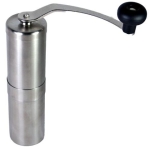
Porlex Hand Grinder | $65.00 AUD |
IMG_0609
Why a hand grinder? Apart from the obvious convenience when used for travel, I plan on purchasing a hand grinder to use when brewing single origin coffees at home. Much of my brewing is done with the Hario V60, and I often use this in the evenings, with the electric grinder not a great option when some in the household are asleep.

I have also researched a little into the Hario Skerton model as well, however a couple of reviews seem to suggest the Porlex may shade the Hario in performance. Another plus being the Porlex is sold through my green bean supplier Ministry Grounds, and it may not be too difficult to accidentally click “add to cart” at some point in one my future orders.

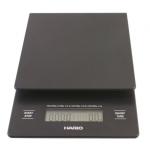
Hario Scales | $61.00 AUD |
IMG_0605
As I mentioned above, much of my home coffee brewing these days is done with the V60, requiring a fairly accurate ratio of water to coffee, as determined by weight.

Although the digital scales I currently use are adequate, there is one major problem in that the auto-off interval is too short. Not so great when aiming for a specific target weight to have the scales go blank and obviously reset to zero when turned back on. I have managed to get around this by constantly pressing and releasing the scales in between pours to keep them “active”, however this is obviously less than ideal.

The inbuilt timer on the Hario model will also come in very handy.

Tools

Kaweco Ice Sport Fountain Pen | $24.95 AUD |

IMG_0598
A fountain pen was always going to make this list. For years I have used my faithful Mont Blanc Meisterstuck, however given its value (both sentimental and material), I have always been a little nervous carrying and using it as an everyday pen. Obviously my preference for an everyday pen still runs towards something I enjoy using, which is likely to be a fountain pen.

The choice here, a Kaweco Ice Sport in green. Something that is great value for money, has excellent build quality, and in my opinion looks pretty good too. At this price point, my mind would be at ease including this in my everyday carry.

Noodlers Ink – Apache Sunset | $22.95 AUD |

IMG_0596
For many years I have relied on the Mont Blanc Black and Blue-Black inks in my fountain pen. In recent times this pen has been increasingly used for reviewing and marking up documents, where a different colour is useful to easily see any markings or notations on the page (standard white copy paper with black text).

Why not go bright with a colour that will really stand out! This particular Noodlers Ink is a brilliant, rich orange – somehow I don’t think it will be hard to see my notes written in Apache Sunset.

Twelve South Hi-Rise Stand for iPhone / iPad mini | $34.95 AUD |

IMG_0599
Twelve South produce high quality accessories for Apple products, and are available in the Apple Stores or on-line.

This particular stand, which requires a small amount of assembly, accommodates a Lightning charger and is adjustable to allow for having a case on your iPhone or iPad. This is a stylish way of lifting the device up off the desk – very handy for using my iPad mini as a second screen whilst sitting at my Mac, and makes a perfect hands-free face time accessory.

Bonus Item

Yamazaki 12 Yr Old Japanese Whisky | $130.00 AUD |

IMG_0600
This one is a bolt from the blue. I am certainly no expert on golden liquid of the single malt variety, however scotch has always been my drink of choice – to the tune of relaxing with one or two on weekends my maximum intake.

There has been a bit of a buzz around Japanese whisky for a little while now, and I am keen to sample what is on offer. Why this particular maker? No specific reason, however why not start at the beginning, with Japan’s first malt whisky distillery. Australian site World of Whisky provides a little background:

Yamazaki is a Japanese whisky distillery located in Shimamoto, Osaka, owned by Suntory. In 1923, Shinjiro Torii, the founder of Suntory and the father of Japanese whisky, built Japan’s first malt whisky distillery in the Vale of Yamazaki. Using copper pot stills, the Yamazaki distillery was the first of its kind outside of Scotland. The distillery’s location on the outskirts of Japan’s ancient capital of Kyoto offered pure waters, diversity of climate and high humidity—the ideal environment for the maturation of good whisky.

The taste? Described as initially dry and herbal, becoming fruitier with smoke. According to this article in Gear Patrol, I may be onto a good thing. Cheers!

Conclusion

That concludes the Gift Guide / Wishlist for this year, and provides a little more insight into my interests and spare time pursuits. If there is nothing specifically on the list that interests you, hopefully it has at least provided a few areas to look into for similar products closer to the mark.

Most of all, best wishes to you, valuable reader. I truly appreciate the time you take to come and read these posts.

Merry Christmas and a safe and happy New Year to you and your family.

What’s Roasting – El Salvador Duo

Today’s roast consisted of two batches, both originating in El Salvador. The first being the unusually named Finca Siberia Pacamara, explained by Ministry Grounds:

The farm’s history dates back to 1870, when Fabio Morán and Etifanio Silva decided to conquer this hostile territory, sowing coffee trees in one of the highest summits of the Apaneca-Ilamatepec Mountain Range. They named the 28 hectares of land Siberia after its chaotic weather conditions, along with its difficult accessibility. One century later, Rafael Silva, brother of Luis Silva, inherited the property.

All of the coffee is shade grown under Pepeto Cedro and Cypress trees, which protect the coffee from wind and sun.

The expectation for this variety is for some nice fruit flavours, along with a sugar cane sweetness and good overall balance.

Cordillera de Apaneca mountain range in El Sal...

Cordillera de Apaneca mountain range in El Salvador. (Photo credit: Wikipedia)

The second batch through the roaster was another from El Salvador, Finca Suiza. Again from Ministry Grounds:

Finca Suiza is located in prime specialty coffee country in the foothills of the Santa Ana volcano. The farm’s 22 hectares are planted out with a mix of Bourbon and Pacamara varieties, as well as a few old Typica trees. The coffee is grown in the shade of native trees, which also provide habitat for a variety of birds and insects.

The resulting cup for the Suiza should demonstrate floral characteristics with some maple syrup sweetness and fruity acidity.

I am looking forward to comparing the two to determine how closely the flavour profiles align if at all. Both roast batches went reasonably well with the exception of the Siberia Pacamara ending up a little darker than I would have liked, courtesy of playing trampoline volleyball (don’t ask) with my son at a critical part of the roast. The challenges of home roasting!

My iOS Writing Apps

In this dept4 x 4 post we look at my four most used iOS writing Apps. Generally my four ‘most used’ in any series of Apps would be my favourites, though this is not quite the case here, in part because of the need for a certain app related to my job.

Working within a corporate office environment in my day job necessitates a significant amount of time is spent in Microsoft Word, and with the iPad being my primary device for working at home or commuting. Pages is handy for reviewing and modifying these documents, then sending them back to the office completed without requiring further modification (apart from minor formatting) once I am back at my desk.

The morning I commenced planning this post, a new episode of the Generational podcast[1] came through my feed titled “Tackling iOS Text Editors”, in which Gabe Weatherhead and Eric Hess gave an excellent summary of not only some of their favourite Apps, but a few criteria of how to select the most appropriate Apps for your own requirements. I will run through each of the four main Apps I use at the end of this post, however I think the following possibilities are worth considering when you are looking for an app in which to do your writing in iOS (thanks to Gabe and Eric for this line of thinking).

Capture and push or write and manipulate?

The question here is whether or not you intend to use the text editor as a means of capturing quick notes on the go, or using the application for longer form writing which may be redrafted or formatted in some way.

In my experience, although the above may be achievable in one app, there are certain Apps with features to differentiate their ease of use in each of the above situations. By far the most powerful app on the market for grabbing quick notes of text and using a multitude of sharing, URL schemes, ‘open in’ or ‘send to’ options is Drafts by Agile Tortoise. This is my preferred app for this purpose and lives in the dock on my iPhone home screen.

However in saying this, Drafts also handles longer from writing and has Markdown support, however in my individual use case, I prefer doing longer form writing in a different app, as I rarely require multiple options for sharing with my longer pieces of writing.

I think it is certainly worth considering (or indeed trialling) some Apps to see where most of your output ends up, as this may dictate which features better suit your requirements.

Text Editor or Markdown Editor?

This question ties in a little with the one above, in that, if you are looking to use your text editor to format Markdown, then this feature should be one of your first considerations. Generally, if you are looking to write in longer from, post to a blog or even if you prefer having an Evernote entry or email formatted in rich text, then the Markdown features are of primary importance. Whilst any text editor can be used to write in Markdown, previewing the output is a useful feature (in line preview even more so) for these Apps to have, as is an additional keyboard row containing the more common Markdown characters (some of which are three deep in the standard on-screen iOS keyboard).

Not familiar with Markdown? I would highly recommend familiarising yourself with this type of writing and formatting, as it is the single thing that finally convinced me to create this site. Prior to learning Markdown, I was at a loss to determine how I would write largely on my iPad and iPhone, yet still easily format and post the text to a blog. Now 66 posts in on this blog, it is the first thing I recommend learning to anyone considering writing on the web.

There are many sites all over the web outlining the use of Markdown, however the way I learned, and one that I would highly recommend, is the Macsparky Field Guide on Markdown, written by David Sparks and Eddie Smith. This book explains the whole purpose, process, and Apps that are part of the Markdown system.

Anyway, should you wish to format your text for the web, or in replica text, having a strong Markdown feature set in the your app of choice is essential.

Additional Features

These are the features (though many are standard these days) that ensure an app meets your requirements for function, design, or both. Some are non negotiable to many, such as Dropbox syncing, TextExpander support, and a decent sharing menu. Others are nice to have, with varying levels of importance to different users. Here we are talking of things such as overall design, extra keyboard rows, Markdown support, light/dark mode switching, font selection and the like. If you work on multiple devices, whether or not the app is universal (that is, available for both the iPad and iPhone; and also how these sync with the Mac), and if not, at least whether a dedicated version of the app exists for each device. If Dropbox syncing is used, most text editors will be able to pick up the file and allow you to work with it across both formats (iOS and OS X).

The more features required, generally the narrower the app selection will become, however with so many text editors on the market, there are still more than enough to choose from. The definitive iOS text editor comparison document can be found on Brett Terpstra’s site, written as a table and comparing pretty much every text editor (dozens upon dozens) out there and includes just about every feature they contain as well. You will also find prices, a short outline on each app and links to the App Store.

It is impossible to go through all of the particular ‘extra features’ you may find in various Apps here. Features I find most useful are strong Markdown support (including preview; preferably in-line), an additional keyboard row (preferably with customisable keys), TextExpander support, Dropbox syncing, and plain or rich text sharing options. Three of the four Apps below have these features, and my introductory paragraph above indicates why the fourth does not. On with the Apps.

The Apps

Editorial (iPad)

Though I set out to write about these Apps in no particular order, Editorial is my number one. Plain and simple. Though only released in August this year, Editorial (App store, Website) has been my sole writing app on the iPad since that time, in which I am writing this post. For in-depth reviews I refer you to the first two of the following articles, both of which include screenshots and videos of the various workflows that are included or can be created in Editorial:

For me personally, and why I consider Editorial to be number one, is that it satisfies every mandatory requirement I have in a text editor as noted above, however the additional features of this app are unsurpassed. To name just a few:
* Local or Dropbox file storage
* TextExpander support (in addition, customisable in app snippets)
* Light/dark theme; line spacing and text width adjustment
* Swiping left to right reveals a selection (see image below) of a preview view, console, help documentation or in-app browser (customisable to either Safari or Chrome)
* Extra keyboard row with typical markdown keys, including ‘extra’ extra characters on tap and hold
* Sliding across the extra keyboard row will also move and place the cursor (solving a constant annoyance of mine in iOS – the difficulty in accurately placing the cursor); whilst a 2 finger swipe on the same row will expand a text selection (brilliant).

IMG_0588

There is really no way to accurately describe this app without giving it a go. The integration of python scripting (currently beyond the scope of my abilities) makes this app a powerful automation system as much as it is a text editor. There are also numerous workflows available for use (by simple download straight into the app), and of course you are free to create your own.

Photo 30-11-2013 4 46 13 pm

At the time of writing the app is available in the App Store for what I believe is an introductory price of $5.49 AUD, which, for the features included is an absolute steal. Definitely one to try out.

Drafts (iPad, iPhone)

Drafts (Website, App Store iPhone, App Store iPad) is my go to app on the iPhone as an entry point for grabbing text. It sits in the dock on my home screen, and upon opening, presents a blank note with a blinking cursor and keyboard at the ready. This is precisely why it is the perfect app for capturing an idea or small amount of information quickly, however what happens next is where the power of Drafts really lies.

Photo 30-11-2013 4 49 07 pm

Included in the app is a large directory of actions, with many more downloadable directly from the developer’s website. Drafts, along with Launch Center Pro was one of the first Apps to embrace iOS URL schemes (shortcuts that allow automated communication between Apps for specific actions to occur, reducing the required manual tapping and app switching).

My main actions in Drafts:
* General sharing – messages, email, tweets
* Sending text to Evernote, and appending to a specific note for blog post ideas (which are also date stamped automatically through a customisable action)
* Sending text to Due (as reminders), Day One (my weights workout data), Byword (ideas that may expand into blog posts)
* Adding tasks to Omnifocus or Reminders
* General note taking which may or may not be sent to another app or simply deleted once no longer required
Drafts does have Markdown and TextExpander support, with files also able to be saved to Dropbox, though syncing between devices occurs through Simperium sync. Drafts really is a great app to capture all text when you may be unsure exactly where it is headed at the time you are writing it.

Again, more in-depth reviews at Macstories can be found for version 2.0, and also for version 3.0.

Byword (iPad, iPhone, Mac)

I have previously written about my use of Byword (Website, App Store iPad, App Store iPhone, Mac App Store) as a text editor, and it was initially the app in which I began writing in Markdown and publishing to this blog.

Photo 30-11-2013 4 53 20 pm

In many respects, the strength of Byword lies in its simplicity and distraction-free writing environment. The main features I found useful are Dropbox syncing, TextExpander support, and an extra keyboard row for Markdown characters and inserting links. With version 2.0, Byword introduced direct publishing (via a one-off in app purchase of $5.49 AUD) to WordPress (along with other blogging platforms) and Evernote. A workflow I continue to use by opening documents (from Dropbox) in Byword that were originally written in Editorial, sending them to WordPress, and then archiving the post in Evernote.

Photo 30-11-2013 4 53 33 pm

Rapid Dropbox syncing and version conflict controls ensure Byword is a very useful tool if you perform longer form writing on both the iPad and iPhone, providing the ability to preview version conflicts and select which to keep. Despite my recent shift to Editorial on the iPad, I can see Byword continuing to play a significant role in my iOS (and Mac) writing workflow.

For your reference, a Byword review on Macstories, and an earlier review by yours truly.

Pages (Universal iOS, Mac)

As I mentioned in the introduction to this post, Pages (iPad, iPhone) makes this list primarily due to being my means of editing work (read day-job) related documents on the iPad. The office environment I work in runs the typical Microsoft Office suite of applications, and though I can email and quickly preview documents in Apps such as Goodreader (which I commonly do as many are also PDF documents which I then annotate), for tracking changes and editing the word formatted documents, nothing beats Pages for ease of use.

Photo 30-11-2013 4 52 08 pm

I have tried some other Apps for this purpose, such as CloudOn (a full MS office version running on a remote server), which does work very well, however I find because most of the work I do involves reviews and making edits to reports, the fully featured version is not really required, and as it is on a remote sever obviously requires an internet connection and runs a little slower. There are many mobile office suites out there, however for my limited use, Pages serves my needs.

Probably the features that are most useful include robust iCloud syncing, straightforward formatting options (those not carrying over from MS Word are so few, they are inconsequential – to me at least), change tracking, ease of inserting charts, media and the manipulation of text around such insertions. The sharing options for returning these documents back to the office are also adequate, however easy Dropbox syncing would be welcome. Also, the overall user interface is probably looking a little dated, though the recently announced iCloud web interface for the iWork suite of Apps looks interesting and is something that may come in handy.

In summary, after using Pages for around 10 months or so, I have never commenced writing a document in this app, only edited existing work documents, which probably sums up my use case for listing it here. However in saying that, there is no other iOS writing app I would have included instead, simply because the three listed above more than take care of everything else, which is not to say some other Apps may suit you better. However if you primarily prefer to write in rich text format, then Pages may be for you.

Conclusion

The first draft of this post was written a couple of months ago, and since that time we have seen the release of iOS 7, OS X Mavericks, along with new iPads and Macs. I have upgraded my old iPad 2 to a new iPad mini with Retina display, and also acquired a Mac mini for our home computing needs in that time. The delay in completing this post was due to thinking that some of these workflows (and hence the Apps I use) may alter in view of these changes. This has not happened, which is probably not surprising given how well the Apps suit my needs, and the cross platform integration achievable through Dropbox.

Probably the only alteration may come as a result of Google’s acquisition of the mobile office suite Quickoffice, and the integration of this with Google Drive. I can see a possible place for this in my “day-job” usage described above, in viewing and performing rudimentary editing of Microsoft Word documents.

I acknowledge the above Apps and workflows may not suit everyone, however I think they are a good example of how writing on the iPad has gone well and truly beyond tapping a few words into the native Notes App. Pair the iPad with an external keyboard, use the automation possible in Apps such as Editorial, and you have a pretty powerful way of getting words on a page and published to wherever they may need to go.


  1. The Generational Podcast in its original form has been discontinued, having morphed into a new show titled Technical Difficulties. Same guys, but newer!  ↩