NaNoWriMo – My Digital Tools

So far, my NaNoWriMo (National Novel Writing Month) journey continues as we come to the middle of November. My note taking, outlining, and general scribbling continues with the analogue tools I wrote about last week. How has the actual writing (as well as a bit more planning) occurred? With a few digital tools, which I thought I would share below.

Planning and Outlining

MindNode
Although I should no doubt use the technique more, I do find mind mapping incredibly useful. In the past I have used iThoughts, however for 6 months or so, it has been MindNode on iOS, and MindNode Pro on the Mac.

Specifically in relation to NaNoWriMo, MindNode has kept organised the general outline of the four overarching plot lines to the story, which I find particularly useful for referring back to in relation to names and relationships.

Photo 14-11-2014 9 38 49 am


The initial map itself was constructed just prior to beginning writing, however it is now largely an evolving document which develops alongside the story. I’ve found it extremely helpful when adding components, to then sit and review the story as a whole, as it is outlined on the map.

You will also see a timeline running across the top of the map which I have created on a separate node, which will most likely be split into a second node directly below the current one as the story proceeds and the timeline lengthens.

Why MindNode? It’s simplicity is the main drawcard.

Tapping a node allows the creation of child node by pressing the ‘+’ icon which appears, with a double tap to edit text. The nodes can be ‘folded’ down or expanded; detached to create another node, or attached to an existing node by tapping, holding and dragging. The same can be achieved through the contextual menus.

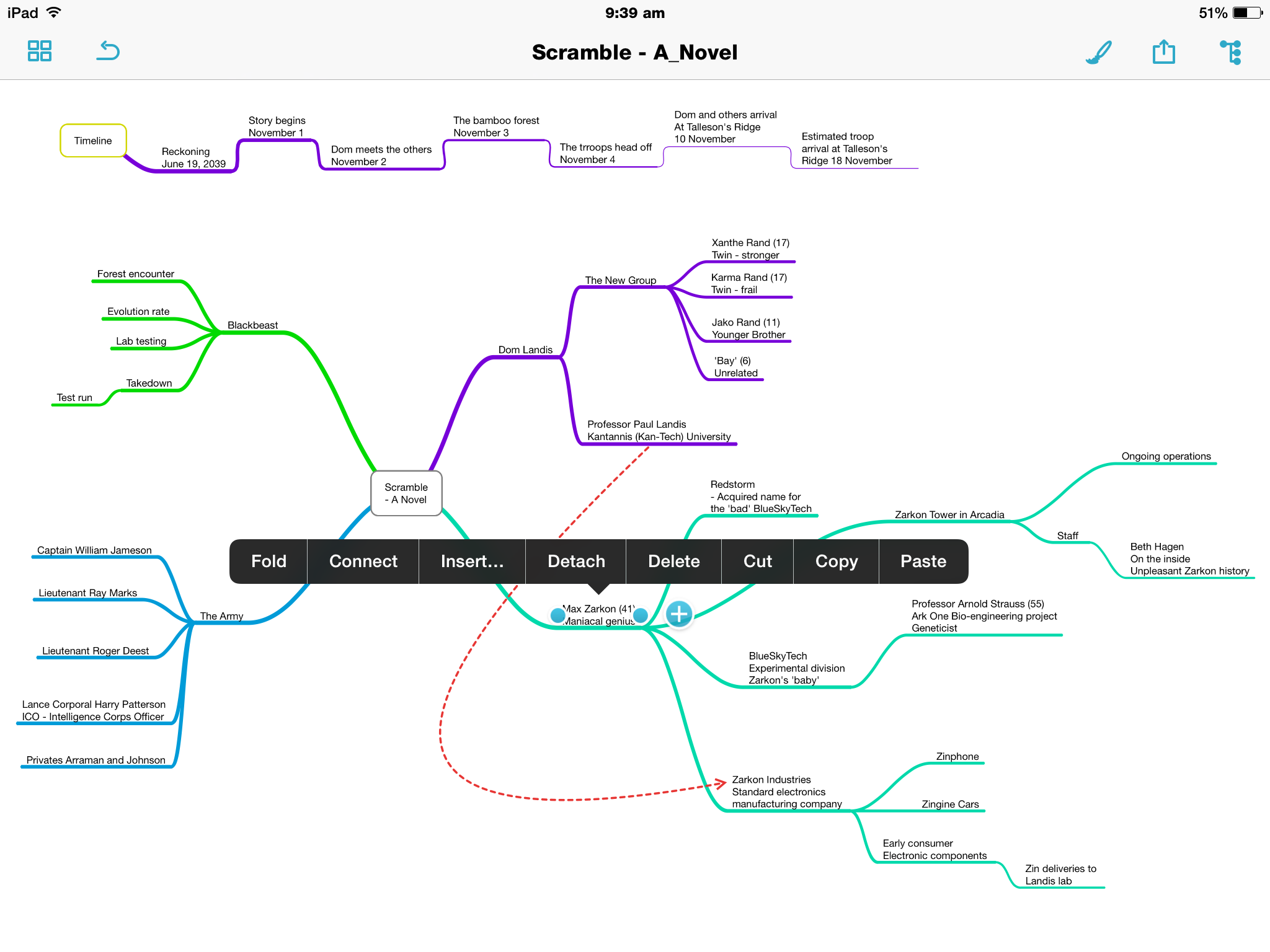
Photo 14-11-2014 9 39 52 amPhoto 14-11-2014 9 39 18 am

Of course there are the usual style and formatting options for the background, text and nodes themselves, with a ‘smart layout’ toggle which, if on, will align nodes and branches uniformly throughout the map.

Although not it’s intended purpose, I’ve also created a ‘location map’ …map, if you will, which has been perfect for getting my head around where the characters have been, currently are, or are going to, geographically in the story.
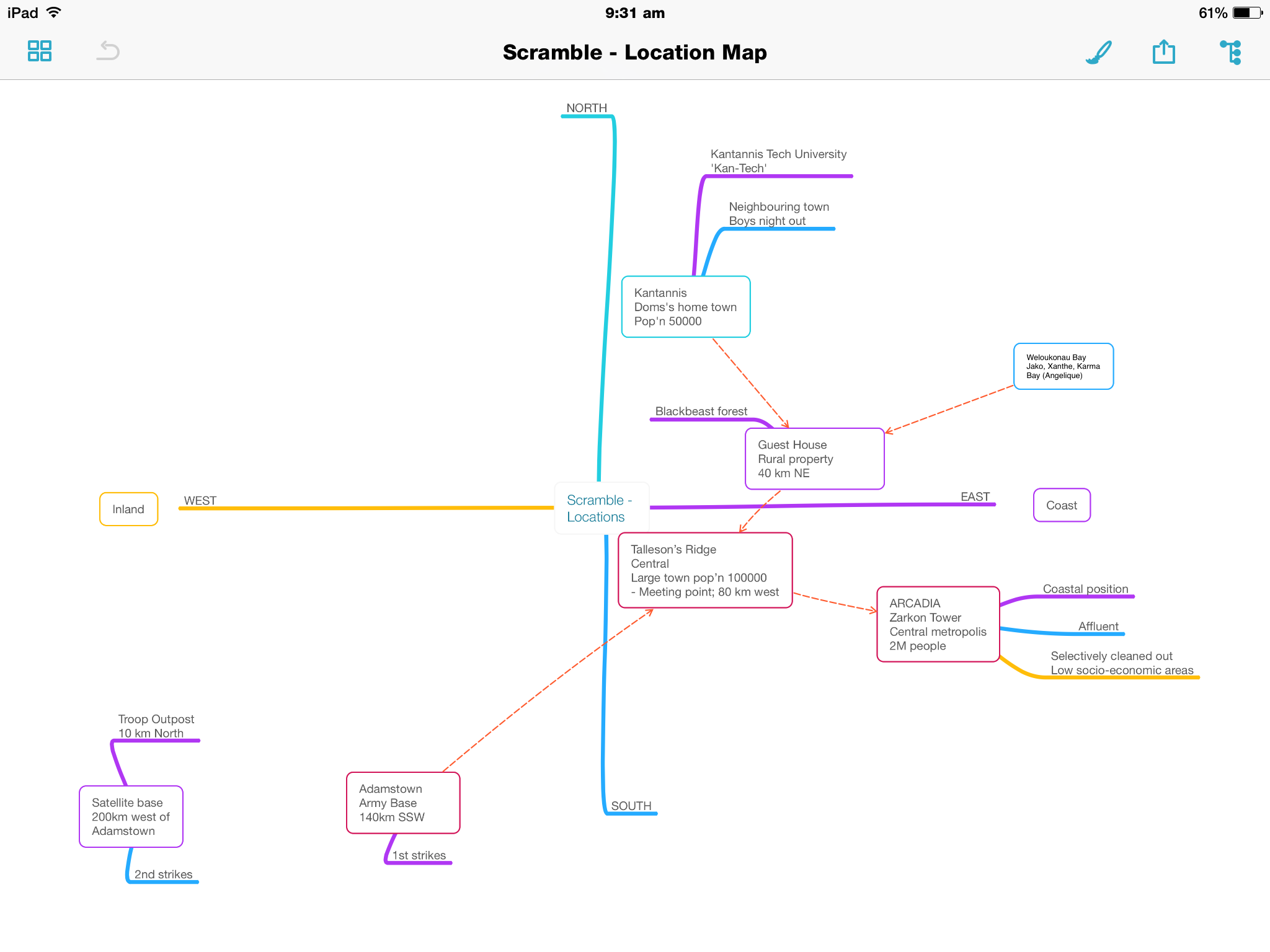
Photo 16-11-2014 9 31 55 am

It does not have the advanced attachment options of say iThoughts, however I simply don’t require those. In organising my ideas, it is the content of what I get down, plain and simple. Oh, and I do love the outline view.

Photo 14-11-2014 9 38 59 am

Syncing is through iCloud Drive or Dropbox, with exporting options including Freemind and OPML file formats, along with text, PDF and image formatting.

Drafts 4
Although iOS only, I have been using Drafts for some time, recently upgrading to version 4.

For NaNoWriMo, it has been my go to app to use for quick notes, without needing to pull out my Field Notes and a pen. Syncing to my iPad mini provides some scope for expanding further on these notes on a larger screen if I need to, however I rarely do this.

Currently in my ‘NaNo Notes’, I have a few thoughts around the plot, a couple of character names I had thought of, and some ideas for an elevator pitch, which only recently came up after a friend asked what the book was about, and I found myself somewhat disjointed in my resulting explanation. A catchy (I think?) tag line rounds out the note.

Photo 14-11-2014 8 50 39 amPhoto 14-11-2014 8 50 32 am

For those familiar with the Drafts app, there are virtually endless actions that can be applied to any note, with many more to be found on developer Agile Tortoise Drafts Action Directory.
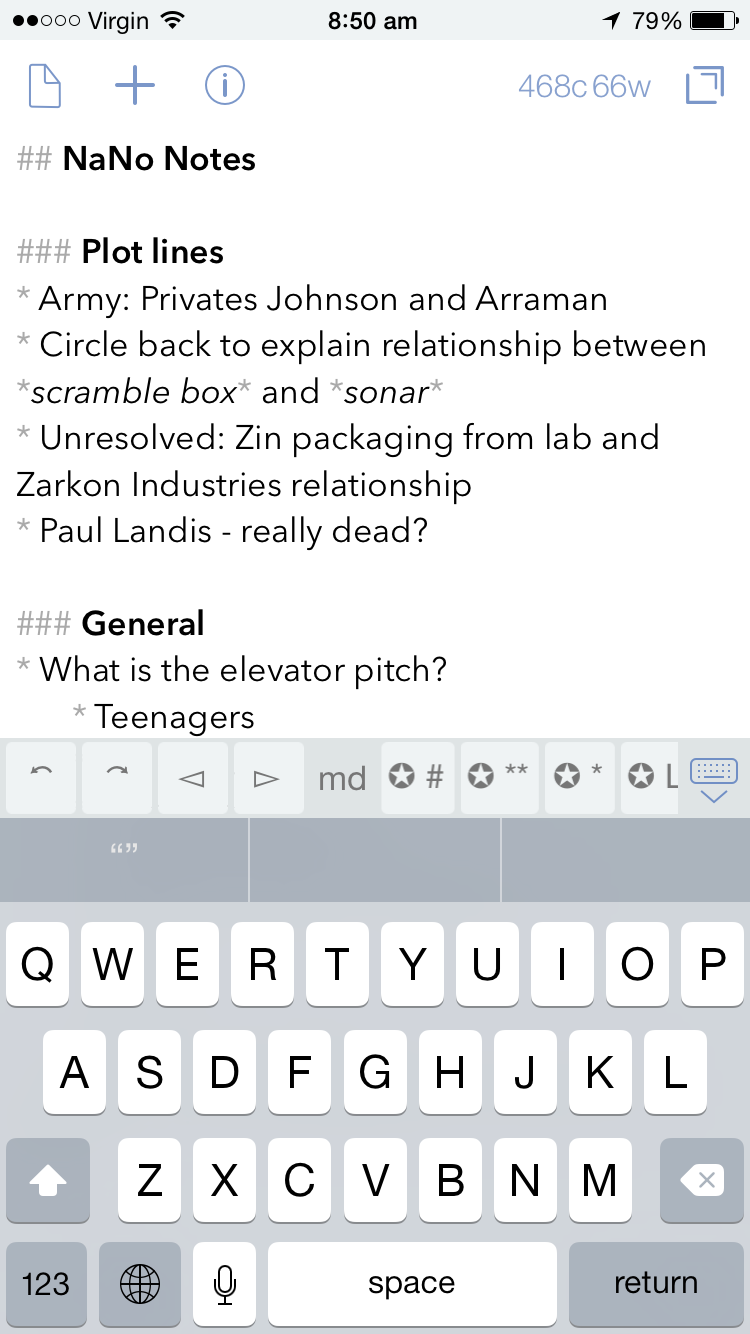
Photo 14-11-2014 8 50 46 amPhoto 16-11-2014 9 40 11 am

As you can see from the screenshots, for anyone wishing to produce longer pieces, there is also Markdown support (with specific keys in the additional keyboard row for this purpose). At the current time, my NaNoWriMo needs only require a robust, reliable note taking app, and Drafts fits the bill nicely.

Writing

Ulysses III
All the planning and outlining in the world won’t get you very far in this challenge unless you get the words down – and a good few at that. For this, I have used Ulyssess III for Mac, which is described thus by developer, The Soulmen:

Ulysses lets you focus when you need to concentrate. It keeps all your texts neatly stuffed in its intuitive library. With a few clicks, Ulysses can create beautiful documents from your manuscripts: PDFs, web pages, even iBooks-ready ePubs. With its simple, clutter-free interface, it will turn work hours into fun time. And mere thoughts into powerful stories. If you love to write, and write a lot, Ulysses is made for you.

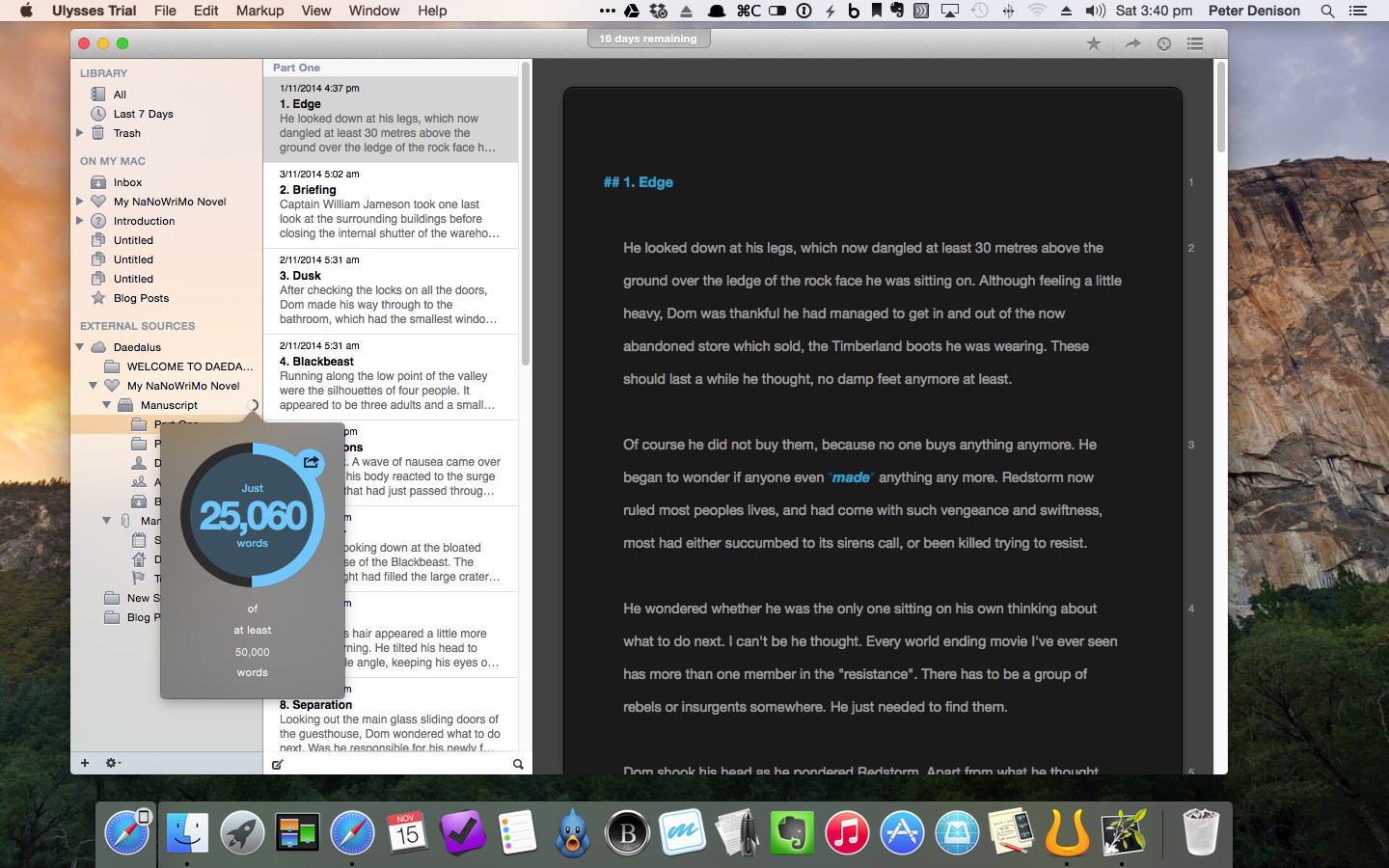
Indeed I have found Ulysses III to be a great tool for getting the 25k+ words down I have managed to write so far.

So, with Scrivener already on my Mac, why Ulysses? To be fair, I have not really written anything of length as yet in Scrivener (a widely known and well-loved app for many an author – not that I consider myself one), so I cannot really compare the two.

Through a sponsorship of NaNoWriMo, Ulysses offered a 30 day free trial of the app, with some email encouragement throughout the month, and a free extract from author David Hewson’s book Writng a Novel with Ulysses III.

Screenshot 2014-11-15 15.40.32

Given the enormity of the NaNoWriMo challenge, I was looking for something with enough structure to keep things organised, yet the simplicity to allow me to just write – a lot. As far as I am aware, Scrivener may be a little more feature packed and powerful, however Ulysses has been spot on for what I have required, namely:

  • Chapter and scene separation through separate ‘sheets’
  • Highly intuitive organisation of folders, files and keyword tags
  • Focused, full screen writing
  • Usual grammar and spell checking
  • Statistics, including word count and reading time etc
  • Effective grouping of scenes with key words so individual plot lines can be worked on in isolation, despite being mixed throughout the book
  • Markdown support
  • Exporting to other MD supported apps and also as ePub / iBooks
  • Syncing through iCloud or Dropbox via the ‘Add External Source’ option
Screenshot 2014-11-15 15.40.48

I have also written both this post, and last week’s on Ulysses, to try out some of the features more specific to a blogging, which has also been a great success. Incidentally, the insertion of a web link via copying a URL to the clipboard, highlighting a word in the post, and simply pasting to finish the link is a little magical.

Screenshot 2014-11-15 15.39.30

Ulysses is indeed a fantastic app for writing, and my initial plan to purchase it as a reward for finishing NaNoWriMo looks on track so far. I encourage you to check it out.

A final word from David Hewson:

Writing’s hard. Software should make it less so. Ulysses really does.

Daedalus Touch
Daedalus is the iOS companion app to Ulysses, also by The Soulmen, who describe it as The World’s Sexiest Writing App, and Simple, Powerful and Flat Out Georgeous.

True? Well, it is strikingly minimal writing app, with an interface considerably different to many you will find on the market. The app is designed as a series of “paper stacks” rather than document lists, and, upon entering a stack, navigation is then by swiping from L to R, or the reverse between each page.
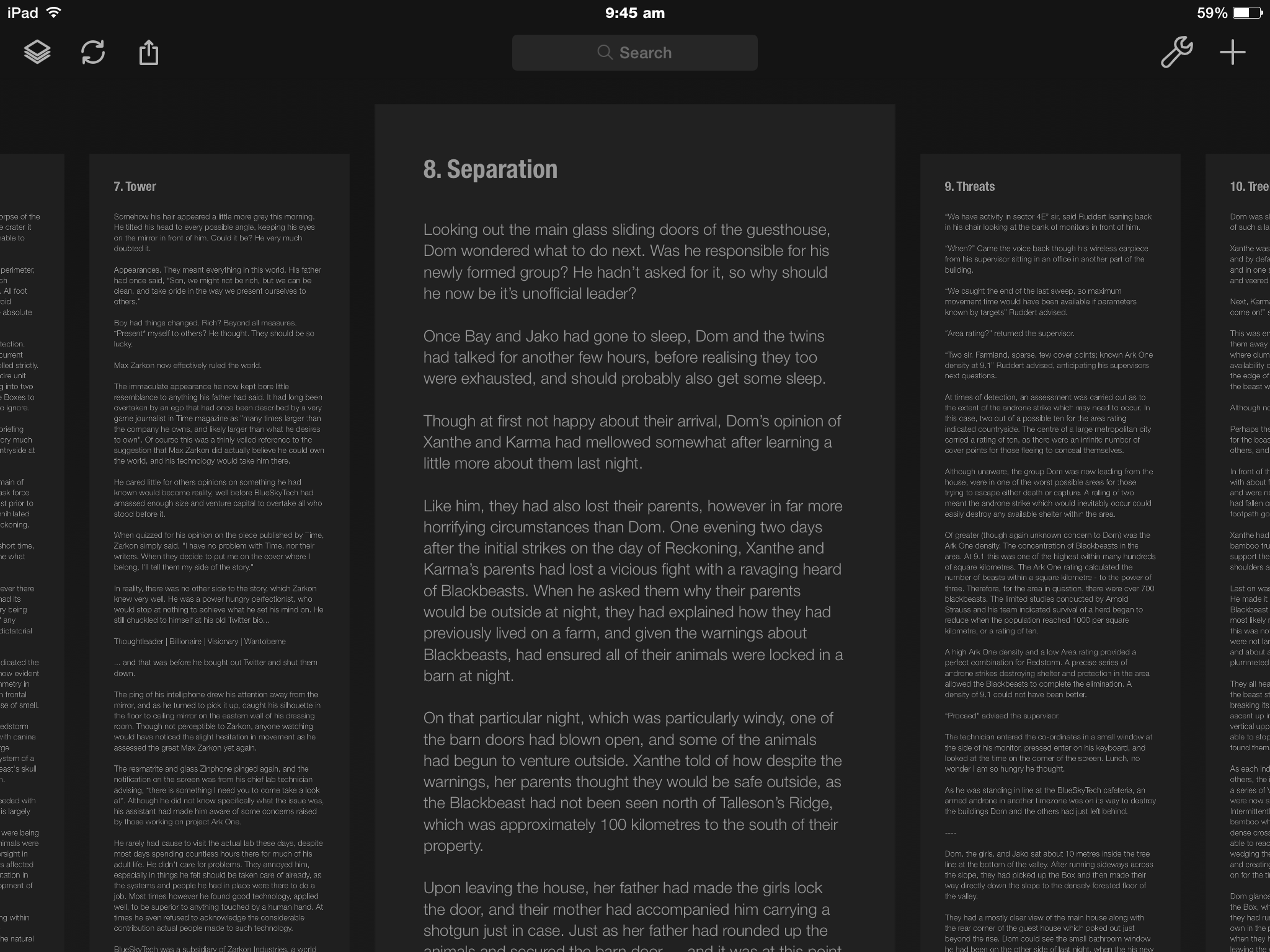
Photo 16-11-2014 9 45 02 am

Pages are not limited to a standard size, and will infinitely increase in length the more you write. To retreat back out of the stacks, a simple two finger pinch is all it takes. Daedalus has an additional, customisable extra keyboard row, containing a central area which, upon tapping, will scroll to the end of the sheet. A nice touch.

Photo 16-11-2014 9 45 47 am

Due to my insecurity with iCloud at the moment, setting up Dropbox syncing with Ulysses was a straight forward task, and has worked flawlessly since day one.

Having had Daedalus on my iPad and iPhone for some time, I guess I really just needed a reason to give it a good run, and I’ve been impressed so far. It has been the go to app for racking up 500–1000 words over my lunchtime coffee, or writing at the kitchen bench nearer my family, rather than being stuck at my desk.

Reviewing and Editing

As you’d expect, a good deal of editing occurs as I go along, however given the somewhat larger word count target than I am used to, there are times when I simply need to continue writing, and the editing and revision suffers a little.

iBooks
I am a firm believer in the reviewing or re-reading work in a different format to that in which it was originally written, as I find this allows me to pick up errors or parts needing revision a little easier. For blog posts I find Marked 2 a great way to review what I have written.

For NaNoWriMo purposes, I have found that exporting the book from Ulysses (an extremely easy task) to iBooks, allows me to not only view what I have written in ‘book’ format, but more easily pick up such errors, and I have the ability to highlight and take notes in the margin, which are then tabulated in the contents section of the book, and it is a simple tap to jump back to the relevant section.

Photo 14-11-2014 1 52 16 pmPhoto 14-11-2014 1 52 25 pm

Though I cannot edit the text directly as I read it, I have found it quite easy to edit on my Mac with my iPad in front of me showing the required revisions in iBooks.

The Hardware

There is not a great deal to say here, apart from mentioning the above Mac apps are used on a late 2012 Mac mini; the iOS apps on my iPad mini with retina display (now referred to as the iPad mini 2) or the iPhone 6, which have all performed flawlessly, and continue to do everything I ask of them. When writing on my iPad mini, I also more often than not use the Logitech Ultrathin Keyboard mini.

Conclusion

So there you have it. My NaNoWriMo ‘digital tools’ both for Mac and iOS. You would have a strong argument in saying I was a little crazy when undertaking this challenge to try new apps as well, however I think it says a lot about the simplicity and functionality of MindNode, Ulysses III, and Daedalus, that things have run so smoothly.

In fact, I am now quite confident these tools will see me through the next 25,000 words to the end.

Lets just hope the creative side of my brain will do the same.

NaNoWriMo – My Analogue Tools

The tools.

The tools.

With so many words to be written this month as part of my first foray into NaNoWriMo, I feared this blog would be a little forgotten over the coming weeks – and no, I had not planned ahead well enough to have written and scheduled posts in advance.

In a rare moment of wisdom, I came to realise my best chance of putting something up on the blog would be to combine the two. That is, participate in NaNoWriMo, and occasionally blog about participating in NaNoWriMo.

I plan to write a few more NaNoWriMo flavoured posts throughout the month, which is of course assuming the weight of expectation that comes with a 50,000 word target doesn’t crush me first.

So, with a tip of the hat to yesterday’s Fountain Pen Day, today I thought I would share some of the analogue tools I have been using to help plan out, and hopefully get written, the 50,000 words that constitute the NaNoWriMo challenge.

Notebooks

Various notebooks, pads, scraps of paper and even the odd dreaded yellow Post-It Note have all played their part here.

Although I have the overall plot and story outlined, my fear of running out of specific ideas to keep filling scenes, has resulted in a litany of places with either paragraphs, a line, or even a single word jotted down to avoid forgetting that great idea. Though I must admit, the more common scenario seems to be noting down why events written two chapters ago no longer make sense given the turn the story has taken.

This whole novel-writing thing is certainly not easy!

The paper I’ve been using:

Clairefontaine Essentials Notebook and Pelikan Edelstein Tanzanite ink written with Pelican M205 EF Fountain Pen

Clairefontaine Essentials Notebook and Pelikan Edelstein Tanzanite ink written with Pelican M205 EF Fountain Pen

Clairefontaine Essentials Notebook with Pelikan Edelstein Tanzanite Ink

Delfonics Rollbahn Notebook; Montblanc Daniel Defoe Palm Geen ink (Pelikan M205 EF Fountain Pen)

Pens

(L to R) Pelikan M205; Palomino Blackwing 602; Retro 51 Stealth; Lamy Safari; Montblanc Meisterstuck Classique

(L to R) Pelikan M205; Palomino Blackwing 602; Retro 51 Stealth; Lamy Safari; Montblanc Meisterstuck Classique

Again, this is either dictated by what is closest at hand for immediate idea capture, or what will be most enjoyable to write with for more extensive outlining. The following pens (and pencil) have to date suited either of these scenarios:

Inks

I have found using inks of varying colours quite helpful when going back through my notes to either check off ideas or plot lines I have implemented into the story, or in highlighting areas that may require more thought or detail. The Montblanc Meisterstuck inked with Burgundy Red has been particularly useful given it’s contrast to the Safari’s blue ink, clearly showing notes made as additions to the originals.

Markup in Field Notes Arts Edition; Lamy Blue ink (Lamy Safari M Fountain Pen); Montblanc Burgundy Red (Montblanc Meisterstuck Classique M Fountain Pen)

Markup in Field Notes Arts Edition; Lamy Blue ink (Lamy Safari M Fountain Pen); Montblanc Burgundy Red (Montblanc Meisterstuck Classique M Fountain Pen)

Rhoda Ice No 16 Lined Notepad; Lamy Blue ink (Lamy Safari M Fountain Pen)

Rhoda Ice No 16 Lined Notepad; Lamy Blue ink (Lamy Safari M Fountain Pen)

Summary

The most used of the items outlined above is probably a combination of the Field Notes Arts Edition notebook, the Lamy Safari for note taking, and the Montblanc Meisterstuck for marking up the Safari’s notes.

The Field Notes became the notebook of choice early on as I my initial intention was to keep all of my ‘NaNo’ notes in the one book, and the majority have ended up in here. I found the larger ‘Arts’ edition the ideal size for more extensive notes, yet small and light enough to carry with me.

Delfonics Rollbahn Grid Notebook

Delfonics Rollbahn Grid Notebook

The Delfonics Rollbahn notebook contains great paper stock for fountain pen use, however the yellow colour is not the best shade to highlight any particularly vibrant inks you may be using. Certainly not a problem for the darker blues and blacks if that is your preference.

The Safari was not necessarily my first choice pen, however is only a fairly recent purchase, and the paper based planning of this project seemed a great chance to test it out. No real complaints here, except it has been a little ’skippy’ occasionally, however I put this down to not having given it a thorough clean before inking it up after purchase.

I am really enjoying the Daniel Defoe Palm Green ink, which is now residing in the Pelikan M205 (EF). Again only a recent purchase, however what a great colour! I am sure it will see quite a bit of use throughout the remainder of November and beyond.

My main (and only minor) grievance has been the extent to which the Safari Blue Ink has faded. Although most likely due to both the ink and Field Notes paper (the same amount of fade was not evident on the Rhodia stock), I would have preferred it to maintain the vibrance it had when first laid down.

NaNoWriMo itself?

With my word count currently just over the 10k mark, I am finding this an extremely interesting challenge. I was falling on the side of “maybe I’ll just do it next year”, right up until a few days before November 1, however would perhaps have continued to say the same thing every year had I not bitten the bullet and entered.

So very glad I did.

Gotta go. There’s an important word count that needs increasing!!


Wiser Web Wednesday – Fountain Pen Day

Wiser Web Wednesday – a regular link to posts of interest from around the web, generally by those far wiser than myself:

This Friday, November 7 is Fountain Pen Day, which is celebrated on the first Friday of November each year. This WWW is thus flavoured with all things fountain pen.

Fountain Pen Day
I’ll let the official home of Fountain Pen Day set the scene:

Taking place on the first Friday in November each year, Fountain Pen Day is celebrated by enthusiasts worldwide as a time to embrace, promote, and share the use of fountain pens.

Fountain Pen Day Home

The Well Appointed Desk
Looking for some Fountain Pen Day merch or giveaways? Ana at the Desk will point you in the direction of some:
Fountain Pen Day: November 7

Pennaquod
I have previously mentioned this great site created and maintained by Ian Hedley of Pens! Paper! Pencils!, though the context of this post requires its inclusion again.

I had originally planned to highlight some of my favourite pen blogs in this post, only to find a) there are too many; b) it was too hard to choose my favourites; and c) the home page of this site pretty much lists them all anyway:
Pennaquod: The pen blog searcher

Richard Binder Fountain Pens
If you are seeking a little more information on terminology associated with the fountain pen, this is a pretty good place to start:

This Glossopedia is a compact glossary/mini-encyclopedia of words, phrases, and names, with more than 1350 definitions and descriptions, more than 800 illustrations…

Glossopedia of Pen Terms

Pete Denison
Yes, a couple of links from this very blog.

Although I do not consider my site a Pen Blog as such, as far as online communities go there is none better than the kind and helpful folk in the pen world. Many of these people can be found through the front page of the Pennaquod link above.

As a good portion of my spare time does turn to things pen and paper, I like to think I contribute to this community in some small way.

The links below are some of my own fountain pen musings:
My Fountain Pen Day
A Tale of Two Kaweco Sports – Classic and Ice
Pilot Kakuno Fountain Pen – Impressions
My Pelikan M205 Fountain Pen

If you have ever thought you might like to try a fountain pen, there is no better time. My beginner recommendations? A Pilot MetropolitanLamy Safari, or Pilot Kakuno for the younger (or younger at heart) writer.

Wiser Web Wednesday

Wiser Web Wednesday – a regular link to posts of interest from around the web, generally by those far wiser than myself:

The Robservatory
Three simple tweaks to return the Safari URL bar on OS X to an appearance a little more pre-Yosemite if that is what you prefer:
Yosemite: Tweaking Safari’s URL bar settings

Modern Stationer
Doug reviews a great looking pocket notebook, particularly the contrast stitching on the binding. Overall, I think he likes it:

The Apprentice definitely hits that bar. It’s my new pocket notebook of choice.

I must admit, a fountain pen friendly pocket notebook is indeed an attractive proposition:
Baron Fig Apprentice Review

Beanhunter Blog
Have an inclination to roast your own coffee? I’ve written before about how I roast mine, and many begin with a popcorn maker:
Roast Your Own Coffee With A Popcorn Maker

Di Bella Coffee
Linked here for relevance to a term used extensively these days in “Specialty Coffee”, however I can’t help but think that rather than highlight how the description is earned, the tone is perhaps a little too “most of the others (read – our competition) are wrong”:
Demystifying the Term Specialty Coffee

The Brooks Review
An interesting take on the continued survival of the original iPad mini in the current Apple line up, amidst the howls of “why are they still selling that” currently swirling the internet.
The Zombie iPad

On Fountain Pens
Since my son’s birthday earlier this year, I have been consistently and often borrowing his Kakuno. Another example of why that will continue to be the case:
Pilot Kakuno fountain pen – great for kids and beginners

Pens! Paper! Pencils!
A need for some bright ink and seeing this review from Ian sent me off to buy some Noodler’s Apache Sunset. Had both the local pen stores in town not been out of stock, I am sure my pages would be looking something like this – perhaps in colour, though not Ian’s fantastic and unique style:
Noodler’s Apache Sunset ink review

The Tim Ferriss Show
Some real gems in this podcast episode from one of the most prolific and interesting information curators and writers out there. Maria Popova of Brain Pickings talks note taking, indexing, apps, philosophy and more:
Maria Popova on Writing, Workflow, and Workarounds

Retro 1951 Tornado Stealth – My Workhorse Pen

As is the case with more than a few owners of the Retro 1951 pen in it’s various forms, mine was picked up after hearing the brand mentioned (often) in the relatively early episodes of the Pen Addict podcast. The enthusiasm with which hosts Brad Dowdy and Myke Hurley talked about these pens was enough to send me searching for them online soon after. The pen in question is now almost two years old.

FullSizeRender 4My choice at the time, a Tornado Stealth model, was ordered from Cyber Space Pens, for at that time I did not have a bookmark folder full of pen shops by the names of Goulet, Jet, Chalet and the like. Although in saying that, I see Cyber Space currently stock the Retro 51 Stealth at a very competitive $US24.00.

I do not recall the exact price I paid at the time, however it was essentially half the cost of purchasing locally through one of the brick and mortar stores in town. I find this both incredibly convenient and somewhat saddening at the same time, given I enjoy nothing better than stopping by and supporting one of the local pen stores, however it becomes increasingly difficult when the cost is often one and a half to two times what can be found online.

Look and Feel

Overall I would say I am fairly conservative in my pen barrel colour choices, so of course I was drawn to the Tornado Stealth model, a sleek, all black, mysterious looking pen. The smooth glossy finish is a joy to both look at and hold.

Now, as the title of this post and some of the images suggest, it has been somewhat of a workhorse pen over the past 18 plus months or so, and developed some nice brass looking highlights on some of the edges, given most of this use occurred prior to the relative luxury it now enjoys in a Nock. Co Sassafras pen case.

FullSizeRender 6

The band with the “Tornado by Retro 1951” branding adjacent to the clip, the clip itself, some of the knurling on the knock twist mechanism, and parts of the barrel have all worn, not quite to the Kaweco AL Sport washed look, however heading that way. That said, I couldn’t be happier. My pens are for using, with a little care, but heavily. They are some of the tools I enjoy using the most, and if that shows, all the better.

FullSizeRender 5FullSizeRender 3

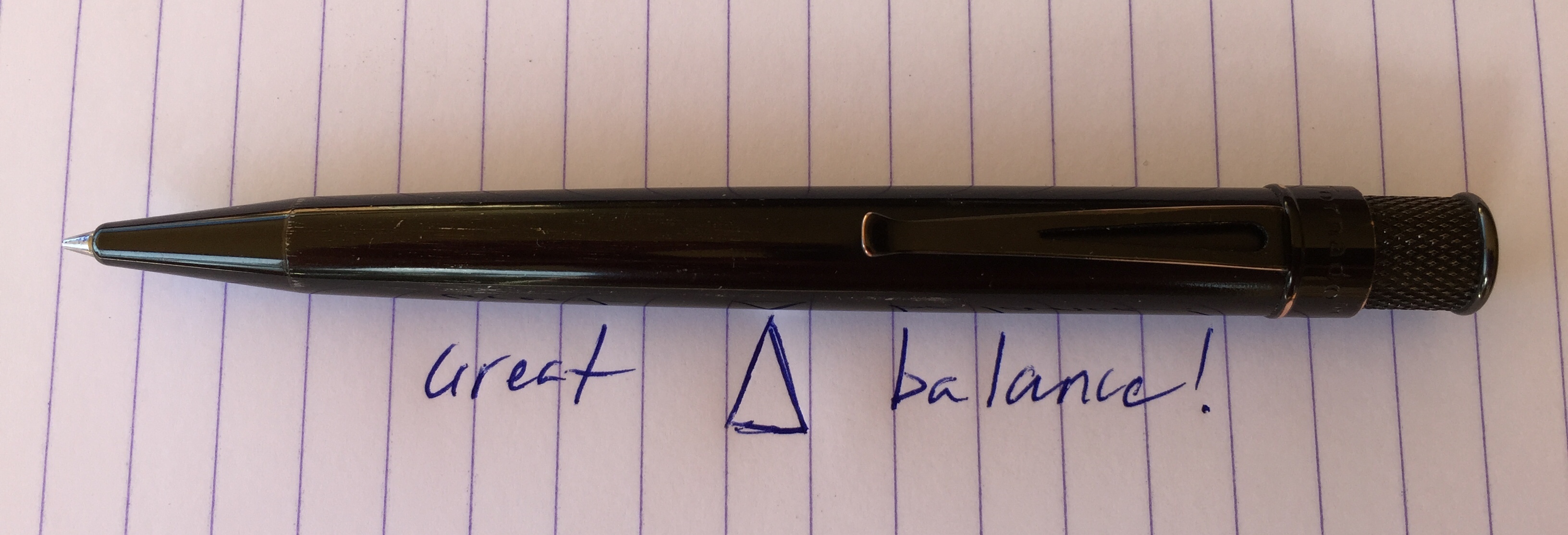
FullSizeRender 7Apart from the slowly evolving outer finish, probably what I like most about this pen is the overall size and weight distribution. For my writing style, it has perfect balance, with the length of 13cm a perfect size for my hand. While the weight is on the heavy side at 28g, the stature and weight distribution ensure this pen is a joy to hold and use, either for a few notes or longer writing sessions. Although my Lamy Safari Rollerball is a light 18.5g, I do prefer the Retro 51 out of the two.

Although the barrel is a smooth glossy finish, I have never had any grip problems, and my preference for a mild taper towards the tip is well catered for by the Retro 51 shape. At the other end of the pen, the knurling on the twist mechanism provides a nice texture, and the knock mechanism itself is one of the most solid you will encounter.

Performance

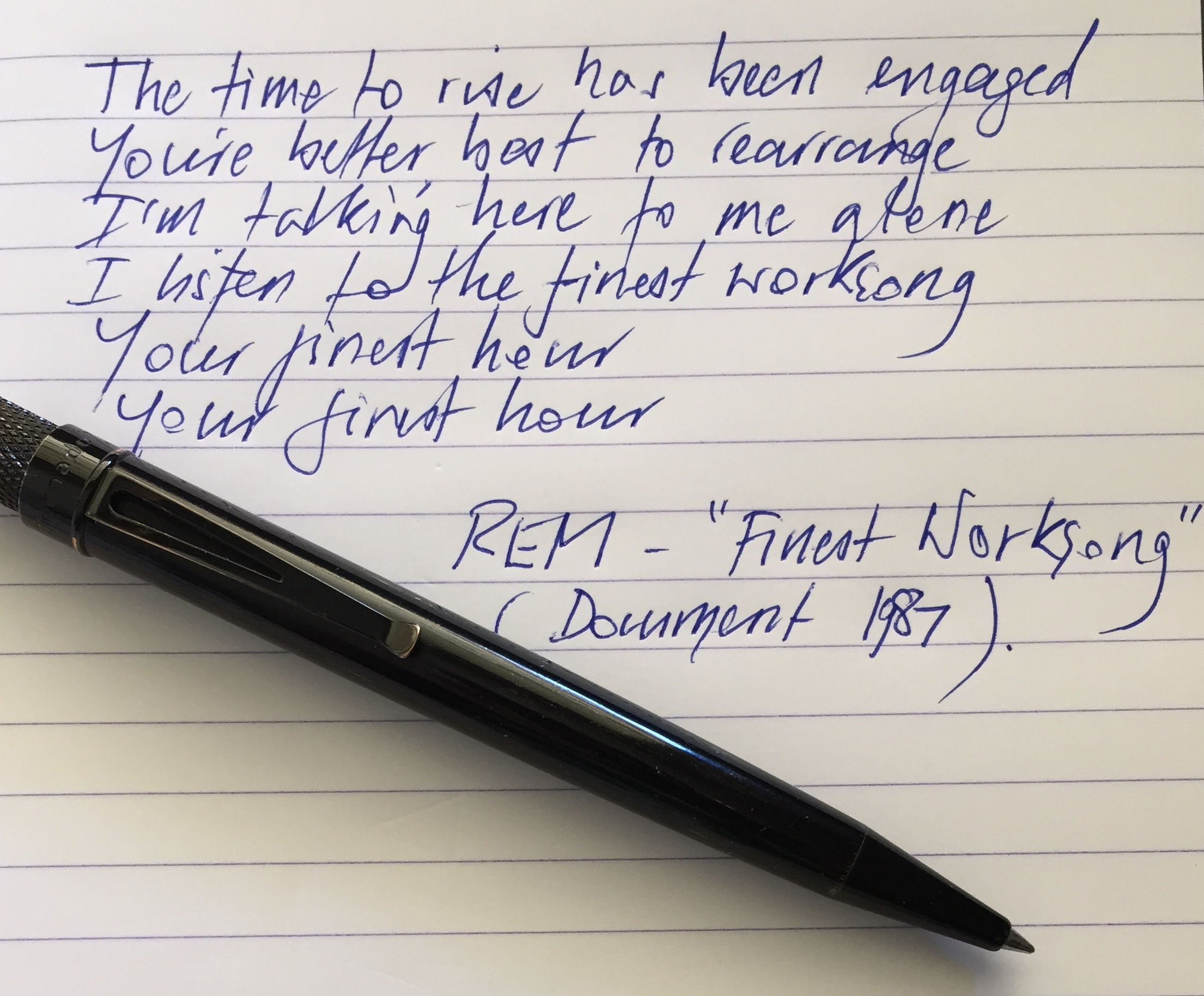
Once again, you probably need to go no further than the Pen Addict Podcast to hear mention of the Retro 51 and/or Schmidt P8126 refills as being one of, if not the best liquid ink or rollerball refill going around – and I’d have to agree. I am currently using the standard Retro 51 branded refill in the pen, and as you can see from the writing samples, the line could not be smoother, broader, or more vibrant.

FullSizeRender 8

The only time I have had the need to swap out the liquid ink refill was in recent weeks when I decided to try out the Field Notes Expedition edition, and needed an appropriate tip for the indestructible Yupo paper of that particular notebook. In this instance, a minor trim of a Uni Jetstream ballpoint allowed it to fit in nicely, which took me through to the and of the Expedition. Mind you, once the last page was written, out came the Jetstream and back in went the Retro 51 refill to an “ah…that’s better” moment.

The majority of use this pen sees involves day-to-day writing at my office job, which is often intermittent signatures, notes, marking up document revisions, or comments/feedback on team members work. I do not have cause (sadly) in a “paperless” office for extended periods of writing, and when I do, I tend to seek out a fountain pen from my desk drawer, though on occasion, will continue with the Retro 51 which does not disappoint.

Conclusion

Thinking back, when I first started searching for this pen based on a podcast recommendation (granted – not just any podcast), I had a nagging feeling in the back of my mind I would not necessarily like it. You know the scenario, something is spoken of so highly, upon finally obtaining the item in question, the expectation and excitement exceeds the experience and performance of the real thing. Definitely not the case here – the Retro 1951 Tornado Stealth is a great pen, has a great refill, and serves equally well as an everyday “workhorse” or as a writing instrument of great pleasure.

I really have no excuse not to add to my collection of these great pens – though I may have a hard time choosing colours. Perhaps a Retro 51 “Unexposed” release may absolve me of making that decision.