Writing With Ulysses

In recent weeks there has been a good deal of discussion around the release of the updated Mac version of this writing app from developer The Soulmen, which also coincided with the release of an iPad version to go with it.

Ulysses-Mac-128x128

Ulysses – Mac

As I have written about previously, I am a recent convert to the Mac app, and earlier this year began using the iPad beta version prior to the full release (affording little value to the developer during the bata period mind you). What follows should be taken as it is intended, simply a few thoughts on how I find both the Mac and iPad applications (certainly not an exhaustive review), and why I enjoy writing with them — from a somewhat less than power user of both.

Ulysses-iOS-120x120

Ulysses – iPad

It is certainly not to sell you on Ulysses – after all, writing is writing — a keyboard and (hopefully) output. There are many other apps out there which may suit your particular needs far better than this one, and I suspect those who are entrenched in something like Scrivener might read these words and be quite happy they already have everything covered. Of course if that is the case there remains the iPad to consider, depending on where your writing occurs.

Other writing apps

A point to note here is that I have been an avid iOS user for around three and a half to four years now (both iPad and iPhone), and a Mac user for two, during which time, most of my writing has occurred in Byword on both the iPad and Mac. Over time I moved to Editorial on my iPad mini, although continued with Byword on the Mac, syncing both through Dropbox.

Although I do have the iPhone versions of both Byword and Editorial, I have never really taken to longer form writing on my phone,  preferring the iPad — and more often than not an external keyboard, which remains the case today.

I find much of Editorial’s more powerful workflows remain under utilised in my writing, and although Editorial continued to serve my iPad writing needs well until the release of the Ulysses iPad beta earlier this year, since that time I have not ventured outside Ulysses for writing on either platform.

Why Ulysses?

In all honesty — no particular reason in the first instance. Going backwards and forwards in my mind last October as to whether I would embark on NaNoWriMo, I came across the offer of a free 30 day Ulysses trial (available for the Mac through the developer’s website). The promise of regular email follow-up as part of the NaNoWriMo group of Ulysses users along with an extract of (the recently updated) David Hewson’s: Writing a Novel With Ulysses eBook.

I think at that point in time, having finally committed myself to the 50,000 word challenge I was looking for all the help I could get! Upon thinking more about this — credit where credit is due to Ulysses here. Had the app imposed more friction to set up, write in, and generally manage over that month, I would most likely have exported what I had written to another app and never looked back.

Retrospectively, undertaking my first NaNoWriMo and learning the features of a new app at the same time was probably not the smartest decision, however it certainly paid off this time. So as you can see, I came across Ulysses through the lure of the free trial and “extras” — am I really so shallow? Evidently yes.

My particular uses

Here we find I again under utilise the power of Ulysses and its potential as — particularly a longer form — writing app. Looking back, to date my use has consisted of the following:

  • my 55,000 word NaNoWriMo effort;
  • 5 months (31 posts) of blogging (approximately 3 months also using the Ulysses iPad app);
  • a few email drafts;
  • reviewing and commenting on some of my daughters’ high school essays

That is it — apart from the NaNo effort, utilising the “sheets” in Ulysses as book chapters – I largely use it as an app to write blog posts. It is here I see most of my future uses also occurring, however I do plan on tackling some longer form writing again in the future.

My favourite aspects and features

In no particular order, there are indeed some features of the app (on both iOS and OS X) which I use more heavily:

iCloud

I am all in with iCloud syncing in my current Ulysses set up. Having used the External Folders option with Dropbox syncing for my initial NaNoWriMo foray, I think iCloud suits Ulysses perfectly — particularly the file and folder structures, and now with both Mac and iPad options available.

It is certainly no crime to choose iCloud as the preferred method of syncing, however there have been a couple of misdemeanours on iClouds part (I believe) which unfortunately for the developer occurred around the same time as the Mac update and release of the full iPad version of the app. Although needing a restart of my iPad or Mac at varying times (no data loss — simply to trigger the sync), after this initial week or so it has been rock solid, and of course it is fantastic to have everything updated with no effort from myself when I next pick up writing — on whether device.

One particular feature I do love are the status indicators which appear on launching the app — on either platform, indicating iCloud is updating. There is nothing worse than opening an iCloud connected app, knowing a sync should be occurring, yet never really being sure it is — not until updated data suddenly appears.
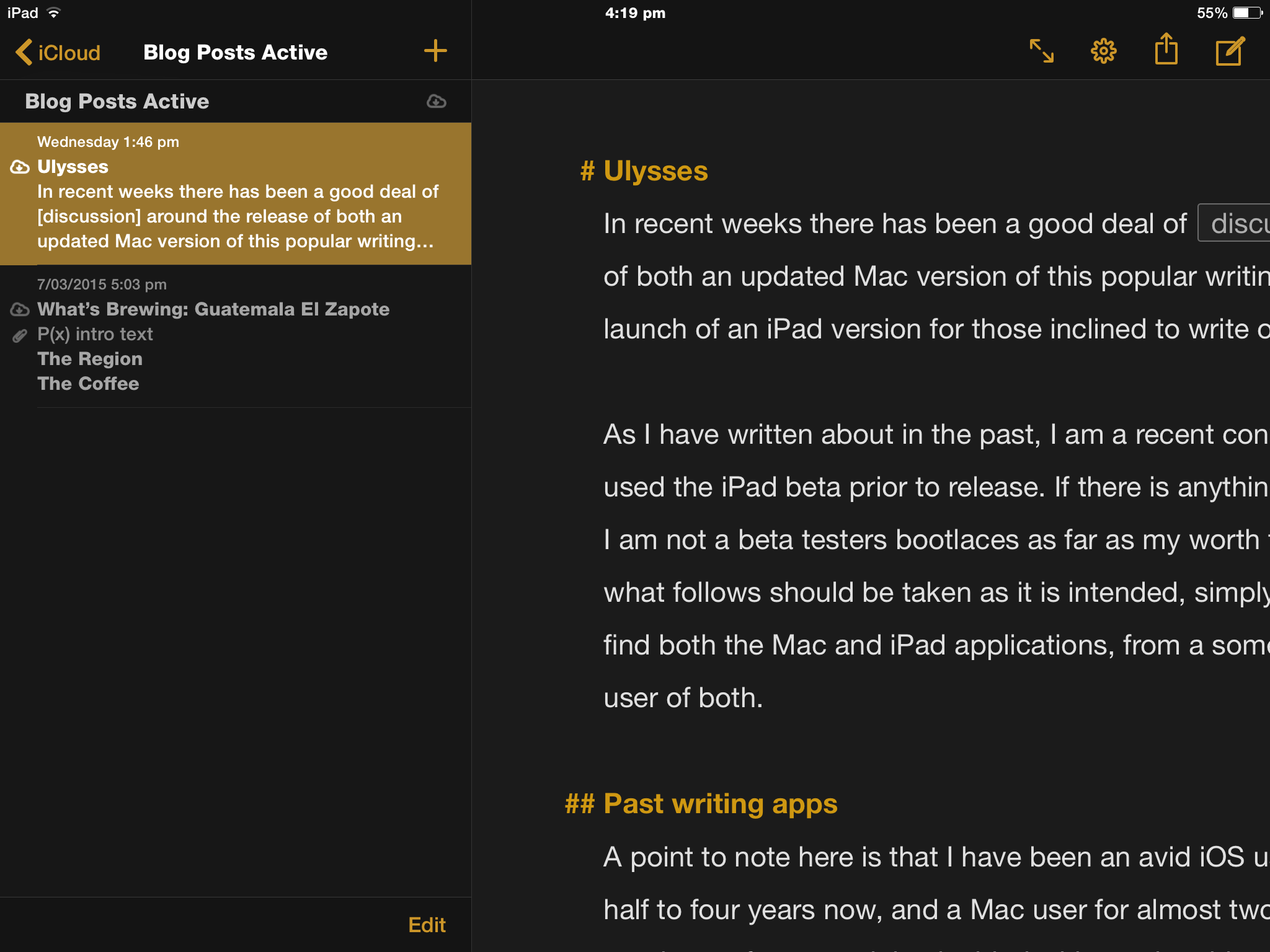
IMG_0888

Two pane view on iPad with iCloud status indicators at left


All of my writing, templates, and planning are therefore kept in the iCloud folders within Ulysses. For those still perhaps a little wary who also use the iPad app, there is a nice use of the iOS Workflow App to semi automate a back up of these iCloud folders to Dropbox.


Three pane view on Mac - folder structure at left.

Three pane view on Mac – folder structure at left.

Add to the above one of the best laid out document history/version controls (Mac only), and you have the perfect way to recover or revise should the need arise.

Mac view of version screen - date scroll marker far right

Mac view of version screen – date scroll marker far right


Organisation

Whilst I am not obsessive about file organisation, I do like the fact my writing is kept nicely laid out within Ulysses itself, and easily accessible in the customisable three pane layout.

Pane one has my current folders contained within iCloud , and within each folder lie the “sheets” — viewable in the second pane, which, in my current way of working are the individual blog posts for example. Although currently absent from the folders after been exported upon completion — the first draft of my NaNoWriMo novel will soon return for revision. For the novel, each sheet was a chapter with keywords added, allowing filtering of specific sheets (or chapters as it were) to follow through a particular plot line relating to a particular character.

Overall, I think a useful analogy here is to consider the iCloud folders as the bookshelf; each project as a loose leaf binder; and the sheets as just that — individual sheets of paper able to be rearranged within the binder with the utmost ease.

Sheets can be duplicated (hence my use of templates), glued, split, merged, rearranged or opened in a new window — handy for referring back to previous chapters or drafts while writing the current one. Note at the current time these features are limited to duplicating and rearranging sheets on the iPad version. The third pane is the editor, where all of your writing occurs.

For my needs, everything is here.

The structure of these folders within iCloud does not place them within view in the iCloud Drive folders, as they are proprietary folders within Ulysses itself — perfect for my needs, and with the amount of export options available you can send and backup your files anywhere you wish, or use the Open In option should you wish to continue in another App. Personally I use this feature to proofread in Marked 2 when on the Mac.

A recent post on the Ulysses blog outlines a new Open Files feature, allowing any .txt or .md file to be opened in Ulysses and edited – with the output saved in the original file location on your Mac. Handy for those times where a full import of a file or files is not necessary.

Layout and style

Navigation pop up on Mac.

Navigation pop up on Mac.

I’ve touched on the layout a little above, and switching between views is as simple as the shortcuts CMD+1, 2 or 3 for three pane, two pane or editor only. Various other shortcuts are available, including CMD+9 for a Markdown cheat sheet, and CMD+4 for the Attachments bar — a key feature allowing images, notes, goals and keywords to the sheet — all which sync to the iPad version with ease.

On the iPad, panes are accessed or hidden by swiping left or right, with tapping in the editor pane bringing it into full view with the onscreen keyboard at the ready. There is also full support for external keyboards.

For longer form writing, another handy feature is the quick access to the Navigation pop-up with the shortcut CMD+8, providing a list of headings — all of which are clickable to jump to their location within the sheet.

There are endless tweaks possible through preferences to create “themes” for the overall colour layout, which can be shared or downloaded from the Ulysses style exchange. These are simple to download for use or duplication and further customisation. Dark mode or theme options are also an option from the menu or shortcuts — handy for my pre-dawn writing.

Style and theme options in preferences on Mac.

Style and theme options in preferences on Mac.

Although reducing Ulysses to the single Editor pane does provide the “distraction free experience” that seems to have been the buzzword with writing apps for some time now — for this purpose alone you will find it similar to other writing apps. Although viewing a blinking cursor and nothing else is available to you — this is not necessarily a point of difference to many other apps, though of course is an essential feature.

Writing

At the end of the day — ultimately all that matters is it not? Well, to me — yes and no. If it were all that mattered, I could be writing in the default TextEdit app, nvAlt, Byword (the list goes on) and the default Notes app or Byword on my iPad.

If I could try to sum things up — it is the power of what this app can do (and do simply and easily), combined with some nice touches and minimalism which combine to give the “Ulysses experience”. That is why I like it.

If we refer back to my particular uses for Ulysses mentioned above, they are fairly limited in scope, yet repeated often (the blog posts anyway). Lets look at what occurs here — text, links, bold, italic, and lists. Formatted in Markdown.

Markdown XL.

Markdown XL.

Also a point to note is Ulysses makes use of Markdown XL, which is where unique markup and other notations reside through comment blocks; comments and strikethrough deletions for example (each with unique characters). Unless iCloud or local Mac storage options are used, upon export, these will be included in the output as plain text. Another incentive to use iCloud, with any markup also syncing nicely with the iPad, and are also available through the enhanced keyboard row there as well.

Images are added once I have exported the piece to the WordPress interface. In Ulysses, CMD+SHIFT+P does give an instant live preview which I probably should utilise more, however habit usually sends me to Marked 2.

Could this all be done in just about any other text editor? Absolutely. But of those I have tried – I prefer to do it here — in Ulysses. A few of the writing features I really enjoy:

  • placing a URL in the clipboard, highlighting text in Ulysses and pasting to instantly insert links (a couple of taps required on iPad)
Adding links on iPad.

Adding links on iPad.

  • statistics and word count goals
  • adding keywords (effectively tags in sheets) for longer writing organisation and sheet filtering
Attachments bar and with word count goal far right.

Attachments bar and with word count goal far right.


  • the ability to “tear off” and move around the pop up windows containing Quick Export, Statistics, Navigation and Markup information (Mac only)
  • text selection on the iPad (perhaps one of my favourites) requires one finger swipe anywhere on the keyboard to move the cursor, a two finger swipe will then select text, again making link insertion on the iPad a breeze
  • the enhanced iPad keyboard row, though not a unique feature and used in apps like Drafts or Editorial, is one of the best laid out and easiest to use when writing in Markdown
  • footnotes – probably my favourite feature – select footnote from the menu on the Mac or enhanced keyboard key on iPad; add text in the popup box and you’re done (these also work on exporting HTML to WordPress – something I have had great difficulty with in the past)
  • customisable statistics are also nicely included in a footer type bar on the iPad layout
  • plays well on iPad with an external keyboard, though I guess this is expected these days
Enhanced keyboard features.

Enhanced keyboard features.

I mentioned Editorial again in the above list — overall I find Ulysses on the iPad plenty powerful enough for my needs, yet a little more efficient to navigate and use in comparison.

To sum up the Ulysses writing experience? If you need it — its there, and if you don’t — you won’t feel like you have to actively step around it. Whatever your “it” is of course.

Exporting

Of course once written, we will be doing something with the end product. My NaNo draft was exported as plain text, Markdown, ePub and PDF (not taking any chances with that one) and ultimately tweaked in iBooks author as well.


ePub and HTML exporting options.

ePub and HTML exporting options.

With Ulysses, exporting your writing is an absolute breeze through the Quick Export/Live Preview popup. Also,  if you do have any concerns around the robustness and reliability of iCloud, or even the proprietary format of Ulysses, exporting your writing at the end of a session is so simple I can certainly understand those who may choose to do so (select text format from Quick Export; save to Dropbox or anywhere else).

A few other things

As I mentioned earlier, my gateway to Ulysses was the NaNoWriMo tie in, and having since purchased and read the full version of David Hewson’s Writing a Novel with Ulysses – I can highly recommend it as a fantastic way to learn some writing strategies and to organise your next big project, along with some great tips for using the iPad and Mac versions of this great app.

Developer The Soulmen also regularly publish great tips and tricks through a newsletter, which are also accessible on the Ulysses blog. As a user, I find these extremely helpful, and can certainly see how my writing will grow as I begin to utilise more of the available features. To that end, I must add the developer website does a great job of showcasing the app, and is worth checking out if you are interested in either the iPad or Mac App versions.

Also, there are far more technically minded and better writers than myself who have reviewed this app if you wish to dive a little deeper:

In conclusion

I mentioned above I was not out to try to sell you on Ulysses as a system for writing — yet in some ways I hope this post has at least been helpful enough to encourage you to try it out. That is of course if any of the above sounds like something you can relate to.

At times I have succumbed to fiddling about with the newest, latest and greatest or apps used by prominent figures on the internet. To my detriment? Maybe – maybe not. I’d like to think this time I have tried the app, liked it, and found my own way.

It has — albeit by pure coincidence — been nice to come into Ulysses at a time where active (you might even say aggressive) development was occurring, with the iPad release a joy to behold, given at least 50% of my writing is done on my iPad mini 2 with an external keyboard.

My advice to anyone considering Ulysses, is to download the free trial on the Mac and give it a try. The bonus here is that you can expect the iPad version to behave in much the same way, at least as far as writing, layout and organisation go (though I acknowledge the obvious differences between iOS and OS X).

In the end, I think you can see I am very satisfied with these two great apps which allow me to get all of my writing done — both efficiently, and wherever I choose to do it. I am confident in the fact my usual pre-workday Mac writing session will be ready and waiting for revision or addition at my lunch time iPad session — and I couldn’t be happier.

To quote the developer’s tagline for the app: Do you write?

If you do, you owe it would be worth at least taking a look.

Ulysses is available on the app store for Mac ($AU56.99) or iPad ($AU24.99); with the free trial available for Mac from the developer website.


Wiser Web Wednesday

Wiser Web Wednesday – a semi-regular link to posts of interest from around the web by those far wiser than myself:

Aaron Mahnke
In my quest to read more books this year, I came across Aaron Mahnke’s supernatural thriller Consumed – which I highly recommended. I’m glad I did, because in doing so I also found one of my favourite podcasts of the year so far – Lore, which the creator explains a little further here:
Why I Created Lore

Incidentally, Episode 3 has just been released – get to it:
Episode 3: The Beast Within

I Laike Pens
Kindly shared by Ian Hedley on Twitter, this is as good a list as any if you want to ensure you have every angle covered for filling and maintaining your fountain pens:
The Fountain Pen Toolkit

Curious Rat
Harry Marks, author and creator/host of another great podcast – Covered (which now has a Patreon page to support the podcast), discusses what has changed over time as his writing has developed and improved. You guessed it — daily reading and daily writing.

Reading is everything. It’s almost more important than the actual writing. I absorb the books I read and in turn churn my stories in my mind to thicken them up. To make them richer.

Read regularly. Read widely. Then grow as a writer — wise words indeed:
My Growth as a Writer

James Greig
The curse of the self help book or site, is of course the sense of improvement we feel just by reading them. What has changed? Actually nothing at that point.

The other thing to remember is that reading too much advice can give you a false sense of empowerment.

Conversely, I have also felt guilty I perhaps could be doing better after reading one of them and then not implementing the recommended changes. Yes – that’s right – you need to implement some of that new-found knowledge for things to actually happen:
Don’t Take this advice

Sprudge
Three recipes from this year’s US AeroPress Championship, two of which use the inverted method. I’d say a sample size of three is probably not necessarily indicative of the entire competition nor any emerging trends. Here for you brewing experimentation if you so desire:
3 Top Recipes From The 2015 US AeroPress Championship

Sprudge again, this time with the Australian winners and recipes. First and second place both using the non-inverted or standard method. I wonder which will triumph at the World AeroPress Championships soon to be decided in Seattle:
The 2015 Australia AeroPress Championship Winners & Recipes

Trubaca
Although written from a coffee industry perspective, more than a few of my friends (i.e. cafe customers) have experienced one or more of the factors causing the author’s lament.

So if your attempt to do by-the-cup service leads to wait times longer than a few minutes, if your espresso tastes sour in milk, if you aren’t giving someone an opportunity to even like what you’re serving: you are sending the message that you are more interested in your perception in the coffee industry than you are in the people coming through your doors

In circumstances like the one quoted above, I often find I am muttering to myself about a fine line between being cool and being too cool — the former is effortless, the latter — all for show. And believe me — it definitely shows. A universal truth here (via Emily Oak):
When Keeping It Real Goes Wrong

That One Pen
An enjoyable read this one. With so many pen review sites out there (not complaining!), sometimes it is good to hear which pens are actually in day-to-day use by those with wide experience in such matters. As Todd states:

For those of us afflicted with late-stage pen and/or pencil addiction, writing tools constantly fall in and out of favor. However, over time, we find ourselves returning to a short list of favorites

The post also states the list is “biased and personal”. Of course it is — and has to be. After all — what is the criteria? The pens and pencils you pick up and use, by personal preference — plain and simple.
A great post:
The Pens And Pencils I Actually Use


What’s Brewing: Guatemala El Zapote

I have generally always enjoyed coffees from Guatemala, with most having a solid flavour profile, yet enough subtlety to separate one farm from its neighbours – here I emphasise variety – not my ability to name the various farms by taste of course!

The Region

Information courtesy Wikipedia

Acatenango is a stratovolcano1 in Guatemala, close to the city of Antigua, in the central highlands of Guatemala. The volcano has two peaks, Pico Mayor (Highest Peak) and Yepocapa (3,880 m) which is also known as Tres Hermanas (Three Sisters). Acatenango is joined with Volcán de Fuego and collectively the volcano complex is known as La Horqueta.

Volcano de Fuego in the Acatenango region in Guatemala. Photo courtesy Javier Ruata.

Volcano de Fuego in the Acatenango region in Guatemala. Photo courtesy Javier Ruata.

Fair enough to call it a volcanic region I’d say!

The Coffee

Information Courtesy Ministry Grounds

  • Guatemala El Zapote
  • Region/Town: Acatenango
  • Altitude: 1200-1950 meters
  • Area: quarter of one hectare
  • Varietal: Yellow Bourbon
  • Processing: Wet processed; 100% sun-dried
  • Harvest time: January/February
  • Producer: Julio Melendez
  • Tasting notes: classic and beautifully balanced; notes of lemon, melon and stone fruits

The Brew

Having roasted for both espresso and filter, I was able to enjoy the El Zapote across a wide range of brew methods.

As espresso, it produced a fresh, bright cup, demonstrating a little citrus tang, along with notes of honey and chocolate. With milk, it kicked off my mornings really well, with similar flavours working well, however I’d say even a little better when blended with a some Brazil Fazenda Aurea – also roasted on the same day. This blend, containing about 30% of the Brazil, added a little more depth, and brought the flavour through the milk just that little bit more.

The filter roast provided a very clean, crisp and bright cup when brewed with the Hario V60. The body and acidity nicely balanced, with refreshing notes of citrus. Also perfect in an iced pour over, with summer not really wanting to let go just yet here in Brisbane.

The Finish

Whenever I am browsing the offerings from Ministry Grounds, rarely do I overlook the Central America section, with Guatemala always high on my list. These coffees always seem to work really well in blends, yet also stand happily on their own – the El Zapote is another to add to the list.

Unfortunately at the time of writing this coffee is now out of stock, however was purchased from Ministry Grounds for $AU19.55 per kilogram (green).


  1. A stratovolcano, also known as a composite volcano, is a conical volcano built up by many layers (strata) of hardened lava, tephra, pumice, and volcanic ash.


No Need to Ask – I’ll Tell You

As so often happens, the internet tends to feed you a lot of what you do not necessarily need at the time (that’s what your favourite read-it-later or bookmarking/archiving service is for). Then, some days it slaps you in the face with those “you’ve got to be kidding me — that’s what I was just thinking” moments.

This post has been written after the latter occurred last week. Two posts — each written with a different focus — yet I believe, concepts which are inextricably linked. Introversion, and that old chestnut — the corporate “brainstorming session” — yes, you may shudder at the thought. I know I do.

The writing in question:

Introvert by Iain Simpson on his personal site (shared on Twitter by Matt Gemmell)

Isaac Asimov’s Advice for Being Creative (Hint: Don’t Brainstorm) by Cal Newport, on his Study Hacks site.

Some background

I work in a corporate office. There is brainstorming. Thankfully not often, with my role as a manager providing at least some authority to dictate the frequency of such sessions.

Occasionally this is not the case, and the result would be familiar to many of you. The “brainstorming day” which is beyond my authority to avoid. The large room of 20-30 people; the introduction of why we are here and how it will work; the groupings; the breakout sessions; the ideas we will generate which will create immediate solutions to problems years in the making; the solutions no-one has thought of in the past five years. Yet we will come up with them on this very day — oh yes we will.

I think you get the picture.

As far as introversion is concerned, I would certainly say I fall somewhere towards that end of the spectrum. Iain Simpson’s opening paragraph:

I hate attention. I can’t think of anything worse than being the centre of focus in a room. Everyone looking at you, thinking about you, listening to what you say. I feel unwell just thinking about it.

I describe myself as a very private person1, so in one sense I can relate to the above — yet mainly the first three words. I am the first to admit I am not great at small talk or self promotion, and am often fairly intolerant of the office loud talker — though here I am talking on the inside — as of course, I understand we are all different.

As my working life progresses, I have become more adept at leading my team and conducting group training sessions and seminars both in-house and across the industry in which I work. I would not therefore, say I have any great problems with everyone looking at me and listening to me, and certainly don’t feel unwell thinking about it.

Would I choose a career solely as a presenter and group trainer? Absolutely not, however my role dictates that I have important, relevant and valid things to say, and I am happy to share them to a group.

If I am guilty of anything in relation to these presentations it is over-preparing, however my experience indicates I have very different views on what constitutes “over preparation” to those around me.

The eye of the storm

So, away we go. Into the room, butcher’s paper strategically placed in every corner, ready for those ideas to be scribbled illegibly for all to see (and vainly attempt to read); spoken aloud by the group representative standing in front of the easel — back half turned to their audience — often articulating their idea with:

.. err.. I’m not sure why we wrote that. That was Jim’s idea.. uh.. umm.. ah.. Jim? Do you remember what we meant by that? Actually I can’t even read the rest um.. so uh.. I’ll just keep going..

Ground. Breaking. Idea. Lost.

Of course it wasn’t — and you know how these sessions go. You hear from the same people you always hear from — repeatedly. Good for them, I have no problem with that, otherwise there would be silence and all we would see on those easels would be large blank sheets of white paper. In fact I applaud these people for continually showing up and shouting out.

My main issue lies with the fact you don’t hear from the same people you always don’t hear from. Some are disinterested perhaps, however many simply are not suited to be thrust into the limelight at a moments notice, expected to give their thoughts — on what is often a complex and broad problem — to a larger group who wait expectantly in deafening silence for a response.

What comes with the “we’re having a brainstorming session today” is of course the “I expect everyone to contribute”. Because supposedly, in that deafening moment of silence I referred to above, the past six years of a person’s employment — grinding and grafting away day in and day out, making small suggestions quietly to their manager about how things perhaps could be done a little better is not — at that moment — a contribution. Well, today it’s not my friend, unless we hear something right here, right now.

Somehow the suggestion that these ideas are not real, meaningful, or actionable unless the form part of the “Action Plan” emanating from today’s “session” is laughable, and shame on you manager if you do not at least acknowledge and listen to these “grafters” from time to time in your day-to-day operations.

Why on earth we expect the best ideas to come out of a brainstorming meeting between 3:00 and 4:00pm on Tuesday when it is scheduled — wait..what? Oh, its been rescheduled — so the best ideas to complex long-term problems will now be generated between 9:00 and 10:00am on Thursday. Of course. If you must strike gold with a great idea on Tuesday – please hold until Thursday – but as God is your witness you certainly better have one when standing at that butcher’s paper come Thursday.

This is where I like the explanation from Asimov as outlined in Newport’s article:

The goal for creative meetings is not to come up with new ideas, he argues, but instead to transfer the raw material for these ideas between participants. As Asimov explains: “No two people exactly duplicate each others’ mental stores of items.”

Once done — we just need to get back to work (Newport again):

The goal of collaboration, in other words, is to quickly increase the store of material that the creative can then work with once returned to his or her isolated cogitation.

Further, as Newport opines, chatting around tables with butchers paper or in open plan offices is not likely to generate “deep insight”.

Don’t even get me started on open plan offices.

The intersection

If you are still with me at this point, then an explanation of where these two aspects of introversion and office practices intersect is probably unnecessary. That said, a couple of things bear highlighting.

Remember, deep thinkers are not by default slow thinkers — they simply consider things in more depth; require more information to formulate an opinion; and do not necessarily like to express it prematurely. Deep thinkers who may also be introverts to varying degrees by nature — do their best work alone, quietly, and without undue attention or fuss.

As Iain Simpson puts it:

If I haven’t told you how I feel about something, it’s probably because I haven’t decided how I feel about it. I can’t make decisions without all the information, and I don’t offer solutions without understanding the problem.

When they have something meaningful to say, they will say it, and expect you to listen. Conversely – at the very least — respect their silence. They are not disinterested, but are most likely thinking.

And when they’re done thinking and have a well formulated, meaningful answer?

No need to ask. I’ll tell you.


  1. Yet I write here, for the world to see – touché reader. Small fish – very big pond.


Wiser Web Wednesday

Wiser Web Wednesday – a semi-regular link to posts of interest from around the web by those far wiser than myself:

Write Analog
Mark does an outstanding job of telling us how he came to buy the Pelican M205. Incidentally, I bought the same pen (colour, EF nib) – purchased on the very same Pen Chalet deal (though I must admit, minus the subsequent nib tuning). I do indeed love mine:
Pelikan M205: The Story & Review of My First “Real” Fountain Pen

Reckoner
A nice review on where I guess we are all headed eventually — the smart home. Nice to hear the August Smart Lock (not yet available in Australia) works (mostly) as expected. The protocols and security features of devices such as these really do make me question how secure the good old garage door openers we’ve been using for years really are:
August Smart Lock review

The Pen Addict
It would be remiss of me to post a series of links without including the update Brad has made to his Top 5 Pens lists on The Pen Addict site. I must congratulate my 12 year old son on his own selection of the Pentel Vicuna 0.7mm for the new school year – which I see is number three on the ballpoint list.

View the actual lists here, and read an explanation of same in Brad’s recent post:
Top 5 Pens Spring 2015 Update

Ink & Flour
Sometimes simple is just what you need, and although the Franklin-Christoph 66 is by no means flashy — it delivers where it counts — on paper.

While it’s not flashy, there’s a lot of small details that add up to something special

A great review which captures the essence of this particular pen:
F-C MODEL 66 STABILIS

CoffeeGeek
Posted here simply as one of those nice to look at, and perhaps think about for a couple of seconds before saying to yourself — “yes, it’s very nice, but I won’t be spending $US4495.00 on a home espresso machine any time soon”.

Although a pre-production unit was briefly tested here, I think we gain a pretty good understanding this is a high quality machine with a price tag to match.
La Marzocco Linea Mini

The Spectator
I thought twice about linking to yet another article on the swings and roundabouts of the pens are dying — pens/fountain pens are returning discussion. I’ve included it here simply because this would have been amusing to see:

Last Christmas Eve I encountered a scene of utter mayhem in the pen department of John Lewis on Oxford Street as shoppers fought over the remaining models

Well, I guess that isn’t the only reason. It is, after all, a nice story with some history, and a view on where things stand at present — summed up nicely with:

The fountain pen holds its secrets, and its dignity

Read the full article here:
The return of the fountain pen

From the Pen Cup
A great post on letter writing — something we should all do more often — particularly those of us who enjoy the handwritten word and the tools we use to write them. At times I can be a little self-conscious returning a letter after receiving one which demonstrates vastly superior handwriting — although thankfully I am getting better (at letting go — not necessarily at improving my handwriting!!).

I must admit I’d never thought of making my own envelopes, and I may have just saved the link to the templates available at Jet Pens:
Letter Writing: Stuff That Helps

Steven Pressfield Online
Although I realise things are a lot different these days for aspiring artists to get their work out there, I thought this was interesting from successful author Stephen Pressfield, about what happened to the numerous demo tapes found daily on Bob Dylan’s front gate by his security:

The service’s top priority is to make sure that NOTHING unsolicited gets anywhere near Bob. Each morning the guard collects the demo tapes and throws them unopened into the trash.

Why does the security service do this? First, obviously, to protect Bob Dylan’s time and safety. But equally important, to shield him from a potential plagiarism suit

On the advice of his attorney, Pressfield is also under orders to delete the two or three novels he is emailed each week without ever opening the attachments. It might be an amateur mistake, but one which clearly is ongoing and repeated by many. Some suggestions as to what the “aspirers” should perhaps be doing:
The #1 Amateur Mistake

Gentleman Stationer
I’ve really enjoyed Joe’s posts on vintage pens — none of which I own mind you, however as I’ve said before, these posts are saved for reference when I do look at perhaps buying a couple.

Here’s why I collect Vacs:  They are excellent user pens, among the best vintage pens I have used on a day-to-day basis. They are the perfect size for me, hold a ton of ink via an interesting filling system, and the nibs typically work well for my style of writing…

Reason enough to begin with the vacumatic perhaps.
Vintage Pen Primer, Part IV: The Parker Vacumatic

Macdrifter
I’ve yet to configure Launcher properly after downloading it recently on my iPhone. A nice overview can be seen here.

One great use I have always found for these types of shortcuts? Ensuring the text message I send every afternoon telling my wife I am on the bus home actually goes to her, and not accidentally the last person to whom a message was sent. Perhaps “a great way to idiot proof your phone” should be added to the feature set on the app store description:
Launcher for iOS

Gorgeous.Ink
I did put down a few thoughts in and around blogging, reviews and transparency in a recent post. You know what? At the end of the day, it all really can be summed up quite succinctly, as Paul has done perfectly with this one statement:

So how do you know that I am not influenced by receiving ink for free? You don’t, but I say that I am not and I don’t think that I am

Good enough… no — more than good enough — for me.
How Gorgeous.Ink Addresses Blogger Transparency